Skip to content Skip to sidebar

This thread is resolved. Here is a description of the problem and solution.

Problem:
You have a term in your glossary translating "WA HARDFACE" from English to Portuguese as "WA HARDFACE". However, when translating WooCommerce products in bulk, the term "HARDFACE" sometimes incorrectly translates to "REVESTIMENTO" instead of remaining "HARDFACE", despite being correctly translated when done individually.
Solution:
Our 2nd Tier Support has identified this issue and a fix will be applied server-side. Currently, there isn't anything you can do on your end to resolve this issue. We recommend waiting for the server-side update to take effect.

Please note that this solution might be outdated or not applicable to your specific case. If the problem persists, we highly recommend checking related known issues at https://wpml.org/known-issues/, verifying the version of the permanent fix, and confirming that you have installed the latest versions of themes and plugins. If needed, please open a new support ticket at WPML support forum for further assistance.

This is the technical support forum for WPML - the multilingual WordPress plugin.

Everyone can read, but only WPML clients can post here. WPML team is replying on the forum 6 days per week, 22 hours per day.

Tagged: 

This topic contains 50 replies, has 0 voices.

Last updated by Kor 2 months ago.

Assisted by: Kor.

Author Posts
February 13, 2026 at 12:29 pm #17820503

rustumT

Thanks Kor,

We should be able to check this and advise on Monday.

For now, I have done a quick check and confirm that the previous glossary errors are now gone.

Now we just need to:

1. Set all content to use the advanced translation editor
2. Retranslate all content (starting with products)

Then I will be able to confim the issue is indeed resolved.

*In the meantime, can you please advise what caused the issue? and also confirm if this will be resolved moving forward for additional glossary entries as well.

Thanks.

February 13, 2026 at 2:20 pm #17821010

Kor

Thanks for your reply. I'm glad to hear that the errors are gone now. Please let me know how it goes.

Regarding the issue, our 2nd Tier Support identified the issue and the fix will be applied to the server side. There isn't anything you can do on your end to fix it.

February 16, 2026 at 6:10 am #17824225

rustumT

Hi Kor,

Thank you for resolving the issue. We are currently running a few tests and will revert in the next few days should we identify any further problems. At this stage, everything appears to be working correctly.

We do have another query, however we will log this as a separate ticket. Please allow us a few days to complete our testing.

Thank you.

February 16, 2026 at 7:59 am #17824487

Kor

Thanks for your reply. Alright then, please let me know how it goes, and thanks for opening a new ticket for your new issues.

February 16, 2026 at 1:03 pm #17825769
rustumT

Hi again,

I confirm the main issue has now been resolved. I have switched all my products to use the advanced translation editor and the glossary is now being applied properly.

However, we have run into another issue. Are you able to please advise on this urgently?

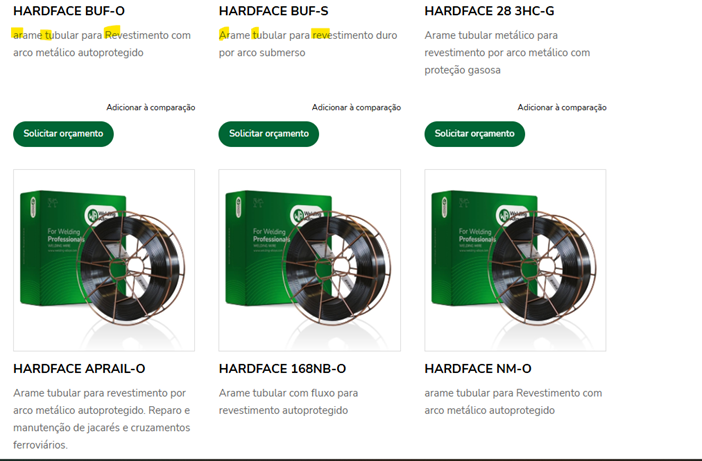
*The issue now is a certain phrase has random capitalization. How can we fis this?

The glossary entry is translated as: cored wire > arame tubular

See example:
1. hidden link VS
2. hidden link
- See attached screenshot. According to the client, this should have been 'A'rame 'T'ubular para 'R'evestimento.
*The same applies to all the products..the capitalization of this phrase is inconsistent.
Please advise.

New threads created by Kor and linked to this one are listed below:

https://wpml.org/forums/topic/glossary-translation-has-random-capitalization/

Picture1.png
February 16, 2026 at 3:32 pm #17826425

Kor

Thanks for your patience. I’m glad to hear that the glossary translation is no longer showing the duplicate warning and that you were able to complete it successfully.

Regarding the other issue with the glossary translation showing random capitalization, I’ve split it into a separate ticket here so we can follow up properly:
https://wpml.org/forums/topic/glossary-translation-has-random-capitalization/