I will need to closely examine your website. Therefore, I will require temporary access (WP-Admin and FTP) to a test site where the problem has been replicated, if possible. This will enable me to provide better assistance and determine if any configurations need to be modified.
Please note that it is important to have a backup for security purposes and to prevent any potential data loss. You can use the UpdraftPlus plugin (https://wordpress.org/plugins/updraftplus/) to fulfill your backup requirements.
Your upcoming reply will be treated with confidentiality and will only be visible to you and me.
✙ To resolve the issue, I may need your consent to deactivate and reactivate plugins and the theme, as well as make configuration changes on the site if necessary. This emphasizes the significance of having a backup.
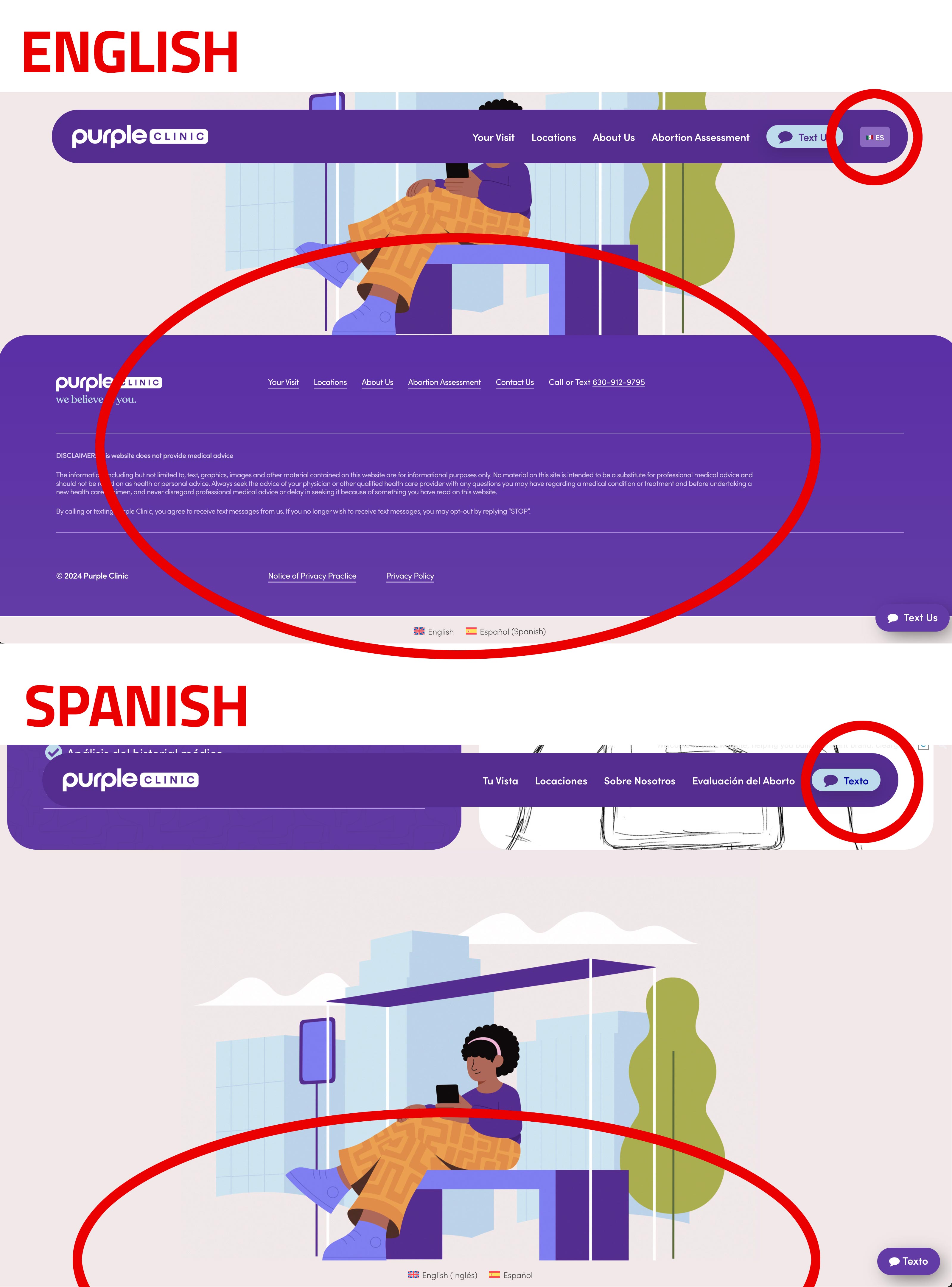
Great, thanks! I see it working on my end. I see on English the "Language" switcher link is active after navigation on English, but on Spanish it does not show the "English" link. We've added some custom code to reformat it, but it doesn't seem to be there at all in the code on Spanish.
THe only other issue is the Global Secitons footer is translated to Spanish, but does not show on the home page in Spanish, it's just empty. We've tried to figure this out on on our own but can't get it to display on Spanish. It only shows on English.
I was able to add Custom XML code to get the "Global Sections" to work as footers in each language.
Our only problem that remains is getting the "Language Switcher" to show up at the end of the menu when we're in Spanish, the menu is working now in Spanish, but the Language Switcher does not show ENGLISH at the end of the menu.
Now when we save the homepage translation in Spanish, we get this error after clicking Complete Translation (shows Success) then redirects to page and shows this error:
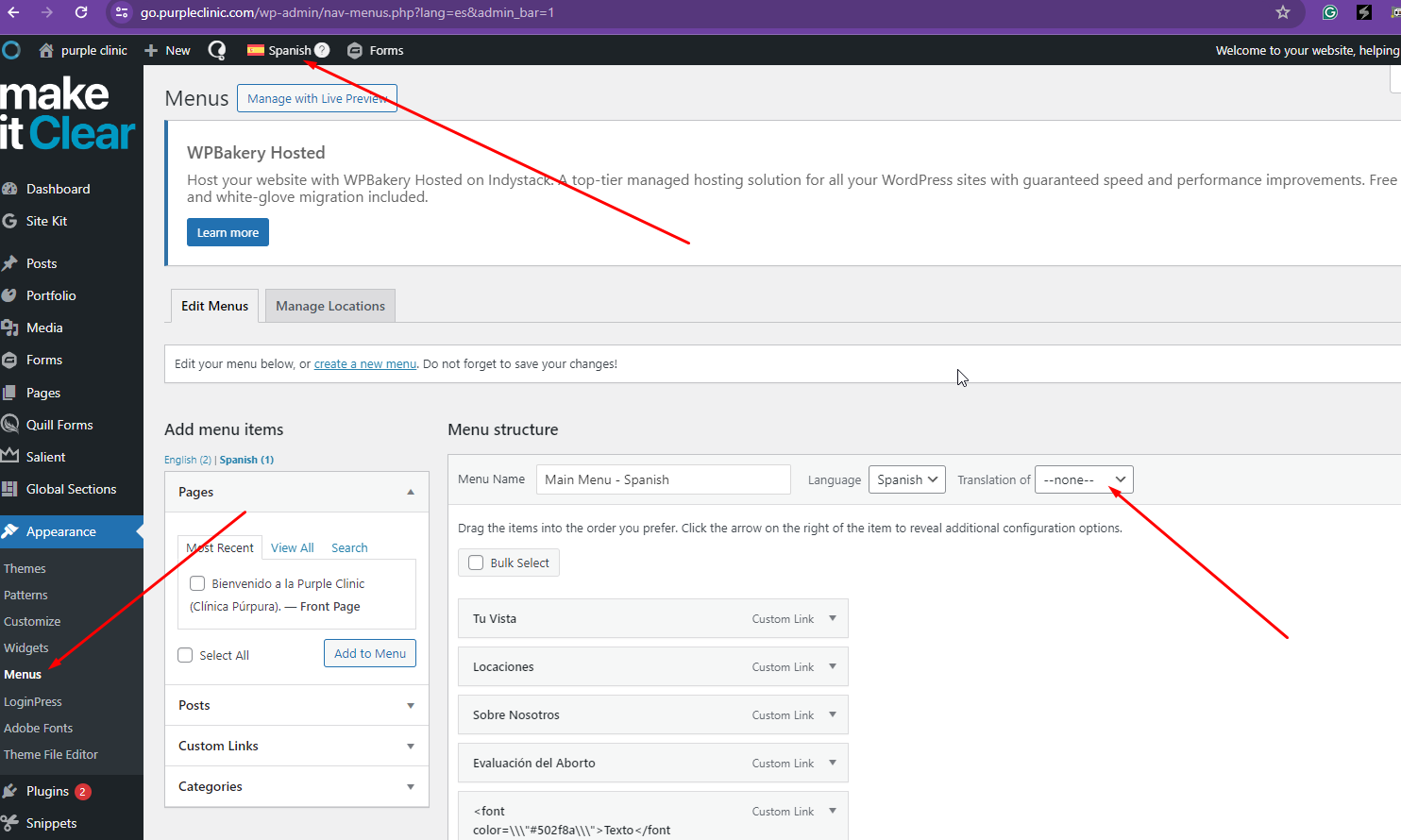
I'm following up regarding the absence of the language switcher on the translated page. It seems there are some navigation menu issues on the following page: hidden link . I am unable to select "Translation Of" as indicated in the attached screenshot. Consequently, WPML cannot assign the language switcher for the translated content.
I need to escalate this matter to our 2nd Tier Support for further investigation. To proceed, I kindly request a snapshot of the site. Alternatively, with your permission, I can generate one myself. For this purpose, I typically recommend using the free plugin "Duplicator." If you're already familiar with Duplicator, please disregard the following steps and simply send me the archive file you downloaded.
To assist you further, please follow these instructions:
1. Refer to the Duplicator instructions video: hidden link
3. If the archive file exceeds 400MB, use Duplicator's file filters to exclude cache, wp-uploads directory, media, and archive files.
Once you have the archive file prepared, please share the link with us. You can use platforms like Google Drive, Dropbox, or similar for file sharing, as the snapshot file might be large.
Please note that your next response will be confidential, visible only to you and me. You can paste the file link there. Rest assured that once the issue is resolved, I will delete the local site.
I've received feedback from our 2nd Tier Support regarding the issue. Please perform a full backup before you proceed. It seems that the problem lies within the 'wp_term_taxonomy' table, which has a different collation. Here's the SQL fix:
ALTER TABLE `wp_term_taxonomy`
CHANGE `taxonomy` `taxonomy` varchar(32) COLLATE 'utf8mb4_unicode_ci' NOT NULL DEFAULT '' AFTER `term_id`,
CHANGE `description` `description` longtext COLLATE 'utf8mb4_unicode_ci' NOT NULL AFTER `taxonomy`;
Once this fix is implemented, I recommend the following steps:
1. Remove all Spanish menus from Appearance > Menus.
2. Run the ghost cleanup.
3. Run the menu sync process from WPML > Menu Sync.
4. Translate the custom menu items via WPML String Translation.
5. Re-run the menu sync process.
Additionally, when translating as an admin string: "[theme_mods_salient-child][nav_menu_locations]top_nav", you should probably adjust it to the correct ID. Alternatively, it's better to remove that admin string and let the normal auto-adjust ID take effect, ensuring you see the actual translated menu instead of something corrupted.
The topic ‘[Closed] Cannot get Main Menu to utilize Spanish version, only English shows :(’ is closed to new replies.