Skip to content Skip to sidebar

This thread is resolved. Here is a description of the problem and solution.

Problem:
After migrating a website, the client is unable to edit the translated pages, despite having added a new WPML key and attempting an automated sync between the sites.
Solution:
We recommend making a small edit to the post in the original language and then attempting to update it. If this does not resolve the issue, it may be due to the solution being outdated or not applicable to your specific case. We highly recommend checking related known issues at https://wpml.org/known-issues/, verifying the version of the permanent fix, and confirming that you have installed the latest versions of themes and plugins. If the problem persists, please open a new support ticket at WPML support forum for further assistance.

This is the technical support forum for WPML - the multilingual WordPress plugin.

Everyone can read, but only WPML clients can post here. WPML team is replying on the forum 6 days per week, 22 hours per day.

Tagged: 

This topic contains 1 reply, has 0 voices.

Last updated by rodrigoM-10 4 weeks ago.

Assisted by: Shekhar Bhandari.

Author Posts
April 3, 2026 at 8:06 pm #17948548

rodrigoM-10

Hello!
I translated a lot of pages on this website hidden link, and recently moved it to hidden link

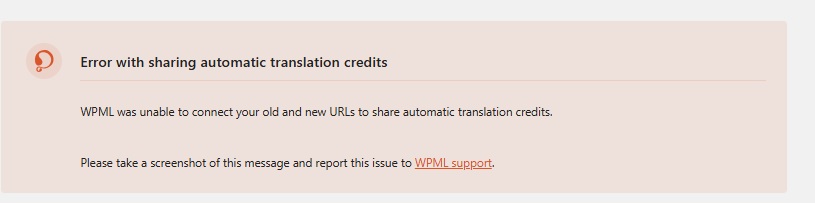
After the migration, the translated pages are visible on hidden link , but I'm unable to edit them. I have added a new WPML key for this site. Also I atempted to do the automated sync between both sites but I'm getting the error shown in the screenshot attached.

Can you please help me with this issue?

Thank you.

April 7, 2026 at 6:53 am #17952707

Shekhar Bhandari
WPML Supporter since 03/2015

Languages: English (English )

Timezone: Asia/Kathmandu (GMT+05:45)

Hello,

Thank you for reaching out to WPML support. I’d be happy to assist you with this issue.

Please avoid sharing login details on the forum, as it is public. I have removed the information for your security.

Could you please try again? Make a small edit to the post in the original language and attempt to update it.

I look forward to your reply.

Thank you.

April 13, 2026 at 11:49 pm #17967148

rodrigoM-10

This solution worked. Thank you, Shekhar!