
This is the technical support forum for WPML - the multilingual WordPress plugin.
Everyone can read, but only WPML clients can post here. WPML team is replying on the forum 6 days per week, 22 hours per day.
Tagged: Compatibility
This topic contains 3 replies, has 0 voices.
Last updated by stanislavR 5 hours, 55 minutes ago.
Assisted by: Shekhar Bhandari.
| Author | Posts |
|---|---|
| April 28, 2026 at 2:38 pm #18000290 | |
 stanislavR |
Here is Problem description from yoast support service POST hidden link 400 (Bad Request) When we enabled troubleshooting mode on your site and performed a conflict check, we enabled the Yoast SEO Free & Yoast SEO Premium plugin, and then the Kadence Child Theme, the AI generate feature was working as expected. It was when the WPML Multilingual CMS plugin was enabled where the issue occurred again with the AI features and the 400 bad request error and 'string language must match pattern' error. The AI generate token and prompts are sent to the Yoast SEO AI generator and the results are generated but when it's sent back to your WP site, it's rejected. On one of our test sites, we enabled the Yoast SEO Free + Yoast SEO Premium plugin along with the WPML Multilingual CMS plugin (default settings), and a default theme, and the AI generate feature was working as expected. This issue with the AI generate feature looks to be a particular conflict on your website setup and WPML settings, so we recommend that you reach out to WPML support and provide them with the particular error message for further assistance and information, as there might be a particular setting or feature within WPML you might need to configure in order to get the AI features in Yoast SEO Premium working properly. 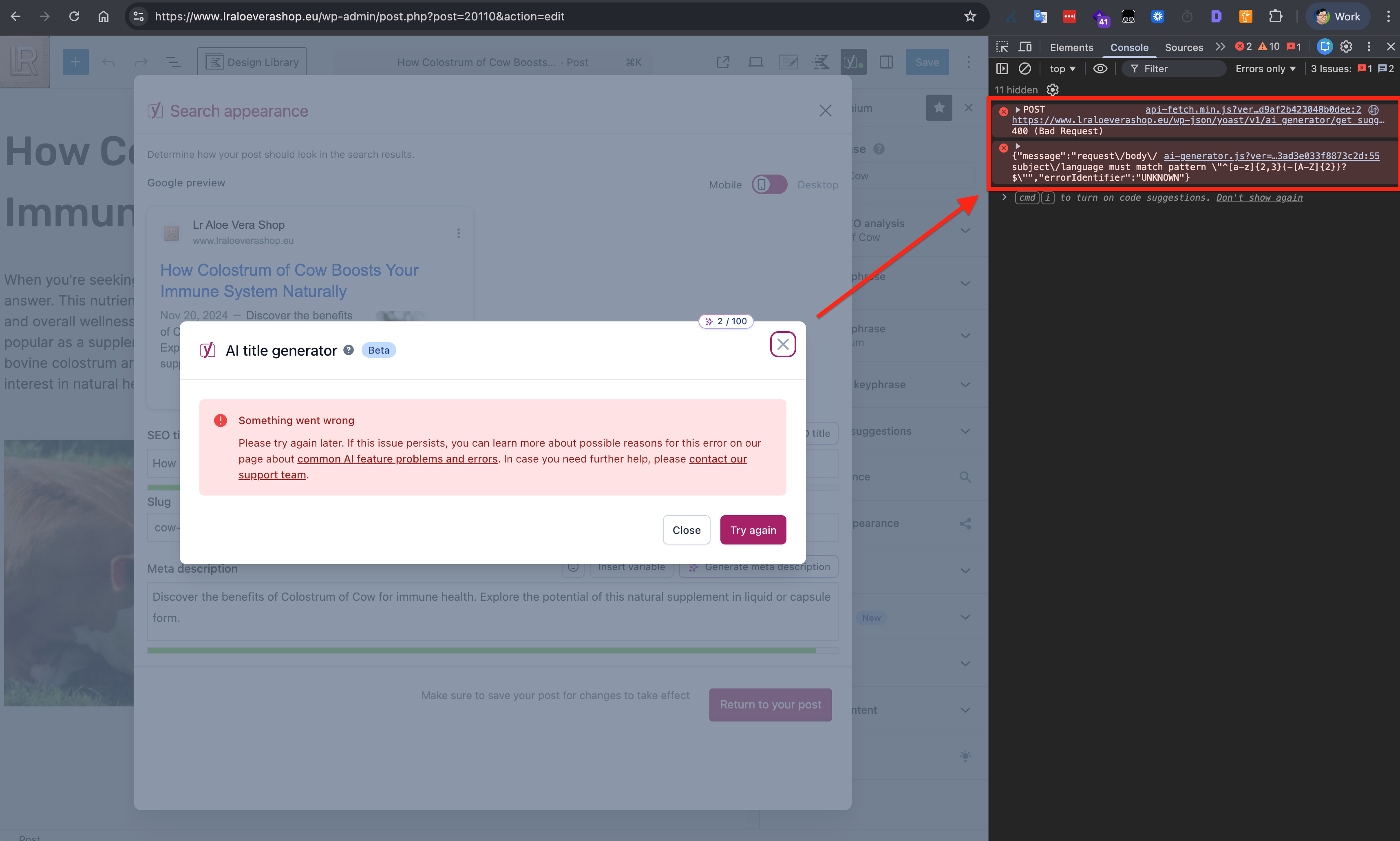 |
| April 29, 2026 at 11:47 am #18002711 | |
 Shekhar Bhandari WPML Supporter since 03/2015 Languages: English (English ) Timezone: Asia/Kathmandu (GMT+05:45) |
Hello there, Thank you for contacting WPML support. I’ll be happy to assist you with this. Since the initial debugging has been completed, the next step is to gain a deeper understanding of the issue. I recommend sharing a backup of your wp-content folder along with your database. You can compress the files and upload them to Google Drive, then share the access with me. This will allow me to set up a local copy of your site, investigate further, and involve our developers if needed. Looking forward to your reply. Thanks |
| April 30, 2026 at 12:37 pm #18005806 | |
|
Shekhar Bhandari WPML Supporter since 03/2015 Languages: English (English ) Timezone: Asia/Kathmandu (GMT+05:45) |
Hello there, I wanted to let you know that I’m currently discussing this issue with our compatibility team. I’ll update you as soon as I have any feedback to share. Thanks |
| May 4, 2026 at 6:01 am #18009834 | |
|
Shekhar Bhandari WPML Supporter since 03/2015 Languages: English (English ) Timezone: Asia/Kathmandu (GMT+05:45) |
Hello, It appears that the login URL you provided is no longer working. Could you please check and share the updated login details? Additionally, could you provide the FTP details so we can investigate this further? I look forward to your reply. Thank you. |
| May 4, 2026 at 3:02 pm #18011357 | |
|
stanislavR |
I decided to stop this ticket. I gave login details to Yoast seo supporter and they did something wrong with my website. In the linking suggestion on product page I have now link suggestion in all languages. Yoast suggest me in english part of website to linking to woocommerce product in Spanish language |





