
This is the technical support forum for WPML - the multilingual WordPress plugin.
Everyone can read, but only WPML clients can post here. WPML team is replying on the forum 6 days per week, 22 hours per day.
Tagged: Bug
This topic contains 12 replies, has 0 voices.
Last updated by Stefano 2 months ago.
Assisted by: Sumit Singh.
| Author | Posts |
|---|---|
| February 18, 2026 at 10:06 am #17831587 | |
 Stefano |
Web Page: hidden link Subject: Critical Error: Advanced Translation Editor Crashing on ES/PT after Automatic Translation Failure Description: Steps Taken: Forced Update Attempt: I made minor "dummy" edits to the original language pages to trigger a re-translation, but the system flagged them as already completed. Manual Overwrite: I attempted to manually edit the translations. While this worked for EN, FR, and DE, the PT and ES editors crashed upon opening. Cache & Job Cleanup: * Canceled all pending Automatic Translation jobs in the Translation Management dashboard. Cleared WPML caches, Avada theme caches, and server-level WP Engine object caching. Current Status: The PT page appears resolved after the cache clear, but the ES (Spanish) page consistently triggers a critical error/crash when attempting to open the translation editor. Error Message Received: WPML tried to translate this page three times and failed. To get it fixed, contact WPML support. Environment: Theme: Avada Hosting: WP Engine Editor: Advanced Translation Editor (ATE) Requested Action: |
| February 18, 2026 at 11:44 am #17831985 | |
|
Stefano |
Subject: Follow-up: Encoded Field Error preventing Automatic Translation (Post ID: 2026/02/18) Workflow Context: Troubleshooting Steps Taken: Site Reversion: I reverted the site to a backup state prior to the initial post creation. Cache/Job Cleanup: Cleared all site and server caches (WP Engine/Avada/WPML) and canceled all pending translation jobs. Plugin Update: Manually updated all WPML components to the latest versions. Fresh Post Creation: Re-created the post with a modified headline and new slug to ensure a clean start: URL: hidden link The Current Block: "WPML cannot send some of the content to translation. Some of the content that you selected for translation includes fields that are encoded. Translators will not be able to work on this kind of content, so we removed it from the job." Specific Concerns: The English page is published and functioning correctly, but it will not send for translation. Hyperlinks: This post contains several links within the text body. In the previous version of this post, these links seemed to cause issues. Is there a known bug regarding nested links or encoded shortcodes within the current version of WPML and Avada? Request: |
| February 18, 2026 at 7:55 pm #17833845 | |
|
Stefano |
UPDATE Issue Summary: Recent Examples: Latest Test: The Mystery of Passage: Ash Wednesday on the Aventine Hill (This is the one I manually translated) Previous Failure: Oriental Orthodox Study Visit (I have not tried to manually translate this) The Error Message: "WPML cannot send some of the content to translation. Some of the content that you selected for translation includes fields that are encoded. Translators will not be able to work on this kind of content, so we removed it from the job." Crucial Context – Billing Change: I am wondering if there is a synchronization issue between my billing account and the Translation Management dashboard that is triggering this "encoded fields" error as a false positive. Could you please check if my account status is active and correctly linked to the ATE server? Observations: Manual translation works, but is not sustainable for longer posts. All WPML components are up to date. Caches have been cleared at the theme, plugin, and server levels (WP Engine). Request: |
| February 19, 2026 at 2:54 pm #17836479 | |
 Sumit Singh WPML Supporter since 12/2025 Languages: English (English ) Timezone: Asia/Kolkata (GMT+05:30) |
Hi, Thank you for contacting the support forum. Regarding the encoded error, this is a known issue and our team is already investigating it. I will get back to you with a possible workaround as soon as possible. Could you please confirm if the ATE issue — “WPML tried to translate this page three times and failed. To get it fixed, contact WPML support.” — is still happening on your site? This might have been a temporary connectivity issue, as we had some downtime yesterday which has now been resolved. Looking forward to your update. Thanks |
| February 19, 2026 at 4:32 pm #17836745 | |
|
Stefano |
Subject: Re: Encoded Field Error / ATE Failure Ciao, Sumit, Thank you for the update. I appreciate you confirming that the "encoded field" error is a known issue under investigation. To answer your question: Yes, the issue is still persisting on my end. Even after your team resolved yesterday’s downtime, I am unable to use Automatic Translation. Latest Test & Observations: Billing Update: I have updated my "Pay-as-you-go" account with a standard credit card (replacing a pre-paid card) to ensure there are no payment-related blocks. Link Removal: I tested the post below by removing all hyperlinks to see if they were causing the encoding conflict, but I received the exact same error message: Post: hidden link The Error: I am still blocked by the "fields that are encoded" message, and the Automatic Translation job will not initialize. Urgency: If there are any specific database settings or ATE configurations I should check on my side to help speed this up, please let me know. |
| February 20, 2026 at 8:42 am #17837723 | |
|
Sumit Singh WPML Supporter since 12/2025 Languages: English (English ) Timezone: Asia/Kolkata (GMT+05:30) |
Hi, The ATE error and the encoding error are two different issues. We resolved the ATE error yesterday, and you should now be able to translate the page by editing it and clicking the plus or pencil icon. The encoding error is a known issue. It happens when the page contains some base64-encoded data, and WPML blocks it for extra charge reasons. To move forward, I need to check what data is being encoded. Removing or adjusting that encoded data should fix the issue. For this, I need to request temporary site access (wp-admin and FTP) so I can investigate this directly. You will find the needed fields in the next reply. Privacy and Security when Providing Debug Information for Support Thanks |
| February 23, 2026 at 6:34 am #17841650 | |
|
Sumit Singh WPML Supporter since 12/2025 Languages: English (English ) Timezone: Asia/Kolkata (GMT+05:30) |
Hi, Sorry for the delay. We have identified the encoding issue, and it has been fixed internally. The fix will be included in the next WPML update. If you would like, I can apply a temporary patch on your website so you don’t have to wait for the next release. Also, I tried the login details you provided, but they are not working on my side. Could you please check them and share the correct access details again? Thanks |
| February 23, 2026 at 10:13 am #17842214 | |
|
Sumit Singh WPML Supporter since 12/2025 Languages: English (English ) Timezone: Asia/Kolkata (GMT+05:30) |
hi, Yes, you can translate. I just checked by editing a page and clicking the pencil button. It opens the ATE and is working fine. Please see the attached screenshot. Now I am going to test the patch and see if the same works from TM dashboard. Please note, this will consume some of the credits in testing I will return them to your account after testing. Thanks 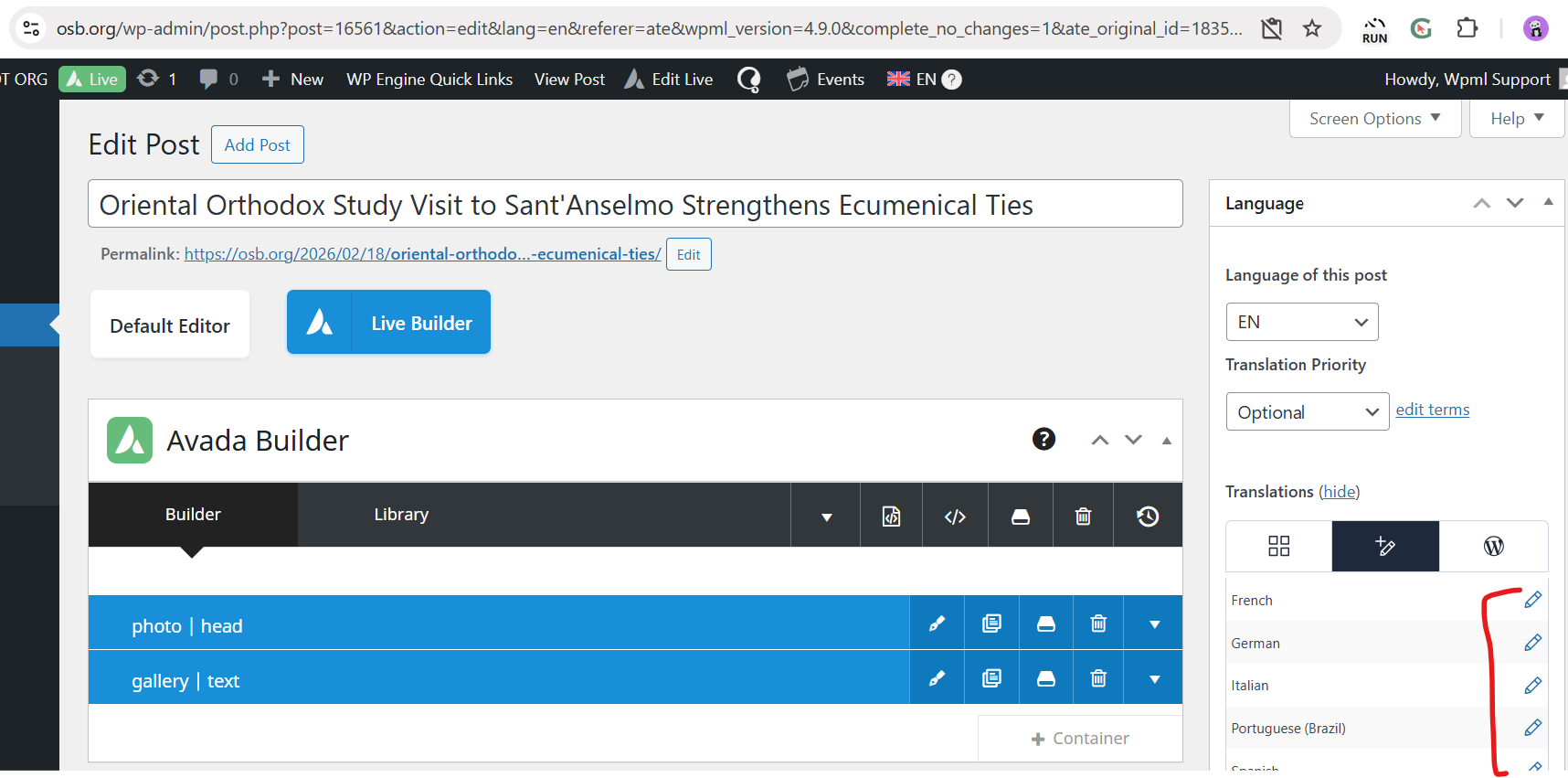 |
| February 23, 2026 at 2:27 pm #17843491 | |
|
Sumit Singh WPML Supporter since 12/2025 Languages: English (English ) Timezone: Asia/Kolkata (GMT+05:30) |
Hi, I have added the patch to WPML files, and I can see this post hidden link is translated without any issue into French. The cost of translation was 2,164 credits, so I have added 2,164 credits to your account. The issue should be fixed with WPML 4.9.1 update. Please confirm if if the issue resolved at your end too. Thanks |
| February 23, 2026 at 4:28 pm #17843852 | |
|
Stefano |
The issue seems to be resolved. I was able to translate from the TM dashboard. I will remove your access to the admin areas. Before I go, one suggestion: I do not want my human translators to be notified when I translate the posts using Automatic Translation. I only want them to be notified when I have something specific for them to translate, and to notify only the specific translators of the language I choose. Right now, it notifies everyone of everything every time. It confuses my human translators. Can you pass this issue to your developers? Perhaps they can craft a way around this problem. Otherwise, I love WPML. My human translators say the translations are phenomenal - even the German translations. So, good job. Thanks very much. I look forward to the WPML 4.9.1 update. Thanks -Simon |
| February 24, 2026 at 7:48 am #17844974 | |
|
Sumit Singh WPML Supporter since 12/2025 Languages: English (English ) Timezone: Asia/Kolkata (GMT+05:30) |
Hi Simon, Glad to know it is fixed. About the 2nd problem, I think there is some confusion here. In past, we had an issue sending emails to translators who were not assigned at all. We have improved this in 4.7. Also, WPML never sends automatic translation notifications to any translator; this is not needed at all. If this issue is bothring to you, would you like to continue this further? I will create a new ticket from this thread, and we can continue checking there? Thanks |
| February 24, 2026 at 7:59 am #17844985 | |
|
Stefano |
Thanks, Sumit, for your offer. Your explanation has led me to question now what I'm hearing from my human translators. Let me research this a bit more with them and determine exactly what notifications they are receiving when I use different methods of translation. This is going to require some experimentation and time. For now, let's close this thread and I will open a new one if the translator notification issue continues for us. All good! Thanks a bunch -Simon |
| February 24, 2026 at 11:38 am #17846260 | |
|
Sumit Singh WPML Supporter since 12/2025 Languages: English (English ) Timezone: Asia/Kolkata (GMT+05:30) |
Hi, Ok great! I am marking it, waiting for confirmation, and you can resolve it. 🙂 Thanks |
| February 25, 2026 at 7:24 am #17849601 | |
|
Stefano |
All good, Sumit. Grazie mille! -Simon |






