Skip to content Skip to sidebar

This thread is resolved. Here is a description of the problem and solution.

Problem:
You have created a custom post type called 'Produkte' using the ACF Post Types UI, which is public and set to show in REST API with the slug 'produkte'. In your main language, German, the post type appears and is detected by WPML for translation. However, when switching the admin language to English, the custom post type does not appear, and you receive an 'Invalid Post Type' error when trying to enable translation for it in WPML settings.
Solution:
To make your custom post type available for translation in all admin languages, follow these steps:
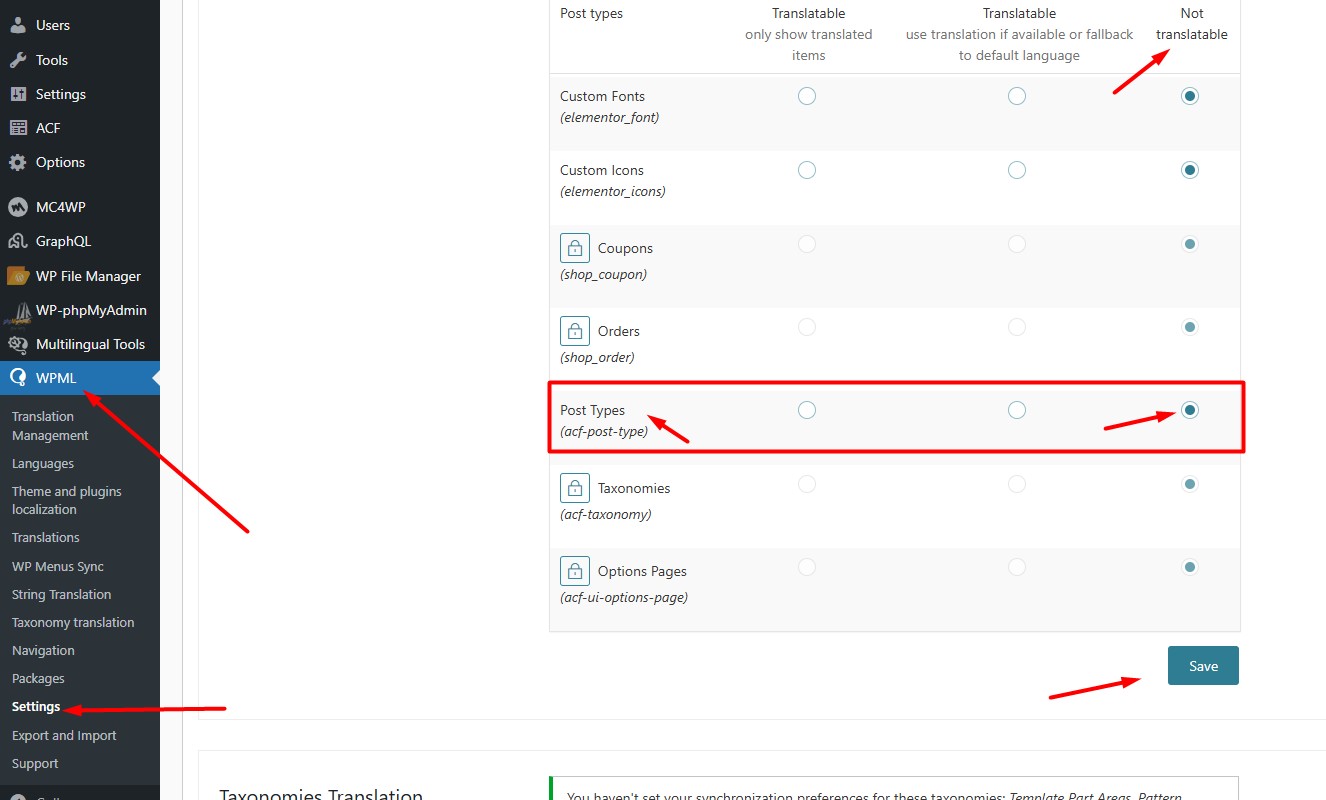
1. Navigate to the WPML >> Settings > Post Types Translation section.
2. Set the 'Post Types (acf-post-type)' to Not Translatable.
3. Press the Save button.
This adjustment should resolve the issue of the custom post type not appearing in different admin languages.

If this solution does not apply to your case, or if it seems outdated, we recommend opening a new support ticket. Additionally, we highly recommend checking related known issues at https://wpml.org/known-issues/, verifying the version of the permanent fix, and confirming that you have installed the latest versions of themes and plugins. For further assistance, please visit our support forum at WPML Support Forum.

This is the technical support forum for WPML - the multilingual WordPress plugin.

Everyone can read, but only WPML clients can post here. WPML team is replying on the forum 6 days per week, 22 hours per day.

Tagged: 

This topic contains 1 reply, has 0 voices.

Last updated by Philip 11 months, 2 weeks ago.

Assisted by: Noman.

Author Posts
June 3, 2025 at 2:56 am #17099157

Philip

Background of the issue:
I created a custom post type called 'Produkte' using the ACF Post Types UI. The post type is public, set to show in REST API, and uses the slug 'produkte'. My main language is German, and in the German admin, the post type appears and is detected by WPML for translation. However, when I switch my admin language to English, the custom post type does not appear, and I cannot enable translation for it in WPML settings.

Symptoms:
When I switch my admin language to English, the custom post type does not appear, and I get an 'Invalid Post Type' error when I try to enable translation for it in WPML settings.

Questions:
How can I make my custom post type available for translation in all admin languages?

June 3, 2025 at 9:24 am #17101101

Noman

Hi,

Thank you for contacting WPML Support. This type of issue usually happens when “Post Types (acf-post-type)” translation is enabled from the WPML >> Settings page which should be disabled to work correctly. To fix this issue, please try to follow the below steps:

1. Go to the WPML >> Settings > Post Types Translation section.
2. Set the “Post Types (acf-post-type)” to Not Translatable (Screenshot attached).
3. Press the Save button.

I hope it will solve the issue, could you please check and confirm?

Thank you

ACF post type settings.jpg
June 3, 2025 at 10:39 pm #17104193

Philip

It worked, thank you. 🙂

I confess it seemed extremely counterintuitive to disable the translation for acf post types... to enable translation to an acf post type.