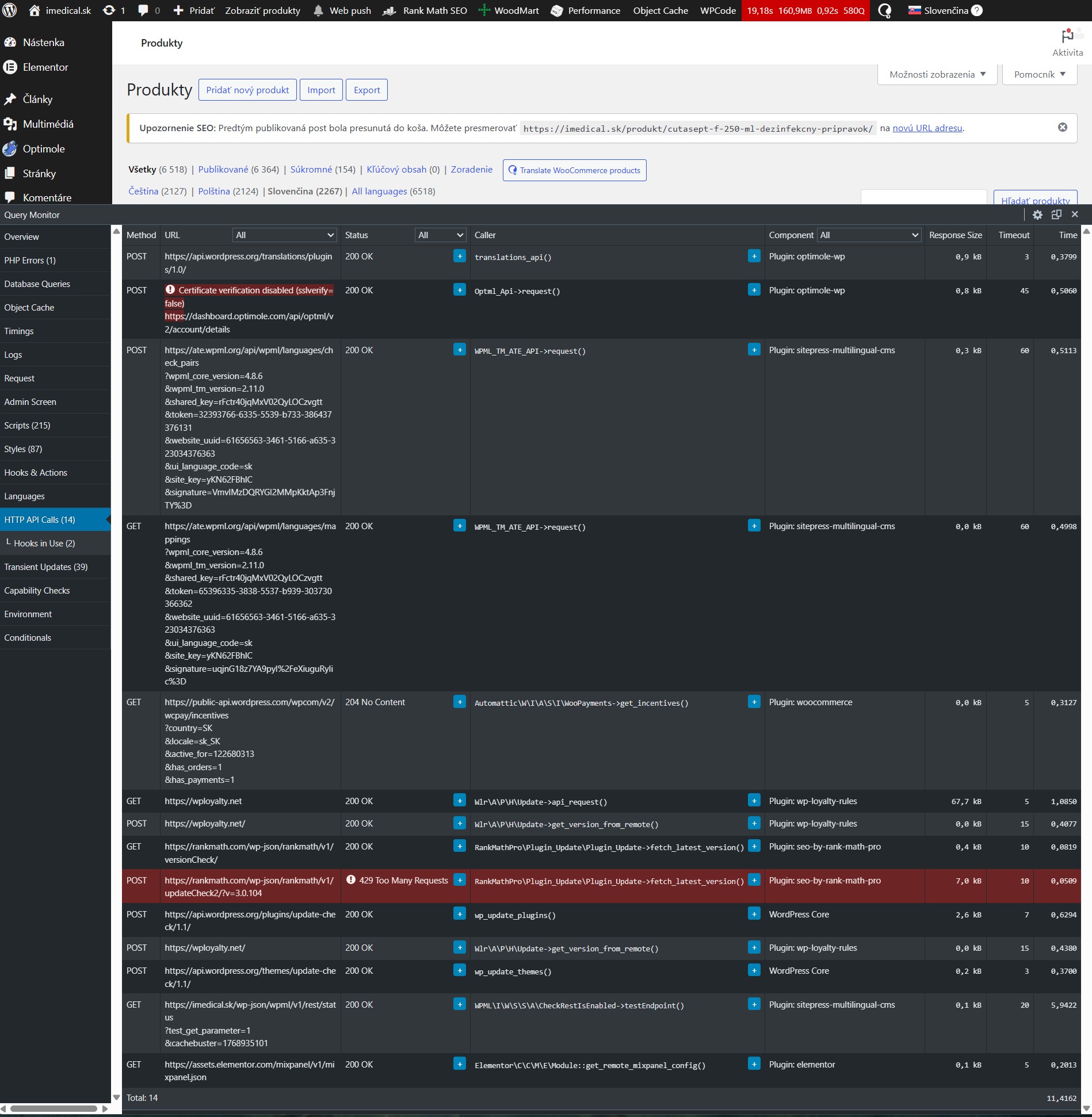
is called on every single admin page load, not once every 10 minutes and not only on WPML admin pages.
Here is the relevant entry from Query Monitor:
GET hidden link
Caller: WPML\I\W\S\S\A\CheckRestIsEnabled->testEndpoint()
Plugin: sitepress-multilingual-cms
Execution time: 5.53 seconds
This happens on every admin navigation (products, orders, pages, settings, etc.).
This means:
- It is not limited to WPML pages
- It is not cached for 10 minutes
- It is not a rare call
- It is very expensive (5+ seconds per call)
- It significantly increases server load and admin latency
- I can also see multiple other WPML-related remote calls being triggered on each admin load.
So my questions are:
1. Why is this endpoint being triggered on every admin page?
2. Why is it not cached for 10 minutes as described in the previous thread?
3. What exact condition causes WPML to invalidate the transient?
4. How can I prevent this check from running on every admin request?
Right now, this behavior is not consistent with what your support described as the intended logic.
But at this point, the problem is clearly reproducible and measurable.
I created a fresh WP installation with WPML configured and Query Monitor installed, and I can't see the issue there.
You can access the site's back end by following this link, and check if I am missing something: hidden link
Did you check what Kor suggested in the other ticket?
Check whether something on the production site (such as another plugin, a cron job, or hosting-level cache rules) is clearing WordPress cache data too frequently. In particular, please verify that the cache entry named _transient_timeout_wpml_requirements:
Is being created correctly
Updates approximately every 10 minutes
Is not being deleted or overwritten unexpectedly
Thank you for testing this on a clean installation.
On my production site, I tested this behavior multiple times and found that the issue appears only when the Redis Object Cache plugin (by Till Krüss) is active. When Redis is enabled, the endpoint /wp-json/wpml/v1/rest/status is called on every admin page load. When I disable Redis, the behavior immediately returns to normal and the check runs approximately once every 10 minutes, which is expected.
I would really like to keep using Redis, because without these repeated API calls I was getting better loading times. However, I can’t explain why the transient used by WPML for this check does not seem to persist when Redis is enabled.
So I wanted to ask:
Do you have any experience with the Redis Object Cache plugin in combination with WPML?
Are there any known issues, recommended settings, or workarounds?
Is there a specific caching plugin that you generally recommend as being the most compatible with WPML?