Skip to content Skip to sidebar

This thread is resolved. Here is a description of the problem and solution.

Problem:
If you switch to Chinese Simplified on your homepage, you encounter a fatal error.
Solution:
We found that some strings contained placeholders like

%1$s

,

%3$s

which were either missing or incorrect in the Chinese translation. This discrepancy caused the fatal error. We corrected these placeholders in the affected strings, ensuring they are formatted correctly, such as changing

%1$

to

%1$s

.

If this solution does not resolve your issue, or if it seems outdated or irrelevant to your case, we recommend opening a new support ticket. Additionally, we highly recommend checking related known issues at https://wpml.org/known-issues/, verifying the version of the permanent fix, and confirming that you have installed the latest versions of themes and plugins. For further assistance, please visit our support forum at https://wpml.org/forums/forum/english-support/.

This is the technical support forum for WPML - the multilingual WordPress plugin.

Everyone can read, but only WPML clients can post here. WPML team is replying on the forum 6 days per week, 22 hours per day.

Tagged: 

This topic contains 4 replies, has 0 voices.

Last updated by antonioD-71 1 day, 21 hours ago.

Assisted by: Andrey.

Author Posts
April 10, 2026 at 8:41 pm #17962880

antonioD-71

If I switch to Chinese Simplified in the homepage, I get a fatal error.

April 11, 2026 at 6:21 pm #17963578

Andrey
WPML Supporter since 06/2013

Languages: English (English ) Russian (Русский )

Timezone: Europe/Kyiv (GMT+03:00)

Thank you for contacting WPML support.

To better understand your situation, could you please enable debugging, replicate the issue, and share the full error message from your debug.log file?

Here are the steps:
1. Enable WordPress debugging by editing your wp-config.php file. Add (or modify, if these lines already exist) the following lines before the comment /* That's all, stop editing! Happy publishing. */:

define( 'WP_DEBUG', true );
define( 'WP_DEBUG_LOG', true );
define( 'WP_DEBUG_DISPLAY', false );

2. Replicate the error.
3. Check the debug.log file (located in the /wp-content/debug.log) for any WPML-related errors.
4. Copy and paste the full error message here.

I've enabled debug information for this support ticket. Please refer to this link for instructions on how to retrieve this information from your site and provide it to us: http://wpml.org/faq/provide-debug-information-faster-support/

April 18, 2026 at 3:37 am #17977698

antonioD-71

I have enabled the debug but no log has been created.

Screenshot 2026-04-17 alle 20.36.42.png
April 20, 2026 at 1:50 pm #17981279

Andrey
WPML Supporter since 06/2013

Languages: English (English ) Russian (Русский )

Timezone: Europe/Kyiv (GMT+03:00)

Looking at your screenshot, it seems there is a critical error present. It's strange that there is no debug.log.

I need to request temporary access (wp-admin and FTP) to your site—preferably to a test site where the problem has been replicated, if possible—in order to be of better help. When you log in to leave your next reply, you will find the needed fields below the comment area. The information you will enter is private, meaning only you and I can see and access it.

Please provide the steps to reproduce the issue.

April 27, 2026 at 1:58 pm #17997225

Andrey
WPML Supporter since 06/2013

Languages: English (English ) Russian (Русский )

Timezone: Europe/Kyiv (GMT+03:00)

I’ve looked into this and fixed the issue.

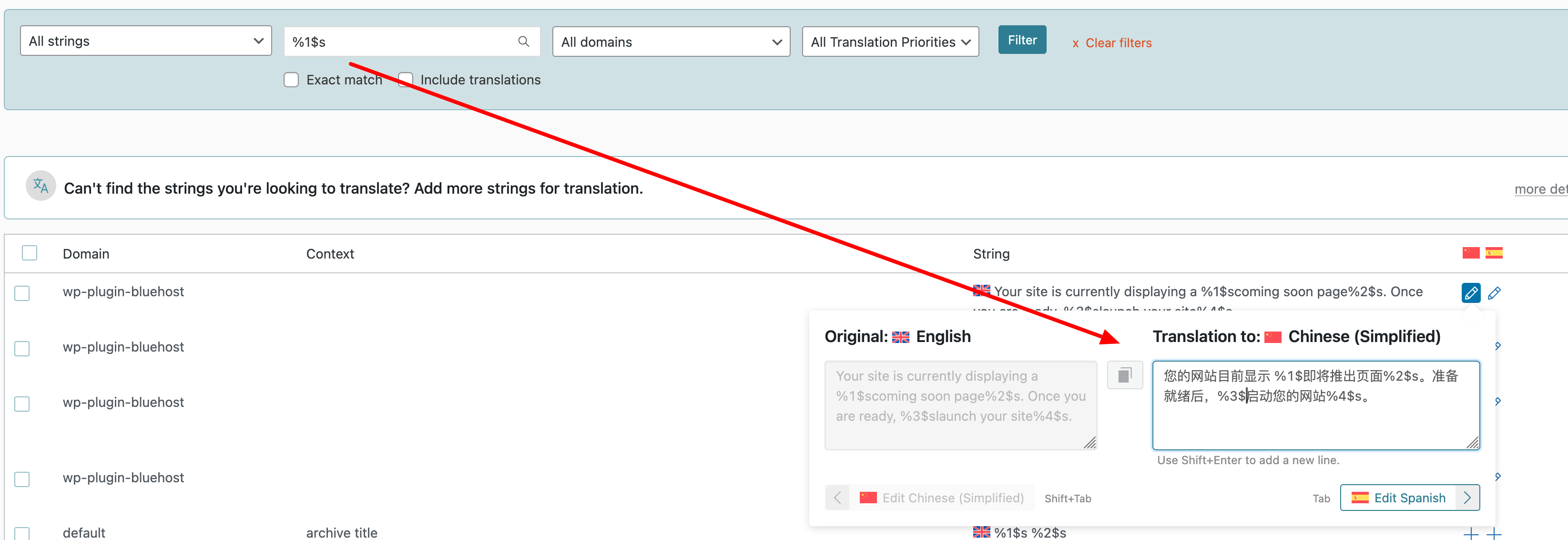
Some of your strings contain placeholders (e.g., %1$s, %3$s), but these were missing or incorrect in the Chinese translation. This caused the problem.

I located the affected strings and corrected the placeholders—for example, adding the missing s to %1$ so it correctly reads %1$s.

I’ve attached a screenshot for your reference.

Screenshot-2026-04-27-at-16-54-05.png
April 30, 2026 at 12:23 am #18004198

antonioD-71

Thanks! Much appreciated.