Home›Support›English Support›[Resolved] Homepage header and images missing after enabling “Use directory for default language (/de/)” ...
[Resolved] Homepage header and images missing after enabling “Use directory for default language (/de/)” ...
This thread is resolved. Here is a description of the problem and solution.
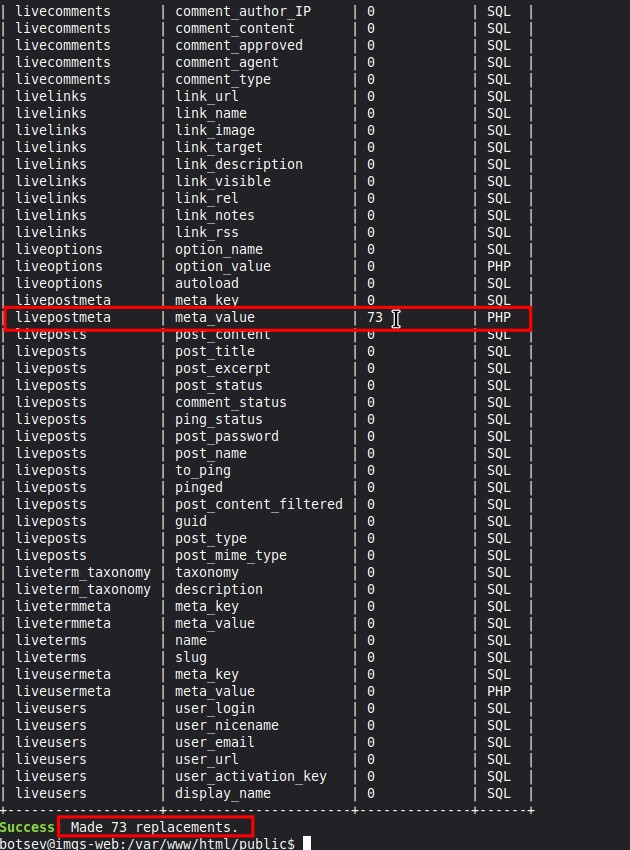
Problem: After switching the WPML setup to use a directory for the default language (/de/), the homepage content partially disappeared. The header, main navigation menu, and all Elementor images and sections are missing on the German homepage, affecting the SEO as Google now sees /de/ as the canonical homepage. Solution: The issue might have occurred due to the site's rewrite base changing when the default language directory was updated, causing some URLs, especially those in Elementor's internal data, to retain the old path. To fix this, you can use the following command if your site runs on WordPress with WP-CLI installed:
If WP-CLI is not available, consider using a plugin like Better Search Replace. Always ensure to back up your site fully before running these commands.
If this solution does not apply to your case, or if it seems outdated, we recommend opening a new support ticket. We also highly recommend checking related known issues at https://wpml.org/known-issues/, verifying the version of the permanent fix, and confirming that you have installed the latest versions of themes and plugins. For further assistance, please visit our support forum at WPML Support Forum.
This is the technical support forum for WPML - the multilingual WordPress plugin.
Everyone can read, but only WPML clients can post here. WPML team is replying on the forum 6 days per week, 22 hours per day.
Languages: English (English )German (Deutsch )French (Français )
Timezone: Europe/Zagreb (GMT+02:00)
This has been escalated to our 2nd tier team team and may take some debugging time, I'll get back to you as soon as I have any news or questions for you.
Languages: English (English )German (Deutsch )French (Français )
Timezone: Europe/Zagreb (GMT+02:00)
It looks like the issue may have happened if the site’s rewrite base changed when the default language for the directory was updated. In that situation, it’s possible for some URLs—especially inside Elementor’s internal data—to keep the old path.
The reason a standard search-and-replace didn’t fix it is likely because the _elementor_data field is very large, and the URLs inside it are stored in an escaped format, for example:
Languages: English (English )German (Deutsch )French (Français )
Timezone: Europe/Zagreb (GMT+02:00)
It doesn’t appear that this issue was caused by your theme or by any plugin. What happened is that some Elementor internal URLs kept an older absolute path that was used previously on the site. These URLs are stored inside Elementor’s JSON data, and because they are absolute paths, WPML cannot interpret or rewrite them, so the outdated path simply gets reused in the translation.
As for what originally triggered this, we can’t say with certainty. We have no other cases of this happening and no reliable way to reproduce it, so it seems to be an isolated exception that occurred at some point—possibly when the rewrite base or the “default language in directory” setting was changed, although we cannot confirm that. Since there is no identifiable bug, there isn’t anything to fix in WPML or in your theme.
The only action needed is to update those outdated URLs in bulk, after which everything will function normally.
Please fix this today. We will not use any unknown tools that we are not familiar with. A copy of the website has already been sent to WordPress support. If you claim that neither the theme nor the WPML plugin is responsible, then WordPress must have a bug.
Your plugin caused our website to be offline for an entire week.
On top of that, your support team provided misleading information instead of addressing the issue transparently.
This behaviour is unacceptable. We expect an immediate explanation, a full root-cause analysis, and concrete steps to ensure this does not happen again.
Languages: English (English )Spanish (Español )German (Deutsch )
Timezone: Europe/Vienna (GMT+02:00)
Hello, this is Marcel. I’m one of the support team leads, and I’ve reviewed the full history of this case, including the package you provided and our developers’ analysis.
What we found:
The /de/ prefix appearing in some image URLs was not added by WPML. These values were previously saved inside Elementor’s internal JSON structure (_elementor_data) as absolute URLs that already included /de/. Elementor preserves these values exactly as stored, which is why re-adding an image corrects the issue immediately.
WPML does not rewrite or modify these internal Elementor entries retroactively.
Why this happened:
At an earlier stage, the site was most likely running with a different routing configuration (for example, “Use directory for default language”). During that period, Elementor appears to have stored the URLs in this format. Because this is historical data, the issue cannot be reproduced in a clean environment.
About the previous replies:
The guidance you received earlier in this ticket is fully consistent with our internal analysis and based on the information available at each stage.
Regarding the timing of replies: some of your messages arrived outside of Bruno’s working hours and during the weekend, when he was not available. If you ever need assistance more urgently, you’re welcome to open a new ticket. When a chat supporter is available, you can receive real-time chat support there.
Bulk correction:
Our developers provided a safe bulk solution that can be applied using hidden link. WP-CLI is the official command-line interface for WordPress and is included or supported by most hosting providers. It allows running search-replace operations safely and consistently.
If you prefer not to run WP-CLI yourself, the command can be executed by whoever manages the technical administration of your site (for example, your hosting provider).