Skip to content Skip to sidebar

This is the technical support forum for WPML - the multilingual WordPress plugin.

Everyone can read, but only WPML clients can post here. WPML team is replying on the forum 6 days per week, 22 hours per day.

Sun Mon Tue Wed Thu Fri Sat
- 9:00 – 13:00 9:00 – 13:00 9:00 – 13:00 9:00 – 13:00 9:00 – 13:00 -
- 14:00 – 18:00 14:00 – 18:00 14:00 – 18:00 14:00 – 18:00 14:00 – 18:00 -

Supporter timezone: Europe/Kyiv (GMT+03:00)

Tagged: 

This topic contains 3 replies, has 1 voice.

Last updated by Andrey 5 days, 16 hours ago.

Assisted by: Andrey.

Author Posts
April 20, 2026 at 7:47 pm #17982113

Thomas Maier

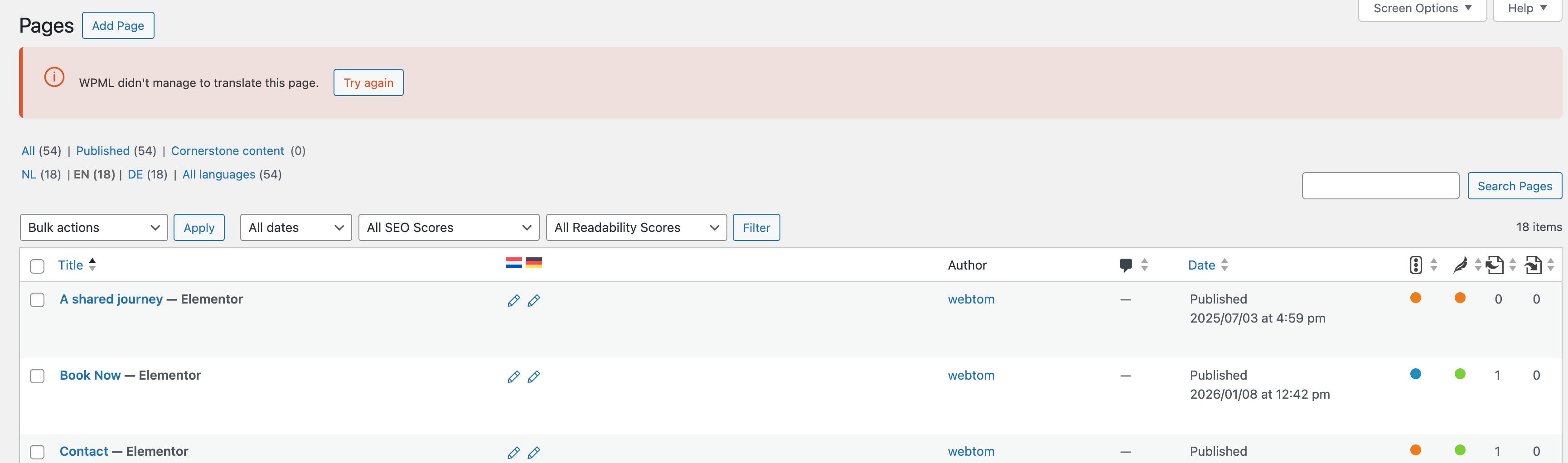
On some pages i somehow get this error message when i click on the icon to translate them "WPML didn't manage to translate this page." Can you tell me why?

April 21, 2026 at 6:38 am #17982602

Thomas Maier

Hello, can i give you access to the site please and you check this out?

April 21, 2026 at 2:31 pm #17984683

Andrey
WPML Supporter since 06/2013

Languages: English (English ) Russian (Русский )

Timezone: Europe/Kyiv (GMT+03:00)

Thank you for contacting WPML support.

I need to request temporary access (wp-admin and FTP) to your site—preferably to a test site where the problem has been replicated if possible—in order to be of better help. When you log in to leave your next reply, you will find the needed fields below the comment area. The information you will enter is private, meaning only you and I can see and access it.

April 23, 2026 at 3:25 pm #17990801

Andrey
WPML Supporter since 06/2013

Languages: English (English ) Russian (Русский )

Timezone: Europe/Kyiv (GMT+03:00)

Thank you for providing the details.

I was able to resolve the issue by using the following steps:

1. I used the page “Who we are” as an example
2. Made a small change to the title (added a letter), updated the page, then reverted the change and updated it again
3. Opened the translation

This process forces WPML to refresh the translation job, which often resolves this type of issue.

Please try the same steps on your end and let me know if it works for you.

Screenshot 2026-04-23 at 18.25.01.png