
This is the technical support forum for WPML - the multilingual WordPress plugin.
Everyone can read, but only WPML clients can post here. WPML team is replying on the forum 6 days per week, 22 hours per day.
| Sun | Mon | Tue | Wed | Thu | Fri | Sat |
|---|---|---|---|---|---|---|
| - | 7:00 – 12:00 | 7:00 – 12:00 | 7:00 – 12:00 | 7:00 – 12:00 | 7:00 – 12:00 | - |
| - | 12:00 – 15:00 | 12:00 – 15:00 | 12:00 – 15:00 | 12:00 – 15:00 | 12:00 – 15:00 | - |
Supporter timezone: Europe/Vienna (GMT+02:00)
Tagged: Exception
This topic contains 10 replies, has 0 voices.
Last updated by mitchC-2 3 days, 2 hours ago.
Assisted by: Lucas Vidal de Andrade.
| Author | Posts |
|---|---|
| April 7, 2026 at 2:37 pm #17954638 | |
 mitchC-2 |
With Woo-commerce Product, I used auto translation using PTE. - Some string of production content, are translated for some language while for other language it's not. - For some string, I can see translated text in translation editor but that same not appear in production page editor for same lang. Let me know if you need any further details. |
| April 8, 2026 at 6:30 am #17955597 | |
 Marcel Supporter Languages: English (English ) Spanish (Español ) German (Deutsch ) Timezone: Europe/Vienna (GMT+02:00) |
Hi, I checked your title in German, and it appears correctly as “BO7 Bot-Lobbys – COD Black Ops 7.” Have you made any changes yet? Best regards, |
| April 13, 2026 at 3:05 am #17964521 | |
| mitchC-2 |
Hey, Marcel I manually saved translated for translation editor screen. Still I found some string are showing translated on translation editor but it's not showing translated version on post edit of that language. You can check "Additional Information" section on that product page. Title of that each accordion items is translated but it's not visible on frontend. I found very inconsistency with translation. New threads created by Lucas Vidal de Andrade and linked to this one are listed below: https://wpml.org/forums/topic/split-custom-theme-element-shows-untranslated/ 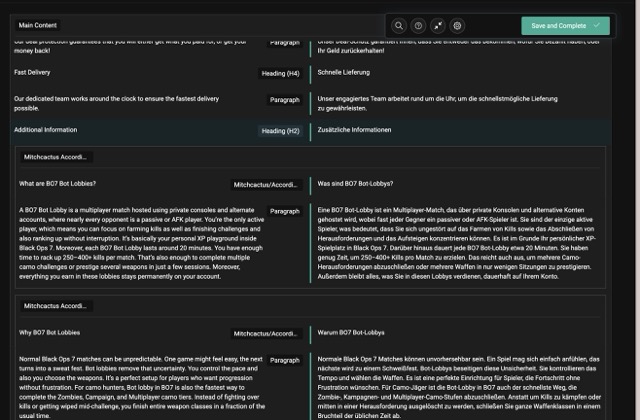 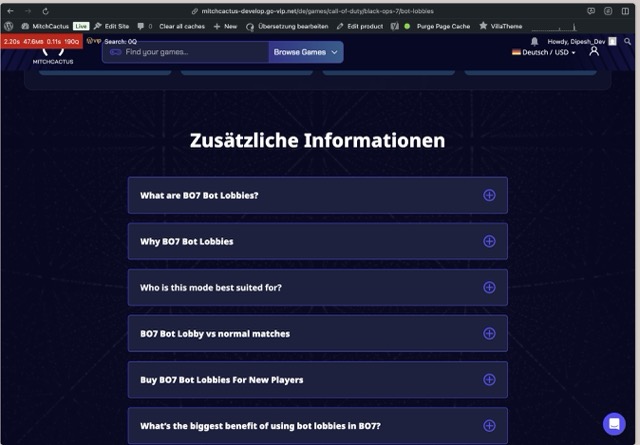 |
| April 13, 2026 at 7:13 am #17964810 | |
|
Marcel Supporter Languages: English (English ) Spanish (Español ) German (Deutsch ) Timezone: Europe/Vienna (GMT+02:00) |
Hi, Could you please try editing the text on the original page? This should help trigger an update for the translated version. Best regards, |
| April 14, 2026 at 2:46 am #17967264 | |
|
mitchC-2 |
Hey, I tired to edit original text as well as tried to Save translated edit screen. unfortunately, not any trick working. |
| April 14, 2026 at 3:14 pm #17969135 | |
|
Marcel Supporter Languages: English (English ) Spanish (Español ) German (Deutsch ) Timezone: Europe/Vienna (GMT+02:00) |
Hi, thanks for the info. I would eventually also need to request temporary access (WP-Admin and FTP) to your site Your next answer will be private which means only you and I have access to it. ❌ Please backup your database and website ❌ ✙ I would additionally need your permission to de-activate and re-activate Plugins and the Theme, and to change configurations on the site. This is also a reason the backup is really important. ✙ Please add the Links to the […] Edit Screen, the Page/Post where you insert the […] and the corresponding Front End Page/Screen Best Regards, |
| April 17, 2026 at 12:09 pm #17976778 | |
|
Marcel Supporter Languages: English (English ) Spanish (Español ) German (Deutsch ) Timezone: Europe/Vienna (GMT+02:00) |
Hi, I wasn’t able to find any issues with the titles themselves. The WPML Translation Editor is currently deactivated, and the site is using the native WordPress editor for translations. As a result, the titles need to be translated manually within the WordPress editor (for example: The setting itself you can see on the right sidebar at hidden link. Best regards, |
| April 18, 2026 at 1:42 am #17977667 | |
|
mitchC-2 |
Hey Marcel Might be this is because I imported other environment db backup in this system. you can check for same post with other language. Check for data which i share screenshot in https://wpml.org/forums/topic/i-need-help-with-translating-my-site-content/#post-17964521 If possible can you schedule call to connect so i can show you wha issue I'm facing. - First I Did translation of that course with PTC. As this staging site need for different purpose, So i need to move this code into different environment for debugging. So I need to send new site credentials for debug. Please allow me to share private message and i share that on Monday. |
| April 20, 2026 at 2:04 pm #17981319 | |
 Lucas Vidal de Andrade WPML Supporter since 11/2023 Languages: English (English ) Spanish (Español ) German (Deutsch ) Portuguese (Brazil) (Português ) Timezone: Europe/Vienna (GMT+02:00) |
Hey there, Marcel will be off for the next few weeks, so I'll be handling this tikcet 🙂 I've read through it and I'm on top of what was discussed so far. Unfortunately we don't offer live call support, bu you can record your screen while you reproduce the issue with the course, so I can check in more detail what's going on. I've activated the private fields, you can share the credentials privately. Regards, |
| April 27, 2026 at 9:42 am #17996441 | |
|
Lucas Vidal de Andrade WPML Supporter since 11/2023 Languages: English (English ) Spanish (Español ) German (Deutsch ) Portuguese (Brazil) (Português ) Timezone: Europe/Vienna (GMT+02:00) |
Thank you for sharing the details. Regarding the issue of the original language being wrongly recognized as German: to fix it, you can delete the translations of the product (all except the EN), select the "WPML Translation Editor" option, and save. Once that's done, you can re-add the translations and the issue will be solved. I showed the steps in detail here: hidden link About the issues with the "Mitchcactus Accordion Item", it does not seem related with the issue presented above, so I decided to create a sepparate ticket for it. I'll answer you there once I have new information: https://wpml.org/forums/topic/split-custom-theme-element-shows-untranslated/ We will leave this ticket for the issue of the wrong original language. Please let's make sure that we address each issue on their respective ticket. |
| April 27, 2026 at 4:53 pm #17997658 | |
|
mitchC-2 |
Hey Lucas That for split ticket into multiple to track all issue. Looks default lang issue is resolved. I want you to test translation with AI auto translation because we aiming to use that. I'm using translation editor to just make sure all string are translated with AI auto translation. |









