Skip to content Skip to sidebar

This thread is resolved. Here is a description of the problem and solution.

Problem:
The client is facing two issues: the language list on the homepage is not fully displaying, and images in the "Projects" section disappear when switching from English to other languages.
Solution:
To address the image disappearance issue in the "Projects" section across different languages, follow these steps:
1. Open your projects and navigate to the Multilingual Content Setup.
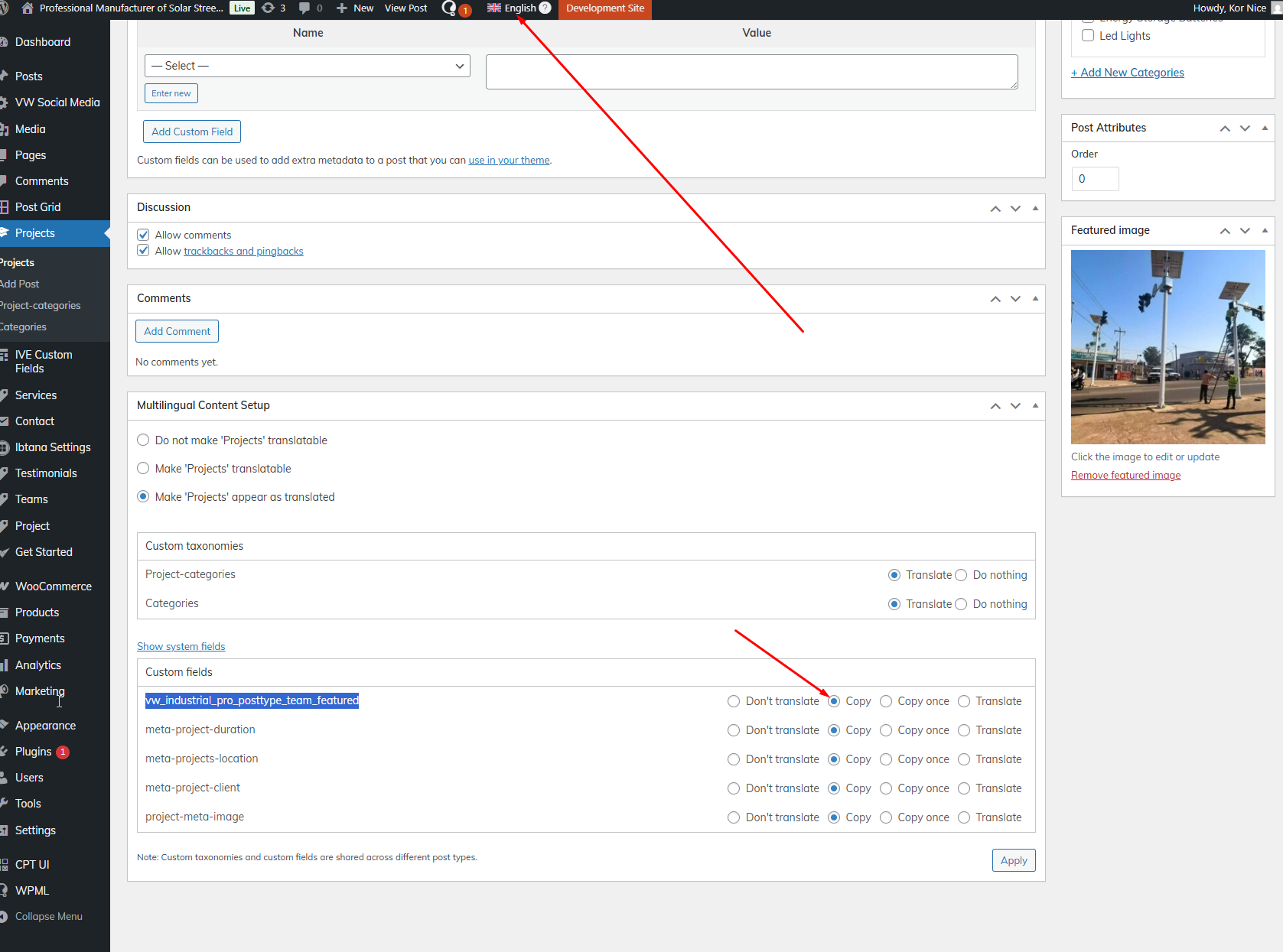
2. Go to Custom Fields and locate

vw_industrial_pro_posttype_team_featured

. Set this to "copy".
3. Open the primary language (English) project page and click "Update". This action will copy the featured image from the primary language to your secondary languages.
You need to manually update each project in the English language by clicking "Update".

If this solution does not resolve your issue or seems outdated, or if it does not apply to your case, we recommend opening a new support ticket. We also highly recommend checking related known issues at https://wpml.org/known-issues/, verifying the version of the permanent fix, and confirming that you have installed the latest versions of themes and plugins. For further assistance, please visit our support forum at https://wpml.org/forums/forum/english-support/.

This is the technical support forum for WPML - the multilingual WordPress plugin.

Everyone can read, but only WPML clients can post here. WPML team is replying on the forum 6 days per week, 22 hours per day.

This topic contains 9 replies, has 0 voices.

Last updated by Kor 3 weeks, 1 day ago.

Assisted by: Kor.

Author Posts
January 27, 2026 at 1:59 pm #17767564

taipingW

Our product is now translatable, but there are still some other issues. I've set up 13 languages, but the language list on the homepage isn't displaying completely. How can I adjust this? Another problem is that when the website is in English, the images in the "Projects" section display correctly, but when I switch to other languages, the images disappear. You mentioned insufficient resources or resource limitations; what should I do?

January 28, 2026 at 11:34 am #17770220

Kor

Thanks for your patience. Your Website keeps failing for me, as shown in the attached screenshot. Are you able to sort out the server resources issue with your hosting provider?

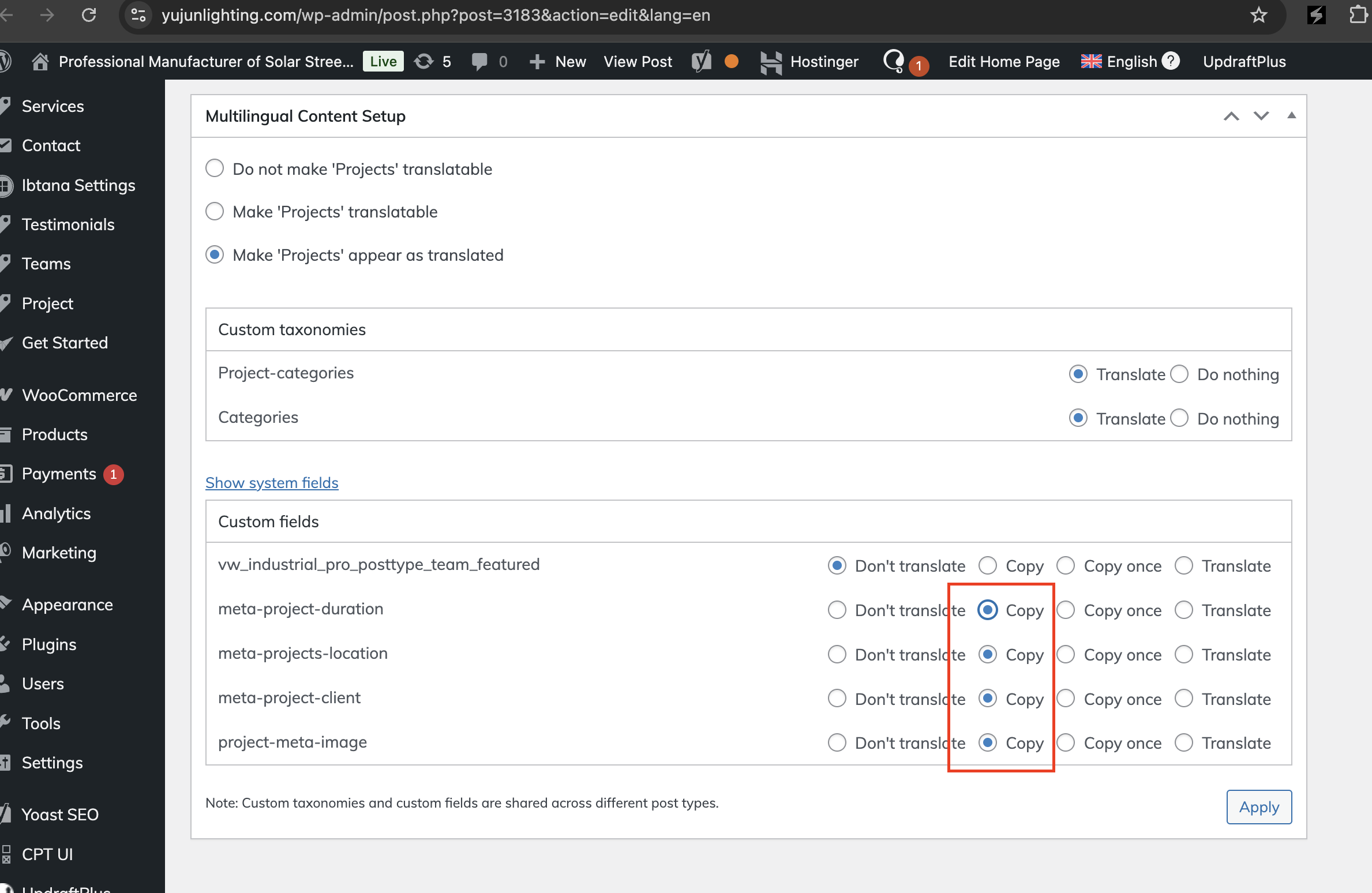
I've switched the custom field options to copy as shown in the attached screenshot, and it should copy the project images and other information to your translated language. However, when I checked, the image shows up in the translated backend project here hidden link , but it's not showing up on the frontend.

May I know how you display the project image on the project page here? hidden link . Do you use a template to create the project page?

Screenshot 2026-01-28 at 7.10.54 PM.png
Screenshot 2026-01-28 at 7.17.09 PM.png
January 29, 2026 at 7:01 am #17772387

taipingW

I added the project in the backend under "projects," but it's not just the images in the translated projects that aren't displaying; the same is true for posts. The images in the translated articles don't show up either. The "posts" section in the backend corresponds to the "Blog and news" page on the website.

January 30, 2026 at 2:46 am #17775476

Kor

Thanks for your patience. I checked your website and it is currently down, as shown in the attached screenshot. Could you please let me know once the site is back up, so I can continue my investigation into the missing images on your projects and posts?

Screenshot 2026-01-30 at 10.44.39 AM.png
February 2, 2026 at 3:03 am #17782152

taipingW

The website has responded; you can now proceed with the next steps.

February 2, 2026 at 10:10 am #17783119

Kor

Thanks for your patience. I've checked and to fix this, please follow the steps below.

1. Open your projects and scroll to the Multilingual Content Setup > Custom Fields > Locate "vw_industrial_pro_posttype_team_featured" and configure it to "copy"

2. Then, open the primary language English project page and click on "Update"

3. This will copy the featured image from the Primary language to your secondary language.

You have to go to each projects in English language and click "update" manually.

Screenshot_63.png
February 5, 2026 at 3:06 am #17794244

taipingW

Hello, I've followed your steps and the images in the Projects section are now translated. Do I need to follow the same steps to modify the Posts section?

February 5, 2026 at 6:11 am #17794352

Kor

Thanks for your reply. No need, I've already configured that option for you. All you have to do now is to resave your projects in your primary language, and the images will be copied over to your translated projects.

February 7, 2026 at 1:02 pm #17801937

taipingW

Okay,thank you, it works.

February 9, 2026 at 6:34 am #17803750

Kor

Glad it works now. If you need anything further, please open a new chat/ticket