
This is the technical support forum for WPML - the multilingual WordPress plugin.
Everyone can read, but only WPML clients can post here. WPML team is replying on the forum 6 days per week, 22 hours per day.
| Sun | Mon | Tue | Wed | Thu | Fri | Sat |
|---|---|---|---|---|---|---|
| - | 8:00 – 17:00 | 8:00 – 17:00 | 8:00 – 17:00 | 8:00 – 17:00 | 8:00 – 17:00 | - |
| - | - | - | - | - | - | - |
Supporter timezone: Europe/Madrid (GMT+01:00)
Tagged: ATE
This topic contains 21 replies, has 3 voices.
Last updated by Paola Mendiburu 1 month, 3 weeks ago.
Assisted by: Paola Mendiburu.
| Author | Posts |
|---|---|
| December 17, 2025 at 11:56 am #17670791 | |
 daveB-3 |
I were previusly in contact with Paola Mendiburu, which requested me to open this ticket. We have migrated a WPML WooCommerce website from a staging environment to a new environment. It looks like that it did not properly migrate the ATE 'memory'. On the front-end everything seems normal. Paola connected the staging to the production environment using the migration key. However, that doesn't fix everything. The sympton we see is that some parts are missing when opening the ATE and (almost) all translations show 'needs updating'. What we want is that all the ATE settings (translation engine preference, glossary, etc.) are identical and that all translaitons re-appear in the ATE, so that we can continue working on the translations. Which is now impossible. To add to it; when we add a translation using the translation dashboard to an automatic translation, it shows '0 words need translation', as if they do have all translations on the WPML server. What we experienced during the migration is that the WPML pop-up after a migration did not properly show. So I think some 'WPML migration' did not run correctly/completely. We are now already waiting multiple days to get this resolved and would really like a quick solution to move forward. Thanks in advance! |
| December 17, 2025 at 3:28 pm #17671754 | |
 Paola Mendiburu WPML Supporter since 11/2020 Languages: Spanish (Español ) Italian (Italiano ) Timezone: Europe/Madrid (GMT+01:00) |
Hi there! I have reopened the ticket. So now I have merged production and staging site so they share the same organization and translation memory. Regarding the ATE settings as the migration can´t be done, I will fix it manually. I am investigating the problem related to the content marked as Flagged for later. |
| December 17, 2025 at 5:04 pm #17672130 | |
|
daveB-3 |
Hi Paolo, Thank you! Looking forward hearing. To add to it; a lot of translations still seem empty when opening the ATE. This doesn't seem to be fixed by the merge? It might be in the memory, but it doesn't seem to be in the actual translation (whilst it is on the front-end). See screenshot please. Seems like the ATE is out of sync with the actual translations. Looking forward hearing, so we can move on :-). 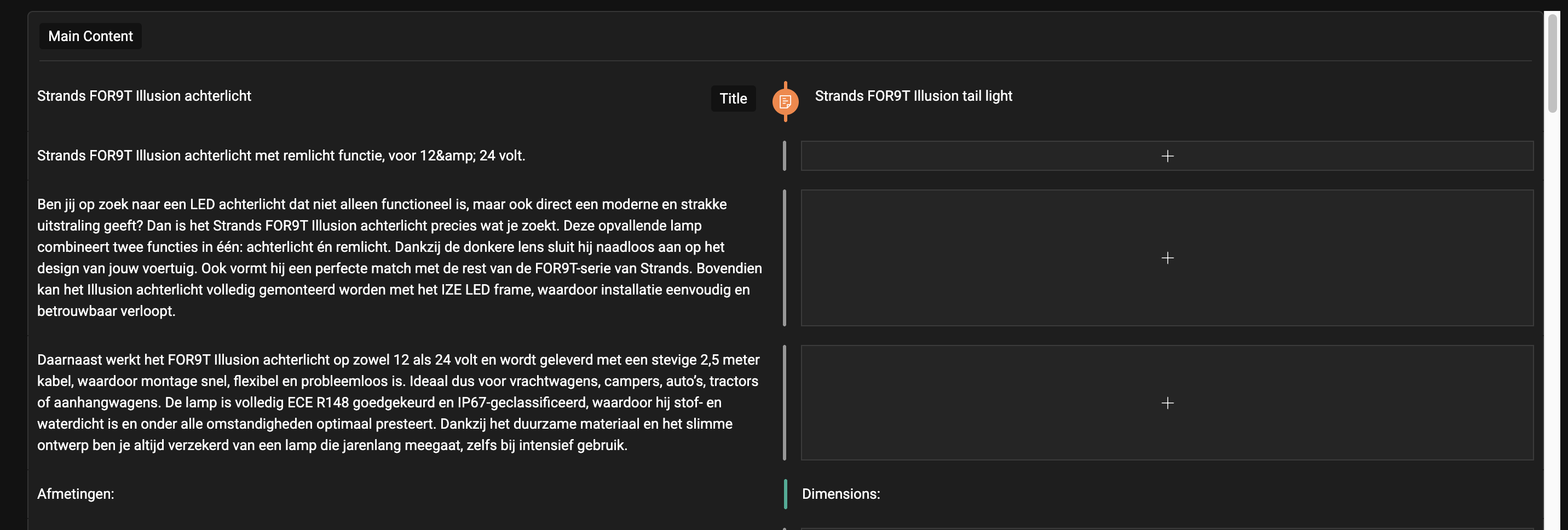 |
| December 18, 2025 at 2:47 pm #17675189 | |
|
Paola Mendiburu WPML Supporter since 11/2020 Languages: Spanish (Español ) Italian (Italiano ) Timezone: Europe/Madrid (GMT+01:00) |
Thank you for all the details. I have escalated the issue to the second tier and we are investigating the issue. I will keep you update when I have news. |
| December 22, 2025 at 1:21 pm #17682257 | |
|
daveB-3 |
Any update? We're already more than a week by now. |
| December 22, 2025 at 2:04 pm #17682419 | |
 Carlos Rojas WPML Supporter since 03/2017 Languages: English (English ) Spanish (Español ) Timezone: Europe/Madrid (GMT+01:00) |
Hello, Our 2nd-tier specialists are already working on a solution for this issue. I will get back to you as soon as I get more information. Thank you very much for your patience and understanding! |
| December 22, 2025 at 2:56 pm #17682628 | |
|
daveB-3 |
Hi Carlos, Thanks. Do you have any estimate? As this is taking a really long time by now. We have to move forward with new content on the site ASAP. As we are currently not adding or changing anything regarding the translations, to prevent anything from falling apart. Looking forward hearing and thanks for taking care! |
| December 23, 2025 at 11:20 am #17684404 | |
|
Carlos Rojas WPML Supporter since 03/2017 Languages: English (English ) Spanish (Español ) Timezone: Europe/Madrid (GMT+01:00) |
Hi, Unfortunately, we don't have an ETA yet, but I will get back to you as soon as I get more information from our 2nd tier. |
| January 5, 2026 at 8:08 am #17702825 | |
|
Paola Mendiburu WPML Supporter since 11/2020 Languages: Spanish (Español ) Italian (Italiano ) Timezone: Europe/Madrid (GMT+01:00) |
Hi there! We would like to clarify what happened with the Translation Memory in this case. The Translation Memory entries disappeared because the user When new glossary terms are added, WPML automatically removes all Translation Memory records that contain those terms. This behavior is expected and ensures that future translations use the glossary translations explicitly defined by the user, giving them priority over previously stored Translation Memory entries. Since the glossary terms were added after the job was completed, the related Translation Memory records were removed at that point. They are looking into it, I will let you know when I have some news. |
| January 5, 2026 at 8:23 am #17702895 | |
|
Paola Mendiburu WPML Supporter since 11/2020 Languages: Spanish (Español ) Italian (Italiano ) Timezone: Europe/Madrid (GMT+01:00) |
Hi, Regarding this point, if the words “achterlicht” and “knipperlicht” are used frequently across the site’s products (as in Job 171095313), then yes, this behavior is expected. In this case, “achterlicht” is a product category, so it is very likely that many product pages contain this term. As a result, when the term was added to the Glossary, all Translation Memory records containing it were removed to ensure the glossary translation takes priority. At the moment, the only possible workaround is to recreate the Translation Memory records manually. This can be done as follows: 1. Go to the previous Job containing the records (it's fine if they are in the test website) Additionally, the team is already aware of this limitation and there is an internal task to improve this feature and prevent similar issues in the future. |
| January 5, 2026 at 8:36 am #17702940 | |
|
daveB-3 |
Hi Paola, Thanks for your answer. However; we migrated the site. So it should take everything with it, right? It also did not sync the ATE settings (e.g. which engine, the context, the glossary (went from +- 200 to 800 words), etc.). We really need the staging site to be migrated to the live site, when opening translations they are now empty (whilst on the front-end they are present). And we translated and paid a lot for it. Re-translating everytime takes a huge amount of credits here. Looking forward to a solution. |
| January 5, 2026 at 9:29 am #17703065 | |
|
Paola Mendiburu WPML Supporter since 11/2020 Languages: Spanish (Español ) Italian (Italiano ) Timezone: Europe/Madrid (GMT+01:00) |
They said: the Translation Memory issue is not connected to the migration, but it's because they added new glossary terms. They will check the migration process and see if I can force it. But that won't solve the Translation memory. Just the ATE settings and the Glossary I will let you know when I have some news. |
| January 5, 2026 at 3:04 pm #17704442 | |
|
Paola Mendiburu WPML Supporter since 11/2020 Languages: Spanish (Español ) Italian (Italiano ) Timezone: Europe/Madrid (GMT+01:00) |
This what the second tier confirms: The problem tha don´t appears translations on the translation that's because the Client added the glossary terms achterlicht and knipperlicht the translation memory is probably cancelled for the other site too. Just that they didn't add a webpage using it yet. |
| January 6, 2026 at 11:36 am #17706422 | |
|
daveB-3 |
Thanks for the clarification. However, untill you merged the two sites, it had 200 words in the glossary, now it is 800? And, how about the settings of the ATE that differ? How is that possible with a migration? Can we safely add new translations, and doesn't it affect existing translations untill re-translating or updating a translation? And how about credit usage? As we paid a lot of credits for those translations that are now gone when editting? Resulting in a lot of additional costs. I would prefer to see the previous translation in the ATE, so that we can edit those instead of that they are completely removed. Looking forward hearing, |
| January 7, 2026 at 1:34 pm #17709586 | |
|
Paola Mendiburu WPML Supporter since 11/2020 Languages: Spanish (Español ) Italian (Italiano ) Timezone: Europe/Madrid (GMT+01:00) |
I will let you know when I have answer from the second tier about how to proceed. |






The topic ‘[Closed] Issues after migrating a website’ is closed to new replies.