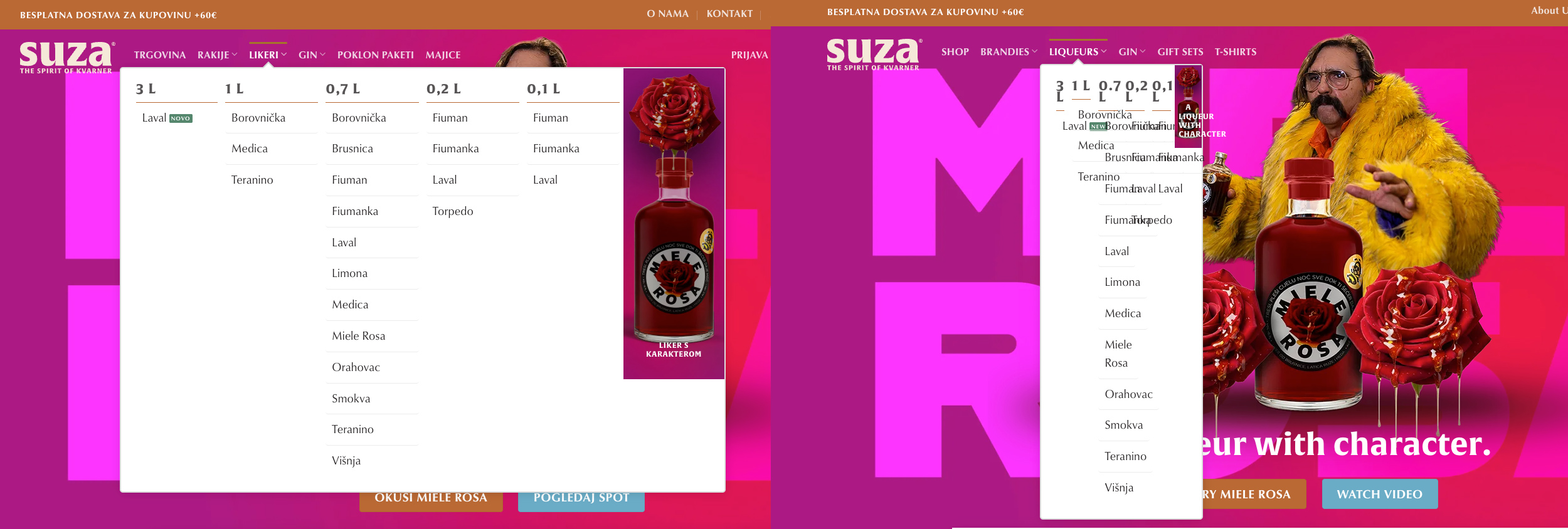
Hi, we have issue with navigation. Site is build with Wp+Flatsome UX Builder+Woocommerce+WPML. After translating navigation, and UX Blocks, main navifation (dropdown menus) are not showing correctly. Screenshot attached.
Can you help me rsolve this issue?
Thank you
As far as your UX Blocks are translated, this issue might be related to the current PHP MEMORY LIMIT on your server, which, according to the provided debug information, is currently set to 128M.
I would suggest reaching out to your hosting support team and asking them to set the PHP MEMORY LIMIT on the server to at least 256M. If you can get a higher value, it would be even better.
If this does not solve the issue, please let me know.
My apologies for the misunderstanding, as on the provided debug information, it said: MemoryLimit 128M
I'd be happy to take a closer look at this and request temporary access (wp-admin and FTP) to the website to investigate the issue further.
You'll find the necessary fields below the comment section if you log in to leave the next reply. The information you provide will be private, meaning only you and I will be able to see and access it.
IMPORTANT
Please be sure to create a backup of the website and database before granting us access.
If you don't see the "wp-admin / FTP" fields, your login credentials for the post and website will be set to "PUBLIC." Do NOT publish the information unless you see the required wp-admin / FTP fields.
The private reply form looks like this: hidden link
When replying again, click "I still need assistance".
Video: hidden link
Please note that we are required to request this information individually on each ticket. We are not permitted to access any login information that was not specifically provided in the private reply form for this ticket.
The topic ‘[Closed] Main Menu not showing correctly’ is closed to new replies.