This thread is resolved. Here is a description of the problem and solution.
Problem:
The client was experiencing an issue where the titles above the menus in their off-canvas menu were not automatically translating into English.
Solution:
We recognized this as a known issue with off-canvas elements and took the following steps to resolve it:
1. We added the following XML in the WPML >> Settings > Custom XML Configuration section:
<wpml-config>
  <shortcodes>
        <shortcode>
            <tag>fusion_button</tag>
            <attributes>
                <attribute type="link">link</attribute>
                <attribute>title</attribute>
                <attribute encoding="base64">dynamic_params</attribute>
            </attributes>
        </shortcode>
  </shortcodes>
</wpml-config>
2. We made a small change in the default language Off canvas menu post and updated the secondary language post.
3. We navigated to Appearance >> Menus > Choose the Menu(Main navigation).
4. We switched to the English language using the admin language switcher.
5. We opened the "Learning & Development oplossingen" menu and clicked on the menu option.
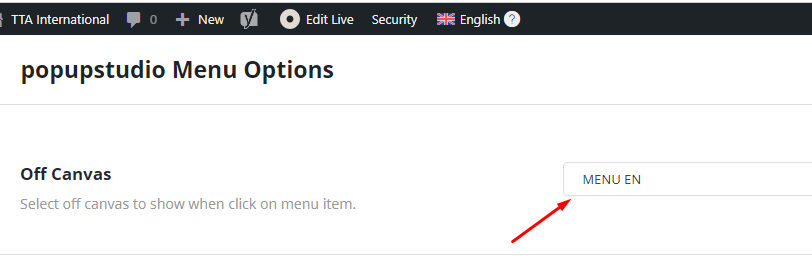
6. We chose the translated off canvas menu as shown in the attached screenshot.
After these steps, the menu displayed correctly in the English language. We also provided an errata page for more details: https://wpml.org/errata/avada-new-off-canvas-elements-not-appearing-as-translated-in-the-front-end/
If this solution does not apply to your case, or if it seems outdated, we recommend checking the related known issues at https://wpml.org/known-issues/, verifying the version of the permanent fix, and confirming that you have installed the latest versions of themes and plugins. If the issue persists, please do not hesitate to open a new support ticket with us.
This is the technical support forum for WPML - the multilingual WordPress plugin.
Everyone can read, but only WPML clients can post here. WPML team is replying on the forum 6 days per week, 22 hours per day.
This topic contains 3 replies, has 2 voices.
Last updated by 2 years, 2 months ago.
Assisted by: Noman.