Skip to content Skip to sidebar

This is the technical support forum for WPML - the multilingual WordPress plugin.

Everyone can read, but only WPML clients can post here. WPML team is replying on the forum 6 days per week, 22 hours per day.

This topic contains 13 replies, has 5 voices.

Last updated by Giuseppe Toto 4 weeks, 1 day ago.

Assisted by: Giuseppe Toto.

Author Posts
February 24, 2026 at 3:50 pm #17847678

petrC-8

Hello WPML Support Team,
I am working with WPML Multilingual CMS and MotoPress Hotel Booking, and I am experiencing a critical issue translating the custom taxonomies registered by MotoPress.
Context:
I need to translate the "Accommodation Types" from MotoPress, which are registered as custom taxonomies and used as room attributes.
The Issue:
When I go to WPML > Taxonomy Translation, the taxonomy related to "Accommodation Type" is either unavailable to select or the terms list appears empty.
Critical Consequence: Because they are not properly configured, when I create a new "Accommodation Type" term or update translations, the term gets duplicated across translations. On the front-end, this results in displaying two translated terms for the same original item, causing display errors and user confusion.
What I've already checked:
In WPML > Translation Settings, I reviewed the "Custom Taxonomies" section, but the MotoPress taxonomy does not appear listed to be marked as translatable.
The taxonomies work correctly on the site in the default language.
What I need:
Could you please advise if WPML requires a special configuration to detect custom taxonomies registered by third-party plugins like MotoPress? Or is there a filter or adjustment that needs to be added to make these taxonomies compatible with WPML's Taxonomy Translation module and prevent duplication?
I look forward to your guidance. Thank you very much.

February 25, 2026 at 9:05 am #17850236

Giuseppe Toto
WPML Supporter since 12/2025

Languages: English (English ) Italian (Italiano )

Timezone: Europe/Rome (GMT+02:00)

Hi,
We’ve received your request, and someone from our team (or I) will take care of your ticket. In the meantime, please provide admin access and permission to create a clone using the Duplicator plugin. This will help us investigate the issue more quickly.

March 4, 2026 at 7:19 am #17870616

George Botsev

Hello!
Thank you for providing the credentials to access your site.
The issue that you are describing is not something that can occur normally and it may be a factor of some of the settings and a custom code from MotoPress.

That being said, I see two steps that we can do right now.

In order to confirm that the settings are the problem, I would suggest that you adjust the translation mode for the problematic taxonomy - Accommodation Types.
At present I see it is set to "Translatable
use translation if available or fallback to default language", and I would suggest that you set it to normal translation mode without fallback - "Translatable
only show translated items"
You might have to re-test with a new taxonomy term but I think it should also work with the already existing terms too.

The second step that I would suggest here is that we actually need to take a copy of your site so that we can debug the issue properly.
For this, we should need to install "Duplicator" plugin and create the package.
But of course, I would need your permission first, so let me know how you feel about that.

March 6, 2026 at 5:04 pm #17878249

petrC-8

Hello George,

Yes, please proceed.

March 7, 2026 at 12:23 pm #17879269

Andreas W.
WPML Supporter since 12/2018

Languages: English (English ) German (Deutsch )

Timezone: America/Lima (GMT-05:00)

Hello,

Currently, when logging into your website, I run into a critical error and can not access the backend.

I realized errors in one of your custom plugins that were caused by calling the function icl_object_id. This function is deprecated and should not be used anymore. I have replaced the function calls using the proper wpml_object_id hook, which solved the errors.

https://wpml.org/wpml-hook/wpml_object_id/

Next, I see that the WCML setup wizard was not completed on your site. Please complete this wizard at WooCommerce > WCML.

When it comes to the Hotel Booking plugin, take note that the author does not recommend translating the following post types:

mphb_booking
mphb_season
mphb_room
mphb_payment
mphb_reserved_room
mphb_coupon

Source: hidden link

Now, as rooms are not supposed to be translatable, I would highly suspect that the same counts for the taxonomy room_types.

Also, I can not recommend changing the default config for the plugin. I see you are using "Translatable use translation if available or fallback to default language" for the post types from Hotel Booking, and this might not be recommended in this case.

I suggest you follow up about this with the Motopress support, as they handle their integration for WPML in this case.

Best regards
Andreas

March 10, 2026 at 7:10 am #17884096

Andreas W.
WPML Supporter since 12/2018

Languages: English (English ) German (Deutsch )

Timezone: America/Lima (GMT-05:00)

Hi,

We are still looking into the issue about Apartment Type (mphb_ra_apartment-type) and need to ask you for some more patience.

Best regards
Andreas

March 10, 2026 at 8:30 am #17884305

Andreas W.
WPML Supporter since 12/2018

Languages: English (English ) German (Deutsch )

Timezone: America/Lima (GMT-05:00)

We suspect a compatibility issue between Hotel Booking and WPML when it comes to translating terms that are declared at Accommodations > Attributes.

To investigate this issue further, we need your cooperation by installing the latest version of the Hotel Booking plugin on the following sandbox:

One-Click-Login:
hidden link

Please make sure to leave us a comment once the plugin is installed. We will then try to replicate the issue and find a solution.

We will try to provide you with a workaround if possible, but kindly take note that fixes for such kind of issues require the cooperation of the plugin author, as the required code changes will need to be implemented inside the Hotel Booking plugin.

March 12, 2026 at 4:38 pm #17893258

petrC-8

Hello Andreas,

I have installed the latest version of the MotoPress Hotel Booking plugin on the sandbox environment using the One-Click-Login link you provided.

Please let me know if you need me to configure anything else or if there are additional steps required to help reproduce the issue.

Best regards,

March 12, 2026 at 10:13 pm #17894072

Giuseppe Toto
WPML Supporter since 12/2025

Languages: English (English ) Italian (Italiano )

Timezone: Europe/Rome (GMT+02:00)

Hi,

I saw that you installed the plugin in our sandbox, but I also need you to active the plugin with the activation key and replicate the issue.

This will be useful for us to isolate the issue and investigate the root cause more effectively.

Please also describe the steps you followed in the sandbox to replicate the issue so that we can investigate further.

Thanks.

March 15, 2026 at 9:30 am #17897877

petrC-8

Hi I just activated WPML and Motopress representative, also activated the Motopress plugin, hope it helps you to resolve the issue.

March 15, 2026 at 4:51 pm #17898368

Giuseppe Toto
WPML Supporter since 12/2025

Languages: English (English ) Italian (Italiano )

Timezone: Europe/Rome (GMT+02:00)

Hi,

Thanks for the activation. Are you able to replicate the same issue in our sandbox?

March 18, 2026 at 3:17 am #17906160

petrC-8

Hello WPML Support Team,
Thank you for providing the test environment. We have completed the requested tests and would like to share our findings to help move forward with resolving this issue:
✅ What Works:
In your staging environment, after adding the MotoPress Hotel Booking (MPHB) taxonomies and terms, translations work correctly. This confirms there is no direct incompatibility between MPHB and WPML plugins.
❌ What Doesn't Work in Our Environment:
In our production-like staging (same domain: costanatura.com/ea), even with:
All plugins disabled except: MotoPress Hotel Booking + WPML Multilingual CMS + WPML String Translation
Theme switched to a basic WordPress default theme (Twenty Twenty-Four)
Translations properly configured
The issue persists: MPHB custom taxonomies (tax_mphb_ra_apartment-type, tax_mphb_ra_floors, tax_mphb_ra_view, etc.) are not syncing or translating.
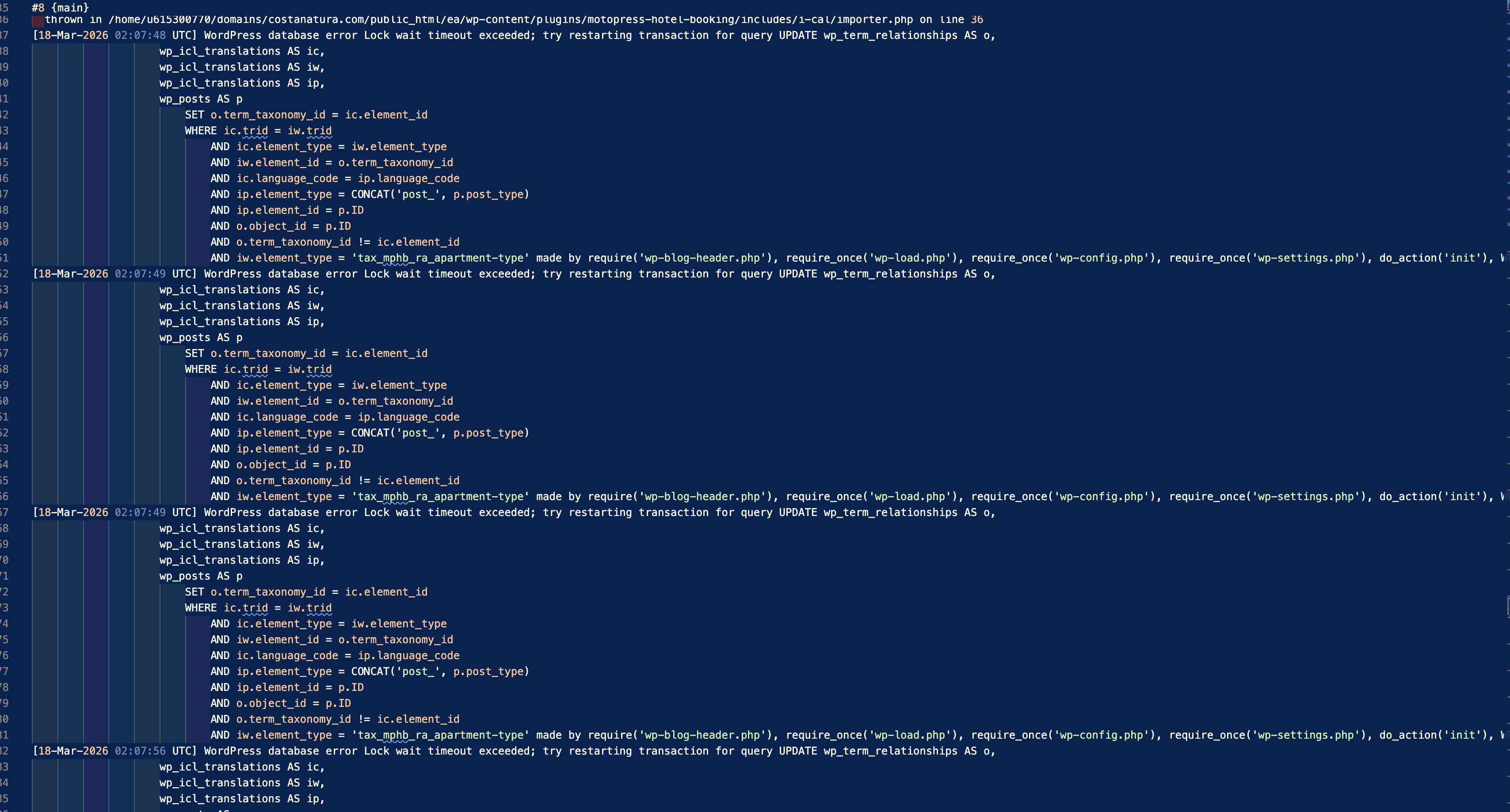
🔍 Excerpt from Error Logs (relevant portion included below):
Below are fragments from our debug.log showing the recurring errors:
log
12345
[18-Mar-2026 02:09:23 UTC] WordPress database error Lock wait timeout exceeded; try restarting transaction for query UPDATE wp_term_relationships AS o, wp_icl_translations AS ic, wp_icl_translations AS iw, wp_icl_translations AS ip, wp_posts AS p SET o.term_taxonomy_id = ic.element_id WHERE ic.trid = iw.trid AND ic.element_type = iw.element_type AND iw.element_id = o.term_taxonomy_id AND ic.language_code = ip.language_code AND ip.element_type = CONCAT('post_', p.post_type) AND ip.element_id = p.
📎 Note: We have the complete log file available if you need to review additional context or timestamps.
🎯 Our Hypothesis:
Given that:
The issue does not replicate in your clean environment
It does occur in our staging with minimal configuration
The logs show Lock wait timeout exceeded errors in WPML queries involving wp_icl_translations and wp_term_relationships tables
We believe the root cause may be related to:
MySQL/MariaDB database configuration (innodb_lock_wait_timeout values, missing indexes, locked tables)
Residual data or inconsistencies in WPML tables (wp_icl_translations, wp_icl_taxonomy_translations)
Conflicts with MPHB background processes that could be generating concurrent locks
🙏 Request for Assistance:
Could you please guide us on the following?
Is there any specific database configuration recommended for WPML when working with custom taxonomies?
Are there diagnostic queries we can run to verify the integrity of the wp_icl_* tables?
Do you recommend any safe procedure to clean/reindex taxonomy translation relationships without losing data?
Could you check if the Lock wait timeout error in reassign_terms is a known issue and if there is a patch or workaround available?
We are ready to provide:
Temporary access to our staging environment (via secure credentials)
Export of relevant table structures (SHOW CREATE TABLE)
Full error log file if needed for deeper analysis
We look forward to your guidance. Thank you very much for your support.
Best regards,

log.jpg
March 23, 2026 at 8:45 am #17917275

Giuseppe Toto
WPML Supporter since 12/2025

Languages: English (English ) Italian (Italiano )

Timezone: Europe/Rome (GMT+02:00)

Hi, sorry for the delay.

I just want to let you know that I am still investigating your issue, but it will take some time to understand and resolve it. I have already copied your website to my local environment and replicated the issue.

In the meantime, as my colleague already said and suggested, it seems that you changed the default configuration in WPML → Settings.

For example, see the screenshot that I attached. It is not clear why you changed the default value of the “booking” custom post type from “not translatable” to “translatable,” and the same applies to some other fields.

The plugin author suggests not editing those options:
hidden link

Could you clarify why you changed the default options?

Thanks
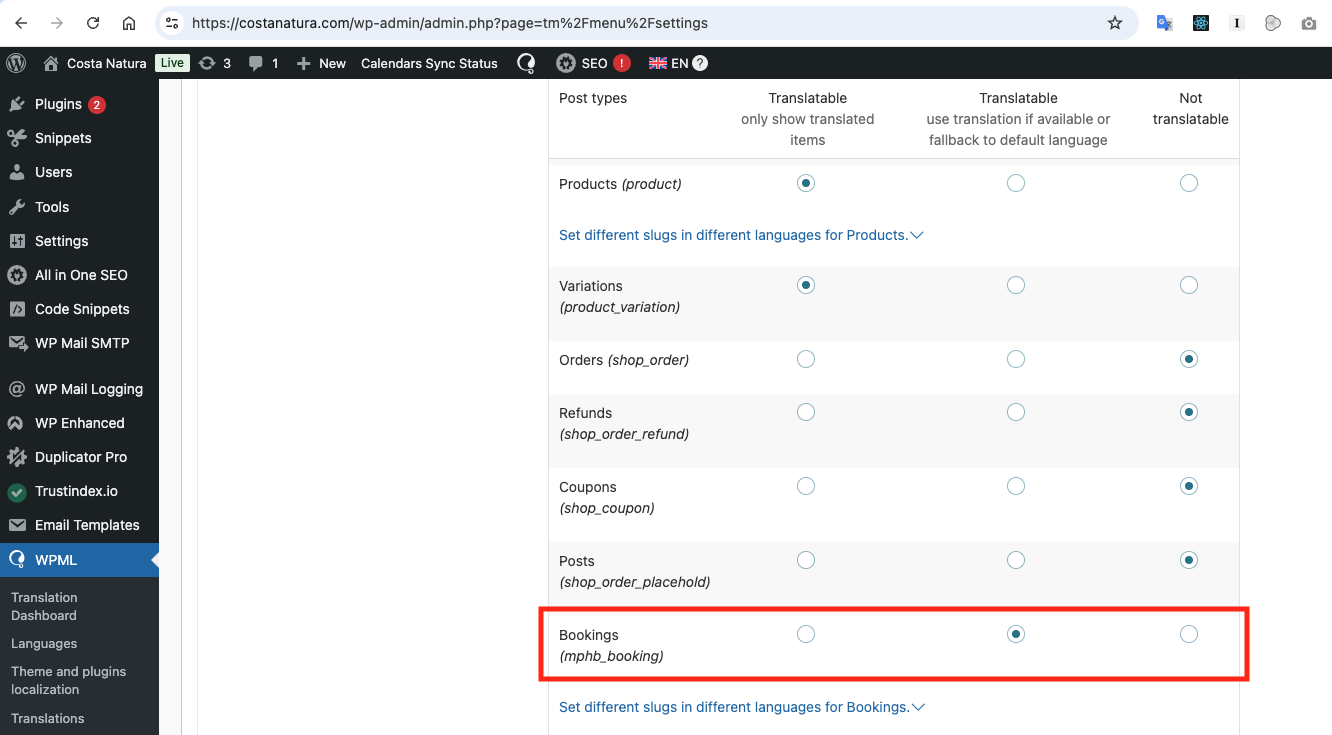
Screenshot 2026-03-20 at 13.26.47.png
March 30, 2026 at 3:57 pm #17937470

Giuseppe Toto
WPML Supporter since 12/2025

Languages: English (English ) Italian (Italiano )

Timezone: Europe/Rome (GMT+02:00)

Hi,

I would like to inform you that I have completed an in-depth investigation. For convenience and to make the findings easier to review, I created a report at the following link:

hidden link

In the report, I describe the issues I identified and suggest possible solutions.

Please review the following points carefully:

  1. The main issue concerns some inconsistent records where
    source_language_code = "xx"

    , and these appear to be causing the problem.

  2. These records do not seem to have been created by the WPML plugin or the author’s plugin. Instead, they appear to have been created manually on your side or through a custom script.
  3. I recommend contacting a freelancer who can help you review the report and execute the queries safely.
  4. Please note that the recommended queries will remove all inconsistent records, including some terms that are already linked to existing posts.
  5. As a result, you will need to recreate these terms and link them again manually.
  6. After that, you should be able to retranslate the posts, and the terms should then be translated automatically.
  7. Please also note that, due to a WPML limitation, only terms linked to posts are translated automatically. This means that terms not assigned to any post will not be translated automatically. We already have a feature request for this in our queue. As a workaround, I suggest creating a post that contains all terms/attributes and translating it, so that all of them can be translated automatically.

Best regards,
Giuseppe