Skip to content Skip to sidebar

This thread is resolved. Here is a description of the problem and solution.

Problem:
The client reported an issue with the Arabic registration form on their website, where the form incorrectly indicates that the password is required even though it has been entered correctly. The client suspects that this might be due to a translation error of backend strings.
Solution:
We recommended the following steps to address the issue:
1. Deactivate and then reactivate the WPML plugins.
2. Navigate to WPML > String Translation and enable the "Auto-register strings" feature.
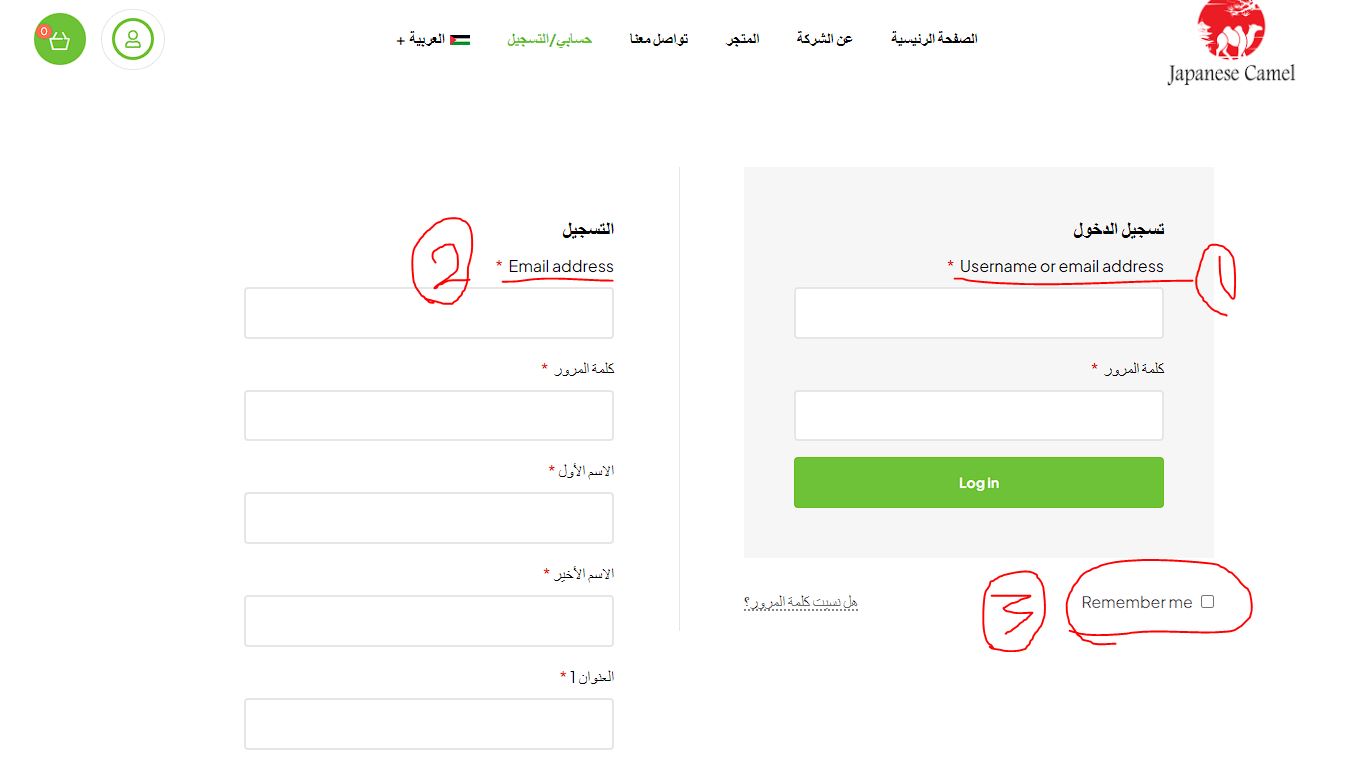
3. Visit the login page in Arabic on the frontend to identify any untranslated strings.
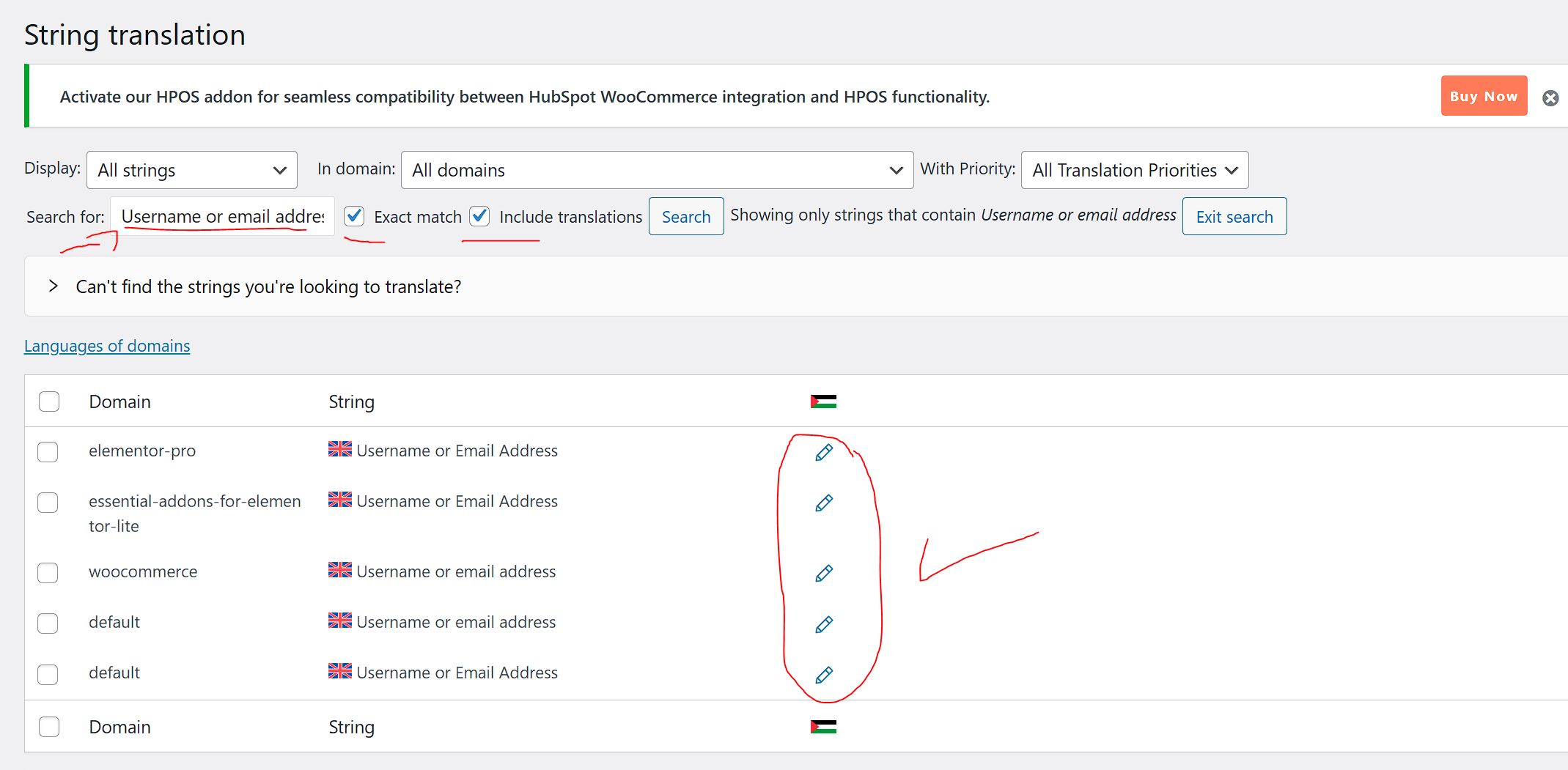
4. Return to the admin area, go to WPML > String Translation, search for the strings, and translate them.
5. Check the translated strings on the frontend.
6. Disable the "Auto-register strings" option.
For more detailed guidance, refer to our documentation on finding and translating strings: https://wpml.org/documentation/getting-started-guide/string-translation/finding-strings-that-dont-appear-on-the-string-translation-page/

If this solution does not resolve your issue, or if it seems outdated or irrelevant to your specific case, we highly recommend checking related known issues at https://wpml.org/known-issues/, verifying the version of the permanent fix, and confirming that you have installed the latest versions of themes and plugins. If further assistance is needed, please open a new support ticket at WPML support forum.

This is the technical support forum for WPML - the multilingual WordPress plugin.

Everyone can read, but only WPML clients can post here. WPML team is replying on the forum 6 days per week, 22 hours per day.

This topic contains 1 reply, has 2 voices.

Last updated by Long Nguyen 1 year, 7 months ago.

Assisted by: Long Nguyen.

Author Posts
May 26, 2024 at 5:21 pm #15671399

housamO

Hi!

+I found a new issue which is the password vildation on the arabic registration form.
"as a new customer"

the form keep showing that the password is required even if the client entered the new password correctly in English.

While a new user can register using the English version of the website without any problems using the same password tried to register with in the Arabic version.

I think maybe I translated one of the backend strings that shouldn't be translated.
Can you also please check this issue and teach me if there is a way to know the strings I shouln't translate?

I think I have solved the password issue in Arabic language but just in case pelase check it and teach me if there is a way to know the strings I shouln't translate?

Please feel free to fix or delete the translation If I made something may lead to error.

Note that the attached screenshots are from the registration form that become available when I published the website, if you need to access it you will need to deactivate the Coming Soon Mode from SeedProd plugin then reactivate it when you done.

Sorry for bothering but we plan to publish the store in Tuesday.

Thanks again and best regards,
Housam

3.jpg
4_26.jpg
May 27, 2024 at 3:49 am #15671863

Long Nguyen
WPML Supporter since 02/2022

Languages: English (English ) Vietnamese (Vietnamese )

Timezone: Asia/Ho_Chi_Minh (GMT+07:00)

Hi there,

Thank you for contacting WPML support, I’m happy to help you with this issue.

I suggest you follow steps below to translate those strings and see if it helps:

1. Deactivate WPML plugins and re-activate them.
2. Go to WPML > String Translation > Enable the feature "Auto-register strings".
3. Visit the login page in the Arabic language in the frontend again to see the untranslated strings.
4. Go back to the admin area > WPML > String Translation > Search for the strings and translate them.
5. Check the translation strings in the frontend.
6. Disable the option "Auto-register strings".

Refer documentation https://wpml.org/documentation/getting-started-guide/string-translation/finding-strings-that-dont-appear-on-the-string-translation-page/

I think maybe I translated one of the backend strings that shouldn't be translated.
Can you also please check this issue and teach me if there is a way to know the strings I shouln't translate?

No, the translated strings in the admin area don't relate to the untranslated strings in the frontend. There could be another issue with those strings or incorrect strings that need to be translated.
Also, I'm afraid that there isn't a way to know the strings that you shouldn't translate as we don't know how and where a string from any plugin is displayed on your site. If you see a string isn't translated on your site, you can try to search for this in String Translation > translate it and recheck the issue.

Looking forward to your reply.
Thanks