
This is the technical support forum for WPML - the multilingual WordPress plugin.
Everyone can read, but only WPML clients can post here. WPML team is replying on the forum 6 days per week, 22 hours per day.
This topic contains 7 replies, has 0 voices.
Last updated by Rosevita Warda 8 months ago.
Assisted by: Otto.
| Author | Posts |
|---|---|
| August 21, 2025 at 3:21 pm #17338097 | |
 Rosevita Warda |
Background of the issue: Symptoms: Questions: |
| August 21, 2025 at 4:42 pm #17338412 | |
 Otto |
Hello, You should see a warning when editing a page that was translated with WPML Advanced Translation Editor with the WordPress editor. Please, take a look at this screencast: It doesn't appear in your case? Can you please describe the steps you take to reach the edit page? Best Regards, |
| August 21, 2025 at 4:55 pm #17338423 | |
|
Rosevita Warda |
Thanks for the demo. I think typically the error happens within the editor. There is no warning when clicking here: hidden link (blue pen), and even if nothing is changed, just opening the page seems to mess everything up... Any guard rails or tips how to restore a corrupted page? |
| August 21, 2025 at 5:05 pm #17338469 | |
|
Otto |
Hello, Thanks. I am sorry, but when following the link you shared, there is a login screen. And after login in, I get: Forbidden. You mean in Pages and clicking in the pencil (check the screenshot attached). That link should send you to the selected editor. Please check this: Best Regards, 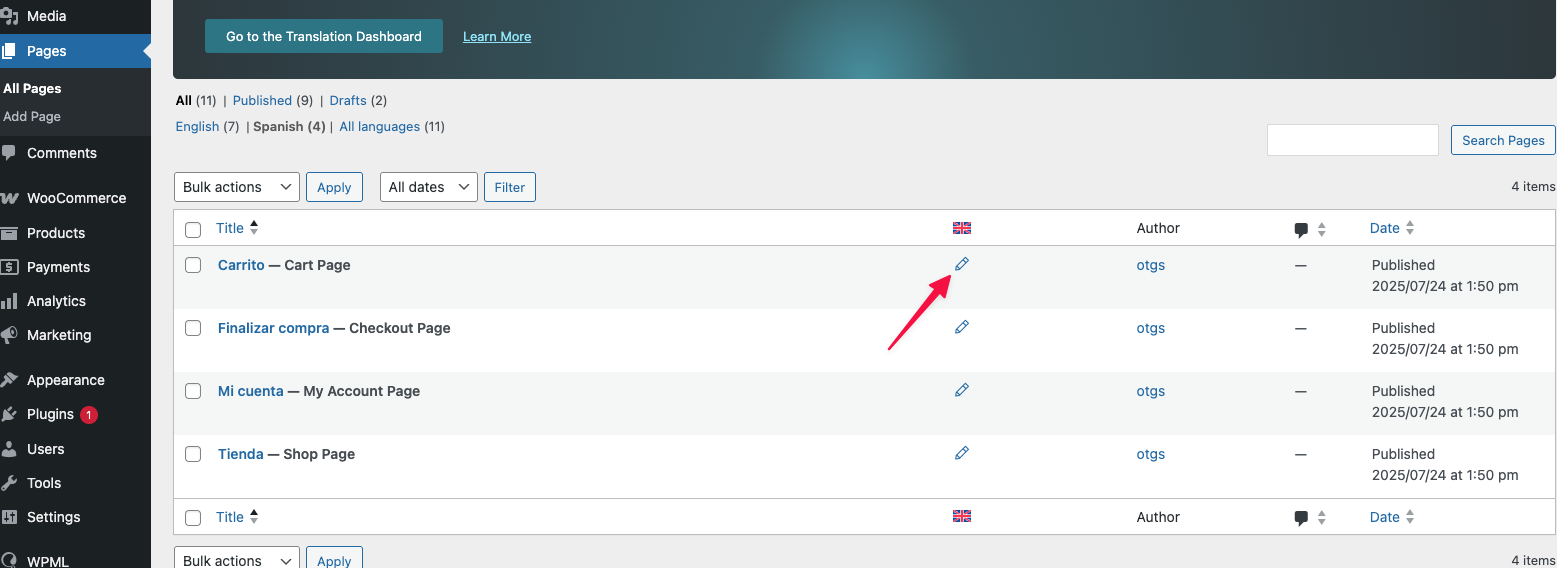  |
| August 21, 2025 at 5:47 pm #17338562 | |
|
Rosevita Warda |
I understand you are showing me the right way to do it. Everyone is trained on that. And here, it happens quite quickly that people review a page and notice something and click edit forgetting they are in the wrong language. There should be a warning here like when you go through the directory, or even more so, as it is so easy to get distracted by the content and click edit. Also, it should not break anything unless something is saved. Lastly, if it breaks, there should be version history to roll it back... Is any of this possible or available with improved settings?  |
| August 21, 2025 at 6:05 pm #17338587 | |
|
Otto |
Hello, Of course, I agree. I am trying to figure out the steps you follow to reach the edit page of a translation without the warning, so we can fix it in the future. I went to a translated page in the front end as an admin. Then I clicked on the edit page icon and I got the warning. I installed WP Bakery, and did the same, but clicking in "Edit with WPBakery Page Builder". And I also got the warning. If you can share the steps you follow and the involved plugins/themes I'll try to reproduce the issue and escalate it to our development team. WP itself has a version control system, so you can roll back to a previous state if accidentally the translated page changes: Best Regards, |
| August 22, 2025 at 4:09 am #17339343 | |
|
Rosevita Warda |
hidden link Loom be praised... I hope I am making the problem clear? I am surprised that WPML does not seem to be aware of both the "edit page" problem in the fronteditor, as well as the problem if that button was clicked. |
| August 22, 2025 at 12:24 pm #17340476 | |
|
Otto |
Hello, Thank you very much for the detailed explanation. Just clicking the button shouldn't make any change in a page (original nor translated versions). Unless you save it, changes are not applied. The warning I mentioned appears only after you are redirected to the edit page. I checked the same flow on a test site and it works as expected. So, I would like, if possible, to take a look at your site to reproduce the problem. It would be better to a testing site where the issue is replicated. The information you will enter is private, which means only you and I can see and have access to it. **IMPORTANT** Best Regards, |
| August 26, 2025 at 2:10 pm #17348690 | |
|
Rosevita Warda |
Hello, we are doing some testing and will reopen this ticket, if we cannot find another solution. Thank you! |