Skip to content Skip to sidebar

This thread is resolved. Here is a description of the problem and solution.

Problem:
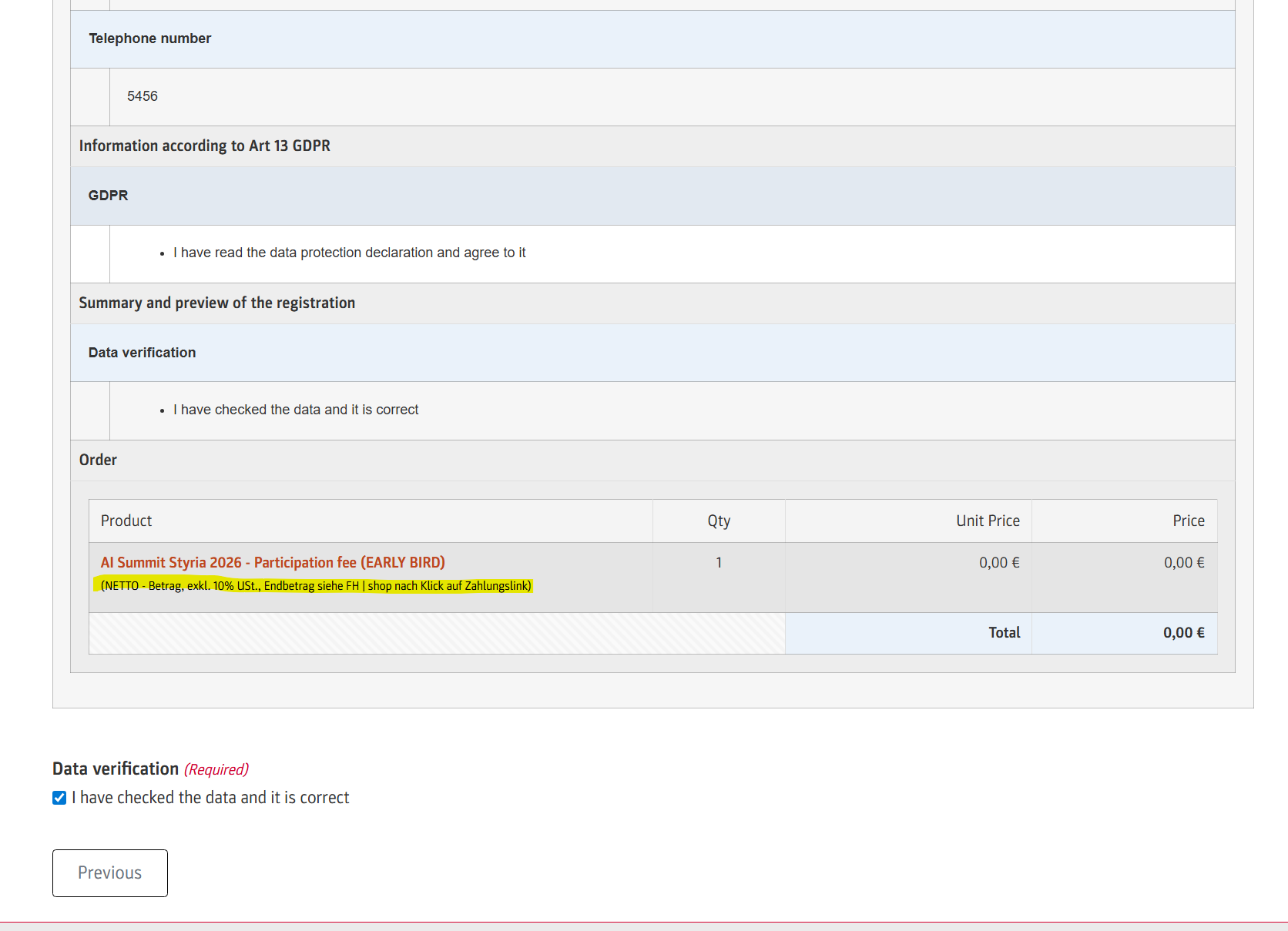
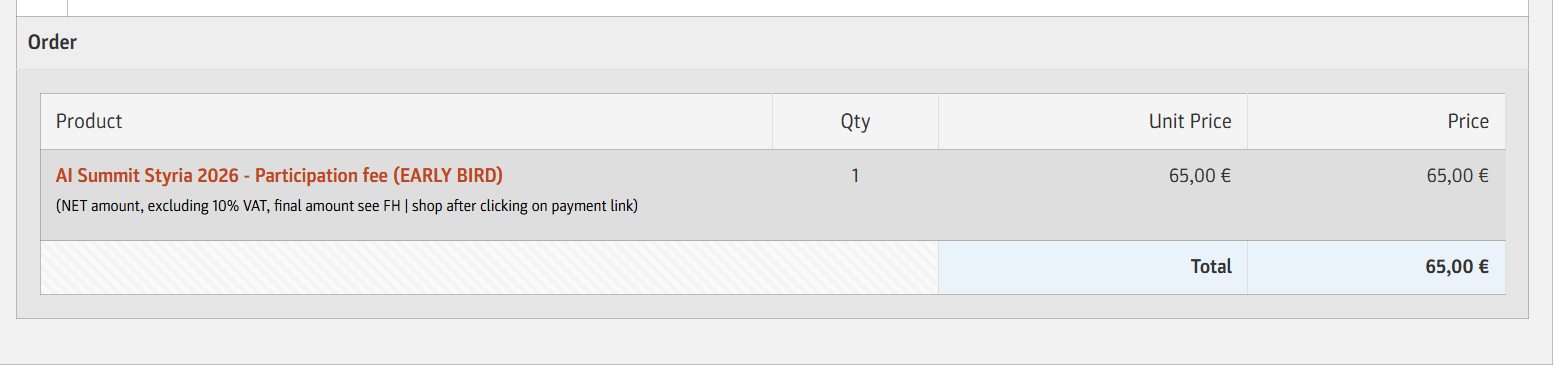
The client was experiencing issues with translating the product field description in the order summary of a Gravity Forms form on a multisite installation. The provided custom snippet did not translate the description text from German to English.
Solution:
We recommended replacing the existing snippet with a new one that includes steps to register and translate strings using WPML. Here is the revised snippet:

add_filter( 'gform_product_info', function ( $product_info, $form, $entry ) {
    foreach ( $product_info['products'] as $key => &$product ) {
        $field = GFFormsModel::get_field( $form, $key );
        if ( is_object( $field ) && ! empty( $field->description ) ) {
            $context = 'gravity_form-' . rgar( $form, 'id' );
            $name    = 'field-' . $field->id . '-description';
            do_action( 'wpml_register_single_string', $context, $name, $field->description );
            $description = apply_filters( 'wpml_translate_single_string', $field->description, $context, $name );
            $product['name'] .= sprintf(
                '<span style="font-size:0.8em;color:#000000;font-weight:normal">%s</span>',
                esc_html( $description )
            );
        }
    }
    return $product_info;
}, 10, 3 );

After implementing the new snippet, the client should:
1. Navigate to WPML → String Translation.
2. Filter by Domain/Context using the format 'gravity_form-{FORM_ID}', where {FORM_ID} is the ID of the form.
3. Look for strings named like 'field-{FIELD_ID}-description', add translations, and save.
If the strings are not visible, the client should submit the form once or load any page that renders the product info to trigger the registration.

If this solution does not resolve the issue or seems outdated, we highly recommend checking related known issues at https://wpml.org/known-issues/, verifying the version of the permanent fix, and confirming that you have installed the latest versions of themes and plugins. If further assistance is needed, please open a new support ticket at WPML support forum.

This is the technical support forum for WPML - the multilingual WordPress plugin.

Everyone can read, but only WPML clients can post here. WPML team is replying on the forum 6 days per week, 22 hours per day.

This topic contains 4 replies, has 1 voice.

Last updated by einkaufZ 1 month, 4 weeks ago.

Assisted by: Bobby.

Author Posts
February 19, 2026 at 4:46 pm #17836809

einkaufZ

Hello!
I found this snippet:
add_filter( 'gform_product_info', function ( $product_info, $form, $entry ) {
foreach ( $product_info['products'] as $key => &$product ) {
$field = GFFormsModel::get_field( $form, $key );
if ( is_object( $field ) ) {
$product['name'] .= '<br><span style="font-size:0.8em;color:#000000;font-weight:normal">' . $field->description . '</span>';
}
}

return $product_info;
}, 10, 3 );

on this website:
hidden link
But Gravity Forms forwards me to WPML support.

Matt from GravityWiz tried to help me and made this snippet:
add_filter( 'gform_product_info', function ( $product_info, $form, $entry ) {

foreach ( $product_info['products'] as $key => &$product ) {

$field = GFFormsModel::get_field( $form, $key );

if ( is_object( $field ) && ! empty( $field->description ) ) {

$description = apply_filters(
'wpml_translate_string',
$field->description,
'field-' . $field->id . '-description',
'gravity_form-' . $form['id']
);

$product['name'] .= sprintf(
'<br><span style="font-size:0.8em;color:#000000;font-weight:normal">%s</span>',
esc_html( $description )
);
}
}

return $product_info;

}, 10, 3 );

But it doesn't work, it is still the german product field description text instead of the translated product field descriptionn text on the english form:

DE: hidden link
EN: hidden link

We have a multisite installation, snippet is installed on the same subsite like the form.

Please help, everybody forwards us to WPML support and this is the last blocker for the form.

Kind regards,

Klaus 🙂

February 19, 2026 at 4:51 pm #17836817

einkaufZ

Oh, it is about the product field description in the order summary.

February 19, 2026 at 4:52 pm #17836818

einkaufZ

Screenshot

field-description not translated in summary.png
February 19, 2026 at 7:08 pm #17836978

Bobby
WPML Supporter since 04/2015

Languages: English (English )

Timezone: America/Los_Angeles (GMT-07:00)

Hi there,

Thank you for sharing the snippet and screenshot!

Please replace the snippet with the one below:

add_filter( 'gform_product_info', function ( $product_info, $form, $entry ) {

	foreach ( $product_info['products'] as $key => &$product ) {

		$field = GFFormsModel::get_field( $form, $key );

		if ( is_object( $field ) && ! empty( $field->description ) ) {

			$context = 'gravity_form-' . rgar( $form, 'id' );
			$name    = 'field-' . $field->id . '-description';

			// 1) Register string so it appears in WPML → String Translation
			do_action( 'wpml_register_single_string', $context, $name, $field->description );

			// 2) Translate string
			$description = apply_filters( 'wpml_translate_single_string', $field->description, $context, $name );

			$product['name'] .= sprintf(
				'
<span style="font-size:0.8em;color:#000000;font-weight:normal">%s</span>',
				esc_html( $description )
			);
		}
	}

	return $product_info;

}, 10, 3 );

Once that is done:

1. Go to WPML → String Translation.

2. Filter by Domain/Context = gravity_form-{FORM_ID} (example: gravity_form-12)

You should see strings named like field-7-description.

3. Add translations and save.

If you still don’t see the strings:

Submit the form once (so the filter runs on the frontend and triggers registration).

Or temporarily load any page that renders the product info.

Let me know your results, please.

NOTE: When using custom snippets please make sure that you have a full backup available as this is custom work and not officially supported or maintained by our WPML Support.

February 20, 2026 at 7:50 am #17837606

einkaufZ

Hey Bobby!

GREAT, that is fantastic NOW!!!

THANK YOU VERY MUCH, it is working perfectly!!!

Kind regards,

Klaus 🙂

field-description NOW translated in summary.png