Skip to content Skip to sidebar

This thread is resolved. Here is a description of the problem and solution.

Problem:
The client is facing an issue where custom fields created with Advanced Custom Fields (ACF) in English are not translating into French. The categories translate, but the custom fields do not, leading to the need to create separate custom fields for each language.
Solution:
We recommend creating a single custom field and setting it to 'Translate' rather than creating multiple fields for different languages. You can translate this field using the WPML Translation Editor. However, if the WPML Translation Editor is unavailable with your current account type, you should create a custom field for the original language post and use the "plus" icon to translate it into other languages. Additionally, you can create another custom field for the secondary language if needed.
If you require further capabilities, consider upgrading your account and follow the instructions in this article: Translate sites built with ACF.

Please note that this solution might be outdated or not applicable to your specific case. We highly recommend checking related known issues at https://wpml.org/known-issues/, verifying the version of the permanent fix, and confirming that you have installed the latest versions of themes and plugins. If the issue persists, please open a new support ticket.

This is the technical support forum for WPML - the multilingual WordPress plugin.

Everyone can read, but only WPML clients can post here. WPML team is replying on the forum 6 days per week, 22 hours per day.

This topic contains 3 replies, has 2 voices.

Last updated by Andrey 1 year, 8 months ago.

Assisted by: Andrey.

Author Posts
May 29, 2024 at 1:11 pm #15683987

lisaP-12

Please, help me to understand, ACF has custom fields, in English, but in French they do not translate. The category got translated, but the custom fields NO, so I have to create two fields. Meaning, in the blog will have two custom posts in the back end, one in English and one in French. Is thar right?

May 29, 2024 at 1:29 pm #15684076

Andrey
WPML Supporter since 06/2013

Languages: English (English ) Russian (Русский )

Timezone: Europe/Kyiv (GMT+02:00)

You do not need to create multiple identical custom fields. Instead, create a single custom field and set it to Translate. You can then translate it using the WPML Translation Editor.

However, please note that the WPML Translation Editor is unavailable with your current account type. In this case, you can create a custom field for the original language post and use the "plus" icon to translate it. You can also create another custom field for the secondary language.
https://wpml.org/documentation/getting-started-guide/#fully-flexible-translating-with-the-plus-icons

If this method does not work for you, you will need to upgrade your account and follow the instructions in this article:
https://wpml.org/documentation/related-projects/translate-sites-built-with-acf/

May 29, 2024 at 1:45 pm #15684260

lisaP-12

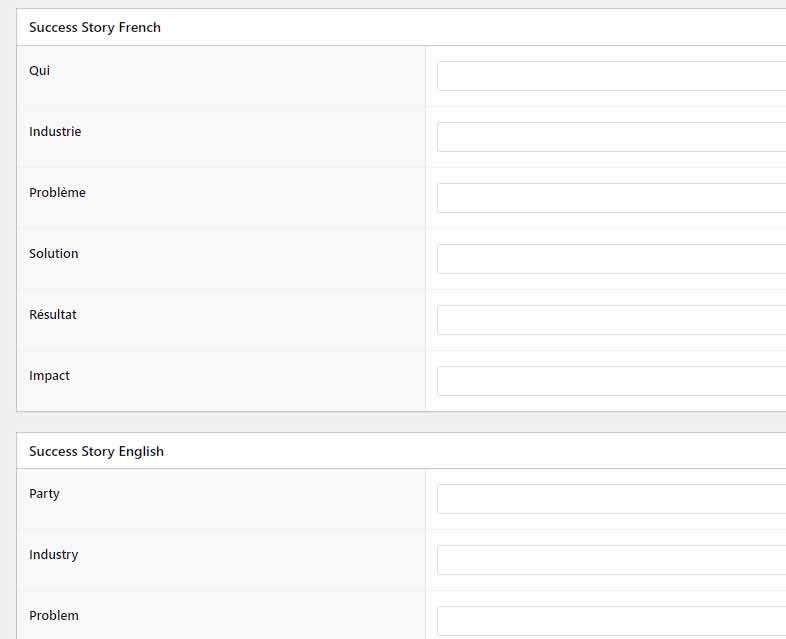
Hi, thank you for answering, so please tell me with WPML Translation Editor, I will be able to do Custom fields translation? So in the blog section, say, VIDEO category, for now, each post has FRENCH and ENGLISH custom posts (in both languages) in the back end, in the front end I did figure it out. So If I get this WPML Translation Editor, it will make it only one field in both languages? Yes?

See the picture, this is what it shows in the back end of the blog post.

f4.jpg
May 29, 2024 at 6:07 pm #15685212

Andrey
WPML Supporter since 06/2013

Languages: English (English ) Russian (Русский )

Timezone: Europe/Kyiv (GMT+02:00)

Yes, that is correct. You will handle only one custom field, which will be translatable. Once you can download plugins, you will have to install Advanced Custom Fields Multilingual, Translation and follow the article above.