
This is the technical support forum for WPML - the multilingual WordPress plugin.
Everyone can read, but only WPML clients can post here. WPML team is replying on the forum 6 days per week, 22 hours per day.
This topic is split from https://wpml.org/forums/topic/new-ticket/
Tagged: Documentation request, Feature request
This topic contains 27 replies, has 0 voices.
Last updated by Christopher Amirian 3 weeks, 5 days ago.
Assisted by: Christopher Amirian.
| Author | Posts |
|---|---|
| March 20, 2026 at 9:57 am #17913227 | |
 wojciechB-15 |
Thank you for your explanation. That’s exactly how I understood it from the very beginning. You yourself raised my doubts and prompted me to try a different approach in your earlier post, where you suggested duplicating the pages instead of translating them. Based on what you're saying, I definitely prefer the approach of translating pages using the Advanced Translation Editor. But this brings me back to the question I asked in my first post in this thread, to which I haven't received an answer: 2. Even though I copied all fields using ‘Copy all fields from original’, the progress bar at the bottom of the page still shows ‘0% Complete’. How can I mark all fields as ‘Translation is complete’ after automatically copying all fields? WPML does not mark my pages as translated until I manually check all the “Translation is complete” boxes. |
| March 20, 2026 at 11:04 am #17913671 | |
 Christopher Amirian WPML Supporter since 07/2020 Languages: English (English ) Timezone: Asia/Yerevan (GMT+04:00) |
Ok it seems that there is a misunderstanding. Do you need the Classic Translation Editor? it seems you use an older translation editor, which is not recommended. Please create a screenshot of that section you mentioned and upload it to the next reply to see. If my guess is correct you selected the legacy editor. You will need to go to WordPress Dashboard > WPML > Settings > Translation Editor and make sure the Advanced Translation Editor is enabled. Also select the checkbox below it to force the pages that you already used the Classic Translation Editor in, to use the Advanced Translation Editor. You will need to finish the translation there and you do not need to click the "Translation is finished" each time. But if that is not what you want, I will need a screenshot. or the best way is that you use loom.com so I can see a screen recording and see what you do. Thanks.  |
| March 20, 2026 at 11:25 am #17913744 | |
|
wojciechB-15 |
I have no problem using the Advanced Translation Editor instead of the Classic Translation Editor, but as I mentioned in my first post, I can’t find the “Copy all fields from original” option anywhere in the ATE, even though it’s available in the CTE. |
| March 20, 2026 at 11:51 am #17913815 | |
|
Christopher Amirian WPML Supporter since 07/2020 Languages: English (English ) Timezone: Asia/Yerevan (GMT+04:00) |
Ok you did not give me anything again to know what you are talking about. Please give me a screenshot on what option you are talking about? Are you talking about an option that is not there in ATE and you wish to have it? If yes, then there is no such option. I can not give additional help unless you give me exctly what you look for and a screenshot to know where you check |
| March 20, 2026 at 12:00 pm #17913827 | |
|
wojciechB-15 |
Do you mean a screenshot of the ‘Copy all fields from original’ option in the CTE? |
| March 20, 2026 at 1:15 pm #17914309 | |
|
wojciechB-15 |
Please see the screenshot in the attachment. In the upper-right corner, there is an option labeled 'Copy all fields from original'. 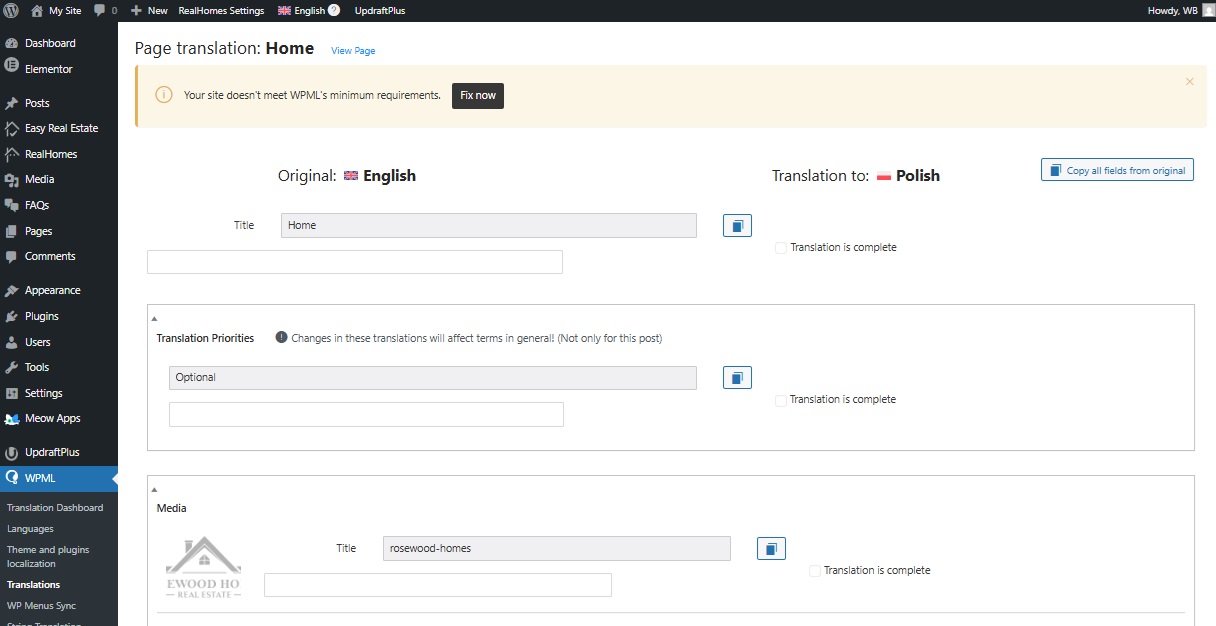 |
| March 22, 2026 at 8:03 am #17916159 | |
|
Christopher Amirian WPML Supporter since 07/2020 Languages: English (English ) Timezone: Asia/Yerevan (GMT+04:00) |
Hi, Thank you for the screenshot. I recorded a video explaining the item: hidden link - The “Copy all fields” option exists only in the Classic Translation Editor, not in the Advanced Translation Editor (ATE). Thanks |
| March 22, 2026 at 12:10 pm #17916572 | |
|
wojciechB-15 |
Thank you for sending the video. In it, you mention that in ATE, I have to click on each paragraph individually to get the copied translation. And that’s exactly why I can’t use ATE, because on the example page I have 1,000 such paragraphs and I’d have to click on them 1,000 times manually. That’s why CTE is my go-to, because I can do it with just one click. And now I’m going back to my original question from my first post: 2. Even though I copied all fields using ‘Copy all fields from original’, the progress bar at the bottom of the page still shows ‘0% Complete’. How can I mark all fields as ‘Translation is complete’ after automatically copying all fields? |
| March 23, 2026 at 8:42 am #17917266 | |
|
Christopher Amirian WPML Supporter since 07/2020 Languages: English (English ) Timezone: Asia/Yerevan (GMT+04:00) |
Hi, The Classic Translation Editor COPY option does not force a translation complete option. And you will still need to check the translation is complete checkbox for each paragraph. Thanks. |
| March 23, 2026 at 9:05 am #17917368 | |
|
wojciechB-15 |
Yes, I've already noticed that. That's why I'm asking how I can do it differently. Could you please tell me where exactly in the database I can mark this? Or do I need to look for it myself? |
| March 24, 2026 at 10:24 am #17920906 | |
|
Christopher Amirian WPML Supporter since 07/2020 Languages: English (English ) Timezone: Asia/Yerevan (GMT+04:00) |
Hi, There is no GUI feature to achieve that in Classic Editor or the Advanced Translation Editor. The checkbox does not have any database entry that I can pinpoint. Your choices: Using the Advanced/Classic translation editor and click one by one to make them considered as translated. Using the duplicate method we already discussed, which will copy everything into the other language, but you will not have access to the editor to change the items later. I can not give any other method as there aren't any. Thanks. |
| March 24, 2026 at 11:24 am #17921464 | |
|
wojciechB-15 |
Hi, It's a real shame there's no way to mark all the strings as translated at once. This means I can't test your module on the developer version (it would be ridiculous to have to click the confirmation button a thousand times). Please consider adding a corresponding option in future updates to the module. |
| March 24, 2026 at 11:48 am #17921642 | |
|
Christopher Amirian WPML Supporter since 07/2020 Languages: English (English ) Timezone: Asia/Yerevan (GMT+04:00) |
Hi, I created a feature request for the action that you asked for. The development team checks the feature request periodically and depending on the feasibility and the number of request they will consider an implementation or reject it. Thanks. |








