Background of the issue:
I am trying to display user roles on the login page in multiple languages using the WP estate theme on my site hidden link.
Symptoms:
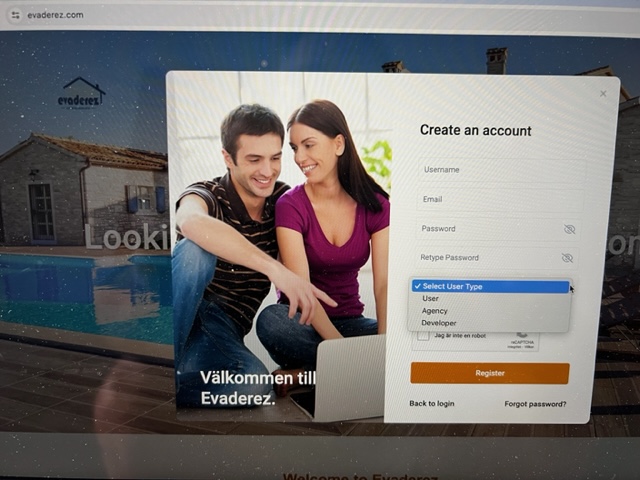
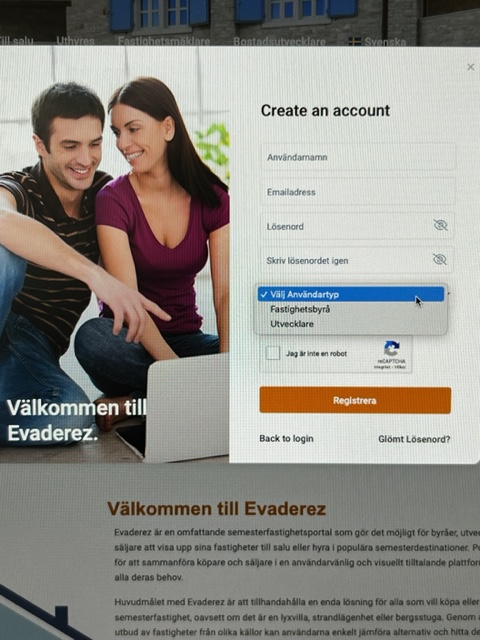
User roles are only displayed on the English login page and not in other languages.
Questions:
Why are user roles only displayed on the English login page and not in other languages?
How can I ensure user roles are displayed on the login page in all languages?
Languages: English (English )Vietnamese (Vietnamese )
Timezone: Asia/Ho_Chi_Minh (GMT+07:00)
Hi Miroslav,
Thank you for contacting WPML support, I’m happy to help you with this issue.
According to the WpResidence documentation hidden link
I see the user role option on the registration form is configured in the admin area. The option could be translated in WPML > String Translation.
Please go to WPML > String Translation > Click on "Translate texts in admin screen" > Search for the relevant string > Add it to String Translation and translate it.
I have added all three user roles as recommended to string transalation and translated them but only two are showing as you can see in the image. In english page all 3 roles are displayed
Languages: English (English )Vietnamese (Vietnamese )
Timezone: Asia/Ho_Chi_Minh (GMT+07:00)
I would like to request temporary access (wp-admin and FTP) to your site to take a better look at the issue. It would be better to have a testing site where the issue is replicated. Your next reply is set to private to share the info.
❌ IMPORTANT: Please backup your database and website before proceeding ❌
You can use this plugin to create the backup: https://wordpress.org/plugins/duplicator/
✙ I would need your permission to de-activate and re-activate Plugins and the Theme to change configurations on the site if needed. This is also a reason the backup is critical.
Languages: English (English )Vietnamese (Vietnamese )
Timezone: Asia/Ho_Chi_Minh (GMT+07:00)
Hi,
I've tried some troubleshooting steps but the User role still isn't available on the translation page. It could be a compatibility issue between the WpResidence theme and WPML.
To be able to report the compatibility issue we need to replicate the issue on a clean installation. I created a clean installation of WordPress, WPML, and all necessary WPML add-ons. You can access the WordPress dashboard using the link below: hidden link
Kindly follow the steps below:
- Don’t restore your site there.
- Install WpResidence theme and its addon plugin.
- Try to replicate the issue with minimal steps.
- Then let me know the steps to replicate it.
I am sorry but if you think that there might be a compability issue between WPML and WpResidence don´t you think it should up to you guys to take contact with the support team at WpResidance and find a solution. Its like you ask me to contact the engine manufacturer of my car bcs the car manufacturer cannot find the issue with the engine.