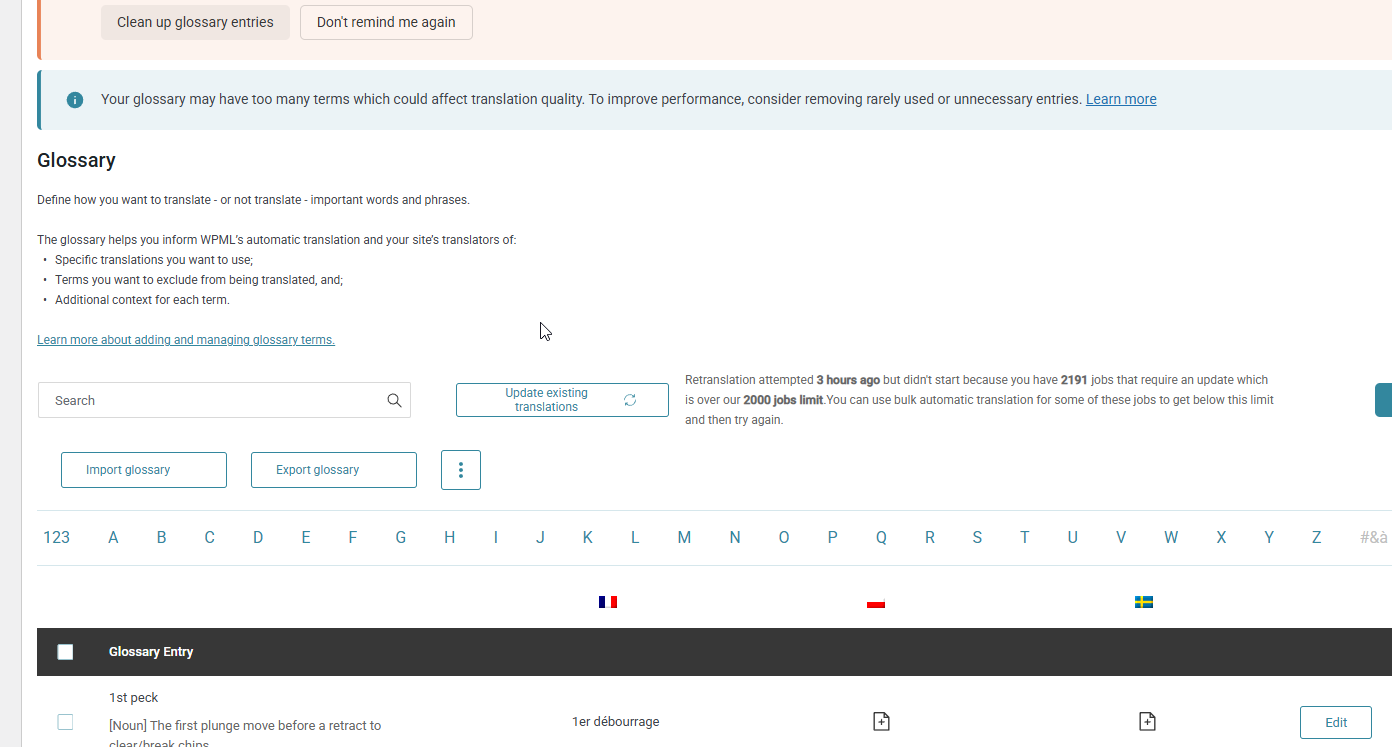
We recently made a number of updates to our WPML glossary entries on a production site. After saving the glossary changes, we initiated the "retranslate" process for the affected glossary items to push the updated terms through to existing translations.
Issue:
The retranslation process appeared to start but provided no progress indicator or status updates of any kind.
We let the process run for several hours (overnight) with no visible change.
Today, the status now reads: "Translations could not be updated."
There is no additional error detail or log output explaining why the translations failed.
Questions:
What is the recommended approach to successfully retranslate content after glossary changes?
Is there a way to determine which glossary items (if any) were successfully updated before the process failed?
Are there known limitations on the number of glossary items that can be retranslated in a single batch?
Is there a log or debug mode we can enable to get more detail on what's failing?
Please escalate to a human agent. The AI response did not resolve my issue. The glossary retranslation tool ran for hours and failed with no error details or logs. I need to know: (1) what changes were applied before it failed, and (2) how to complete the retranslation successfully.
Thanks for your reply. You need to wait until it fails before the error can be generated. You can upload the error logs to Google Drive and share the link with me here.
Quick update. I'm now getting this message "Retranslation attempted 41 minutes ago but didn't start because you have 2183 jobs that require an update which is over our 2000 jobs limit. You can use bulk automatic translation for some of these jobs to get below this limit and then try again."
I am planning on translating the French translation of the site with PCT. There are a probably over 183 existing French translations that need updates. If I run the translations with PCT, will that get me under the 2000 job limit? Or will it actually increase the number?
If you send all 2000+ pages/posts for PTC translation at once, you will likely encounter the same error due to the job limit being reached.
Could you please try splitting the batch to reduce the load? For example, send around 1000 jobs first for retranslation (please make sure not to select “overwrite existing translation”). Once those are processed, you can send the remaining pages/posts for translation.
Thanks for your reply. I will require temporary access (WP-Admin and FTP) to a test site where the problem has been replicated, if possible. This will enable me to provide better assistance and determine if any configurations need to be modified.
Please note that it is important to have a backup for security purposes and to prevent any potential data loss. You can use the UpdraftPlus plugin (https://wordpress.org/plugins/updraftplus/) to fulfill your backup requirements.
Your upcoming reply will be treated with confidentiality and will only be visible to you and me.
✙ To resolve the issue, I may need your consent to deactivate and reactivate plugins and the theme, as well as make configuration changes on the site if necessary. This emphasizes the significance of having a backup.
I know some of those are ignored because they are duplicates. I'm not overly concerned. When I run the same process on live, it doesn't finish. How long should this process take? Should I run it again on Live?
Thanks for your reply. It took me less than 5 minutes to complete the process. Could you backup and share access to your production site so that I can check?
Thanks for your reply. I’ve checked your website and can see the error message on the Glossary dashboard here: hidden link
Based on your site, you have approximately 219 posts and 162 pages, and you are translating into 9 languages. This results in roughly 3,429 translation jobs in total. Retranslation on the Glossary does have a 2000-job limit.
To update the glossary terms if you have over 2000 jobs, you can use the Translation Dashboard and resend your posts and pages for automatic translation. When submitting them, please make sure to select the option "Leave existing translations as they are." This will ensure your current translations remain unchanged while allowing the glossary terms to be applied.
OK, just to confirm if we select "Leave existing translations as they are", we won't be charged credits, but the glossary items will be applied, correct?
Thanks. When I try to run automatic translations again with "Leave existing translations as they are" selected, the "translate" button is disabled. The note says "Selected content is already translated"
The topic ‘[Closed] Subject: Glossary retranslation stuck — no status updates, fails after extended run’ is closed to new replies.