[Resolved] The translation is 100% complete but gear icon won't disappear.
This thread is resolved. Here is a description of the problem and solution.
Problem: You are trying to complete the translation of the page 'Job postings' using WPML. The translation is marked as 100% complete, and you clicked on 'Translation complete'. However, the gear icon remains active, indicating the translation is not complete. The French version of the page cannot be displayed. Solution: The issue arises because WPML is blocked by a firewall. We recommend contacting your hosting provider and asking them to whitelist the following domains:
If this solution does not resolve your issue or seems irrelevant due to being outdated or not applicable to your case, we highly recommend checking related known issues at https://wpml.org/known-issues/, verifying the version of the permanent fix, and confirming that you have installed the latest versions of themes and plugins. If you still need assistance, please open a new support ticket at WPML support forum.
This is the technical support forum for WPML - the multilingual WordPress plugin.
Everyone can read, but only WPML clients can post here. WPML team is replying on the forum 6 days per week, 22 hours per day.
Background of the issue:
I am trying to complete the translation of the page 'Job postings' using WPML. The translation is marked as 100% complete, and I clicked on 'Translation complete'. However, the gear icon remains active, indicating the translation is not complete. The issue can be seen on this page: hidden link
Symptoms:
The gear icon for the page 'Job postings' remains active, suggesting the translation is incomplete, even though WPML indicates it is 100% complete. The French version of the page cannot be displayed.
Questions:
Why does the gear icon remain active despite the translation being marked as 100% complete?
How can I ensure the French version of the page is displayed correctly?
Welcome to WPML support. I will answer this question before the ticket is assigned to one of my colleagues.
The gear icon in the translation column indicates that WPML thinks the translation is still “in progress” or incomplete—even visually and percentage-wise—rather than finalized . This can happen when the translation update hasn't fully registered in the system, despite appearing complete in the editor.
1. Caching Issues
WP caching (server, plugin, or browser) can prevent the UI from updating the icon properly:
Clear your WordPress cache, object cache, and browser cache.
Then refresh the “All Pages / All Posts” list to see if the icon changes
2. Incomplete or Stalled Translation Job
Sometimes, translation jobs get stuck:
Visit WPML → Support → Troubleshooting, and click all tools under Advanced Translation Editor, especially:
“Synchronize local job IDs with ATE jobs”
“Remove ghost entries from translation tables”
“Clear cache in WPML”
After clearing, open the default-language page, make a small change in the title, and resave.
Reopen the translation in the ATE or Classic Editor, click “Finish”, then “Translation complete” again. That secondary save often makes the gear switch to a pencil
3. Sending the translation again
Go to WordPress Dashboard → WPML → Translation Management
Find the content you want to translate and send it again for translation.
Go to WordPress Dashboard → WPML → Translations and take the translation again and make sure it is 100% complete.
I have tried all of what you suggest and I am not getting any tangible results.
With suggestion #3, after I take the translation and proceed with an update and 'complete translation', Translation Management still shows In Progress.
Hi Christopher,
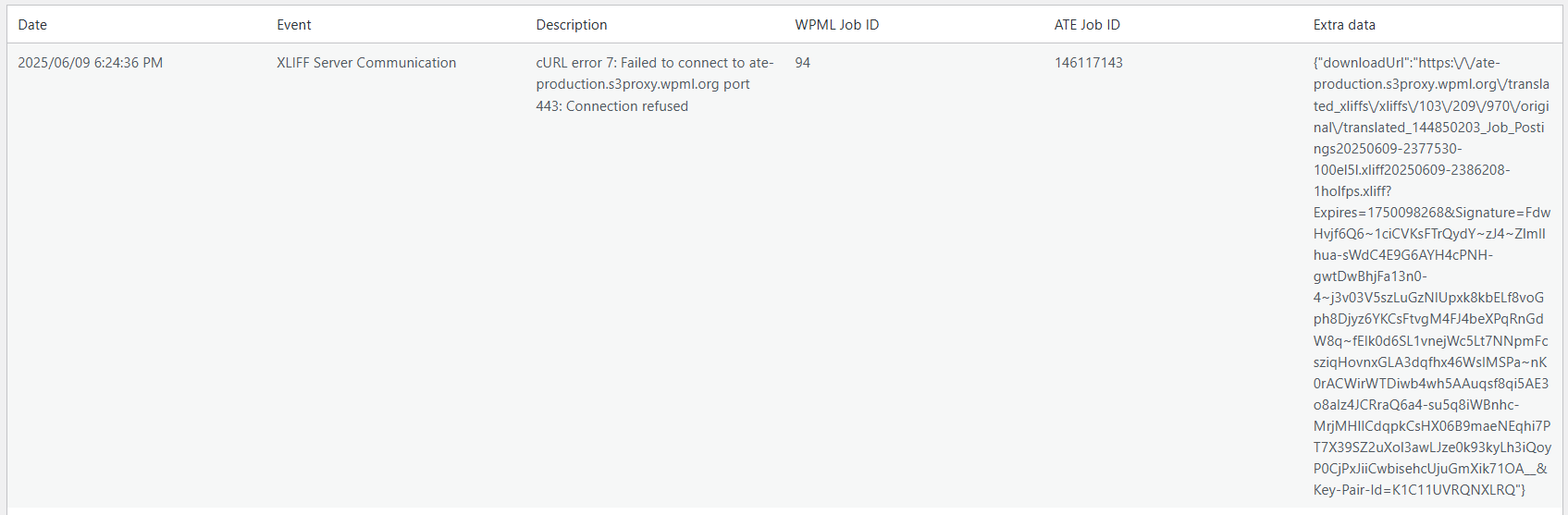
I just noted in the Advanced Translation Editor Error Logs that a connection is refused. It might actually be the reason why the gear icon doesn't disappear.
I don't know what it is trying to connect to. I will leave it with you to figure this out. I am attaching a screen shot of the error message.
Languages: English (English )Spanish (Español )German (Deutsch )
Timezone: America/Lima (GMT-05:00)
Hello,
Have you already tried to make a small edit on the original content, save the page, and then apply the translation again?
If this will not solve the issue, I'd be happy to offer to take a closer look.
I would like to request temporary access (wp-admin and FTP) to the website to investigate the issue further.
You can find the required fields below the comments section when you log in to leave the next reply. The information you provide is private, meaning only you and I can see and access it.
IMPORTANT
Please be sure to back up your website and database before granting us access.
If you can't see the "wp-admin / FTP" fields, your post and website credentials will be set to "PUBLIC." DO NOT publish the data unless you see the required wp-admin / FTP fields.
I may need to install a plugin called "All In One WP Migration" to create a copy of the website so I can investigate the issue further.
However, I would also be very grateful if you could provide a staging site or a copy of the website from your server for this purpose.
If you have any questions about creating such a staging site, you can consult your hosting provider. Please note that WPML must also be registered on this staging site at https://wpml.org/account/websites/.
If you are unable to provide such a copy of the website for testing, please let me know on this ticket.
The private reply form looks like this: hidden link
Click "I still need assistance" the next time you reply.
Video: hidden link
Please note that we are required to request this information individually on each ticket. We are not permitted to access any credentials that were not specifically submitted on this ticket using the private response form.