
This is the technical support forum for WPML - the multilingual WordPress plugin.
Everyone can read, but only WPML clients can post here. WPML team is replying on the forum 6 days per week, 22 hours per day.
| Sun | Mon | Tue | Wed | Thu | Fri | Sat |
|---|---|---|---|---|---|---|
| - | - | 9:00 – 18:00 | 9:00 – 18:00 | 9:00 – 18:00 | 9:00 – 18:00 | 9:00 – 18:00 |
| - | - | - | - | - | - | - |
Supporter timezone: America/Lima (GMT-05:00)
This topic contains 13 replies, has 2 voices.
Last updated by Andreas W. 7 months, 2 weeks ago.
Assisted by: Andreas W..
| Author | Posts |
|---|---|
| September 5, 2025 at 10:56 am #17379027 | |
 ricahrdA |
Background of the issue: Symptoms: Questions:  |
| September 5, 2025 at 7:13 pm #17380305 | |
 Andreas W. WPML Supporter since 12/2018 Languages: English (English ) Spanish (Español ) German (Deutsch ) Timezone: America/Lima (GMT-05:00) |
Hello, Could you please add this markup to WPML > Settings > Custom XML Configuration:
<wpml-config>
    <allow-translatable-job-fields>
        <allow-translatable-job-field type="/^package-string-/" value="/^\d+$/" />
    </allow-translatable-job-fields>
</wpml-config>
Now, edit the original template, save it again, and open the WPML Translation Editor. If you do not directly see the number, try to search for it in the text search field in the top right. Let me know if this worked out, please. Best regards |
| September 8, 2025 at 9:20 am #17382938 | |
|
ricahrdA |
Thanks Andreas. The phone number is appearing now. How do I save the translation for just the phone number? Its asking me to translate all sentences. Thanks,  |
| September 9, 2025 at 3:51 pm #17387950 | |
|
Andreas W. WPML Supporter since 12/2018 Languages: English (English ) Spanish (Español ) German (Deutsch ) Timezone: America/Lima (GMT-05:00) |
When translating pages or posts for the first time with the WPML Translation Editor, you will need to complete the translations to 100% for the changes to show up on the Frontend. |
| September 10, 2025 at 2:16 pm #17391227 | |
|
ricahrdA |
Thanks Andreas - I'll make all the changes. I've implemented the WMPL widget on the following staging site: hidden link When I change the language, the page layout is not correct. I had the Breeze plugin installed, but this is now disabled. Any ideas what might be causing this? |
| September 10, 2025 at 2:44 pm #17391365 | |
|
ricahrdA |
I've managed to get the page to display correctly now, however the Header template is not showing on the translated page. Any idea why this could be? |
| September 10, 2025 at 2:47 pm #17391415 | |
|
Andreas W. WPML Supporter since 12/2018 Languages: English (English ) Spanish (Español ) German (Deutsch ) Timezone: America/Lima (GMT-05:00) |
Did you translate the Bricks Templates already? To translate them, you use the WPML Translation Editor, similar to how you do for posts and pages. If you do not see a translation option, you might need to check WPML > Settings > Post Types Translation and make sure the "Bricks Templates" are set to "Translatable". |
| September 10, 2025 at 3:49 pm #17391627 | |
|
ricahrdA |
Yes - its enabled and I've update the translations for English (Irish)   |
| September 11, 2025 at 2:24 am #17392498 | |
|
Andreas W. WPML Supporter since 12/2018 Languages: English (English ) Spanish (Español ) German (Deutsch ) Timezone: America/Lima (GMT-05:00) |
Hello, Maybe the display conditions are not copied over to the translated template? Have you already reviewed if they exist on the translated template, and if so, have you tried setting them manually on the translated template? (considerable workaround) --- I would like to request temporary access (wp-admin and FTP) to the website to investigate the issue further. The required fields are located below the comments section when you log in to leave the next reply. The information you provide is private, meaning only you and I can see and access it. IMPORTANT The private reply form looks like this: Click "I still need assistance" the next time you reply. Video: Please note that we are required to request this information individually on each ticket. We are not permitted to access any credentials that were not specifically submitted on this ticket using the private response form. Best regards, |
| September 11, 2025 at 12:18 pm #17394215 | |
|
Andreas W. WPML Supporter since 12/2018 Languages: English (English ) Spanish (Español ) German (Deutsch ) Timezone: America/Lima (GMT-05:00) |
On your Dashboard, the Setup Wizard for WooCommerce Multilingual & Multicurrency was still expected to be completed. I completed this setup. Further, there are updates for the Bricks Theme and various plugins available. We need to make sure to always test using the latest versions of all components. Do you mind if we run all those updates before continuing the tests? |
| September 11, 2025 at 2:53 pm #17394868 | |
|
ricahrdA |
ok - thank you. Yes, please go ahead and run the updates. |
| September 11, 2025 at 3:52 pm #17395061 | |
|
Andreas W. WPML Supporter since 12/2018 Languages: English (English ) Spanish (Español ) German (Deutsch ) Timezone: America/Lima (GMT-05:00) |
Thank you for your patience! I ran all the updates, and so far, I can not spot any layout issues. If you still see the issue on the staging site, please drop me a link to a page where I can see it. |
| September 11, 2025 at 4:22 pm #17395111 | |
|
ricahrdA |
Thanks Andreas. It does look like the language chooser is working now and the header is showing. A few more issues/questions: 1. The footer isn't showing Just to check my understanding: Thanks in advance, |
| September 11, 2025 at 5:38 pm #17395379 | |
|
Andreas W. WPML Supporter since 12/2018 Languages: English (English ) Spanish (Español ) German (Deutsch ) Timezone: America/Lima (GMT-05:00) |
1) I can currently see the Footer on the Irish homepage. Could you please provide an example where the footer is not showing up? 2) The number in the header is showing up this way, as it was translated this way. Please adjust the translation on the Advanced Translation Editor. 3) Recommended Cache Plugins can be found here: 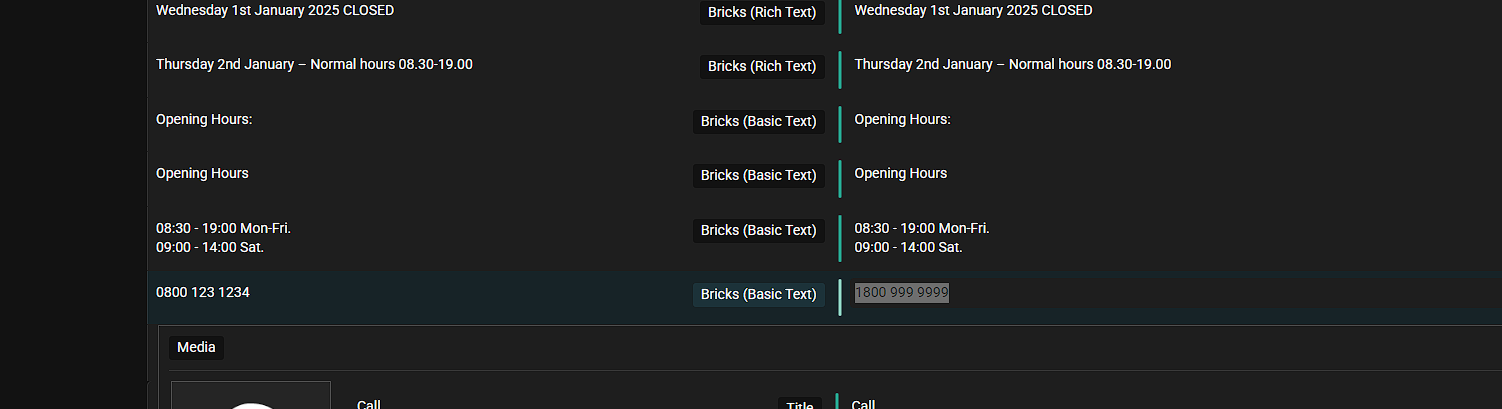 |







The topic ‘[Closed] Translate a phone number in a header template in bricks builder’ is closed to new replies.