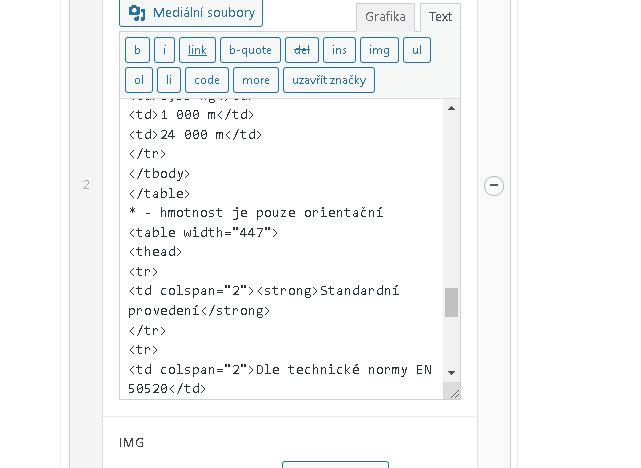
Background of the issue:
I am trying to translate a table from an ACF rich editor on my site hidden link using WPML. When translating, the WPML tag adds line-breaks or possibly HTML tags, which prevents the expression from being translated.
Symptoms:
The WPML tag adds line-breaks or HTML tags during translation, causing translation issues.
Questions:
How can I prevent WPML from adding line-breaks or HTML tags during translation?
Thanks for contacting WPML forums support. I'll be glad to help you today.
First of all, sorry for the late reply; it was due to a higher workload.
1) I would need to look closely at your site, so I would need to request temporary access (WP-Admin and FTP) Preferably to a test site where the problem has been replicated.
Your answer will be private, meaning only you and I can access it.
❌ Please backup your database and website ❌
✙ I need your permission to deactivate and reactivate the plugins and themes and change site configurations. This is also why the backup is critical.
✙ I also need your permission to take a local copy of your site to debug the issue without affecting your live site.
2) Could you please share your Debug information with me?
You can read a detailed explanation about it here. (http://wpml.org/faq/provide-debug-information-faster-support)
The debug info will give me a lot of information about how your site is configured.
When trying to log in, I was redirected to the following message.
(Due to protection of web servers from repeated attacks, we were forced to restrict access to administrative interface of web pages to selected countries. If you are currently in a foreign country, please sign in to WebAdmin, proceed to your domain management and disable this GeoIP filter in CMS section.)
Please disable the GeoIP filter until this issue is checked.
Thanks for the access details. The following post types should be set as not translatable.
Field Groups (acf-field-group)
Post Types (acf-post-type)
Options Pages (acf-ui-options-page)
Please try the following steps:
1- Go to ACF-> Field Groups
2- Delete all the translated ACF field groups
3- Empty the trash
4- Go to WPML-> Settings-> Post Type Translation section
5- Set the "Field Groups (acf-field-group)" to Not Translatable
6- Click Save
Please repeat the above steps with all mentioned 3 post types. After that, please edit a product in the default language, make a minor edit, update it, and update its translation to check the issue.
Best regards,
Osama
The topic ‘[Closed] Translate table from acf rich editor’ is closed to new replies.