Osama Mersal
|
Hi Marco,
I've added them to the file. Kindly check it here. (hidden link)
Would you please check if the issue is replicable? If yes, please let me know the steps to reproduce it.
Thanks for your cooperation
Regards,
Osama
|

marcoS-96
|
Hi Osama,
I've tested all options.
From the home page, on the right, you can see menu and language selector.
I've added a submenu to home page that open a test page where I've inserter WPForm test.
All field has been translated.
Initial passwor is "1234".
I can open Form Page (EN): hidden link
But... how may I open Form Page (IT) in italian?
I've translated SLUG in WPForms "Form Page" addon from test-form to modulo-test
If I try to open: hidden link
wordpress can't find the page.
Thanks in advance,
Marco
|
Osama Mersal
|
Hi Marco,
Thanks for replicating the issue. You can access the form using this URL. (hidden link)
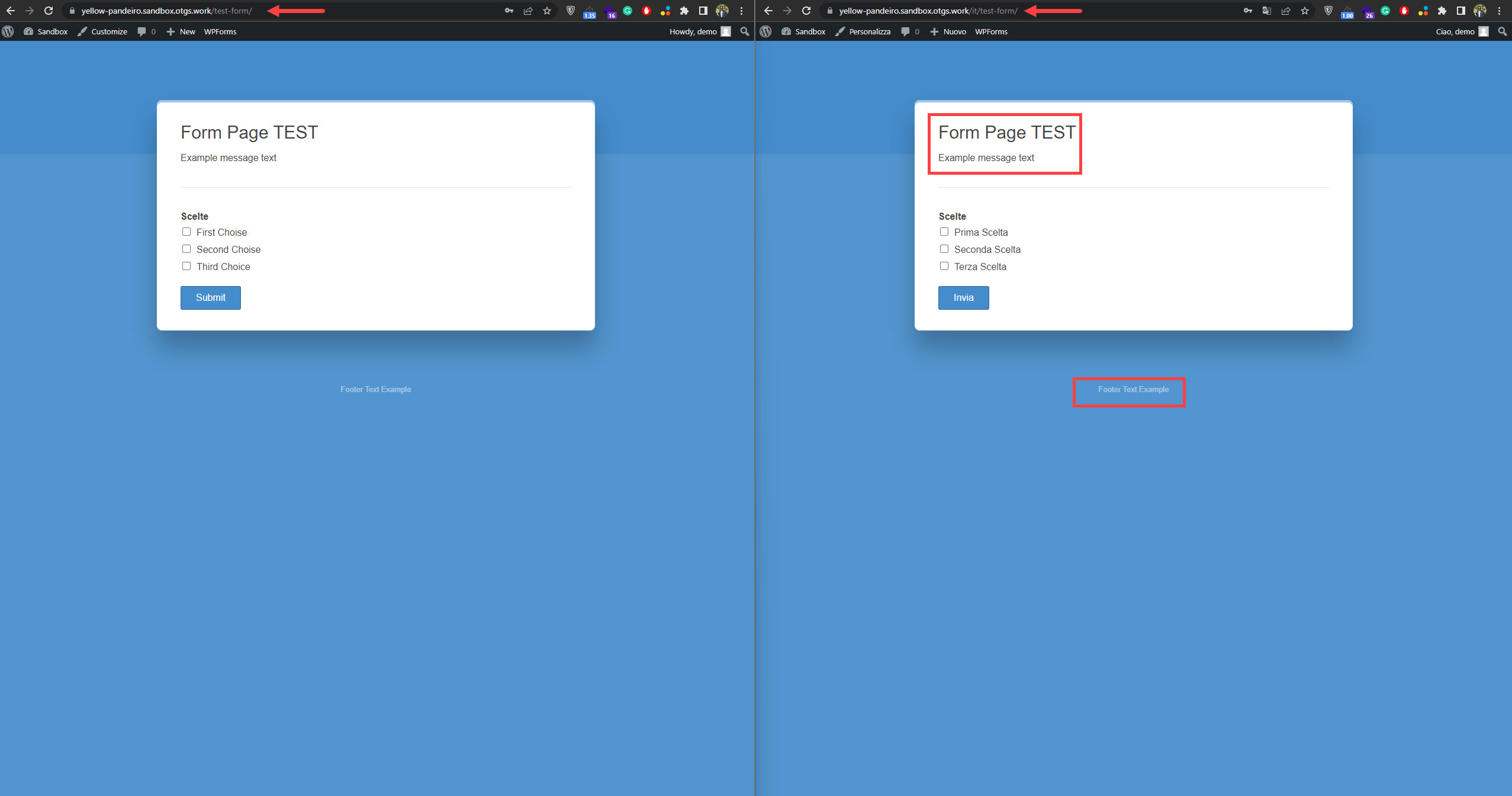
I've noticed that the settings coming from (form_pages_*) are not translated on the front end even though they are translated in the translation editor. (Kindly check the attached screenshot)
Would you please check if the other settings are translated correctly? Kindly let me know which settings are not translated, so I can consult our compatibility team.
Thanks for your cooperation
Regards,
Osama
|
marcoS-96
|
Hi Osama, I've checked... all other translations seem works fine, but (as in your image), some fields coming from (form_pages_*):
- form_pages_title
- form_pages_description
- form_pages_footer
are not translated on the front from English to Italian.
I've also tried to translate slug to: it/test-form (but without success).
Many thanks.
Marco
|
Osama Mersal
|
Hi Marco,
Thanks for your feedback. I'll check this with our comptapilty team and update you with our findings.
Thanks for your cooperation and patience
Regards,
Osama
|
Osama Mersal
|
Hi Marco,
1) Our compatibility team has found a workaround to translate the (form_pages_*) strings on the front end. Kindly check the following steps:
1- Edit the (wpforms-form-pages/src/Frontend.php) on line 89
2- Replace the line with the following line
// Set form data to be used by other methods of the class.
$this->form_data = apply_filters( 'wpforms_frontend_form_data', $form_data );
3- Clear the cache and check the front end
Kindly check the page form and let me know if it's translated correctly. (hidden link)
2) As for the slug issue, please contact plugin support to check this issue and make sure that you use the latest version of the plugin.
I hope this helps you. If you need further info, please let me know.
Best regards,
Osama
|
marcoS-96
|
Hi Osama, thanks for Your answer and support.
I've update line 89, but slug doesn't works and I can't check Form Pages translation.
I'm going to ask to WPForms about this as you suggest.
Best regards, Marco.
|
Osama Mersal
|
Hi Marco,
Could you please try the default language slug? (hidden link language slug)
That should open the form to check the front end. Kindly let me know if that helped you.
Regards,
Osama
|
marcoS-96
|
Hi Osama,
I tried with this link (EN):
hidden link
but I always receive error 404: page dosn't exist
I've also tried to translate slug from "modulo-suggerimento" to "en/default"
but with hidden link I receive the same 404 message.
Thanks, Marco
|
Osama Mersal
|
Hi Marco,
I would need to take a closer look at your site. So I would need to request temporary access (WP-Admin and FTP)
– preferably to a test site where the problem has been replicated if possible –
in order to be of better help and check if some configurations might need to be changed
Your next answer will be private, which means only you and I have access to it.
❌ Please backup your database and website ❌
✙ I would need your permission to de-activate and re-activate Plugins and the Theme and change configurations on the site. This is also a reason the backup is critical.
✙ I also need your permission to take a local copy of your site to debug the issue without affecting your live site.
Thanks for your cooperation
Regards,
Osama
|
Osama Mersal
|
Hi Marco,
Thanks for the access details. I've checked the form and run WPML troubleshooting functions with no luck.
Also, I've deactivated the plugin except for the active plugins on the sandbox site, but that didn't help.
As a testing step, I changed the language URL format from "Different languages in directories" to "Language name added as a parameter ". After that, the form opened correctly using this URL. (hidden link)
So the issue is caused by the language URL format, so please check your installation and server configuration. Also, please check your .htaccess file.
Kind regards,
Osama
|
marcoS-96
|
Hi Osama, thanks a lot for you support.
I had an .htaccess on the root, but my hosting uses the newer Nginx web server instead of Apache, so I don't need to have an .htaccess file and I've disabled it from staging site.
I've also seen language URL as "Language name added as a parameter ", and seems it works!
Thaks a lot again.
Have a nice day,
Marco
|
Osama Mersal
|
Hi Marco,
It's great to hear that the "Language name added as a parameter " language URL format is working. Please let me know if you need further assistance regarding the issue.
Have a great day!
Best regards,
Osama
|
marcoS-96
|
Hi Osama, sorry but I came back to Live site hidden link and I see something goes wrong.
I've deletet .htaccess from root site,
and I've set WPML with "Language name added as a parameter ".
Now I see this message:
For BuddyPress Multilingual to work you must set "Different languages in directories" in WPML > Languages > Language URL Format
Also I see that there are problems with WooCommerce product transaltion.
For example here you can see a demo course shop page:
hidden link
and if I select EN versionI get 404 errore page:
hidden link
So, I've solved with WPForm Form Page, but now I have problems with BuddyPress and WooCommerce.
There's a way to works with "Directory with different languages" and make it works also with WPForms Form Pages? Others ways?
Thanks in advance.
Marco.
|
Osama Mersal
|
Hi Marco,
There is something wrong with your installation/server configuration because WP Forms should work with "Different languages in directories" as it works on the sandbox site. (hidden link)
In my opinion, it could be one of the following reasons:
1- Multisite configuration (Because the sandbox is not multisite)
2- Server configuration
3- WordPress installation (Check if you can replicate the issue on a clean multisite installation)
Kindly check the above possible reasons for the issue, and that could help identify the real reason to know how to fix the problem.
Regards.
Osama
|