Background of the issue:
I am having a problem with a specific product on my WordPress site using WPML. The translations for the product exist, and I can edit the product, change the language, and see that a translation exists with content. However, the permalink does not have a page slug. All translations end with, for example, 'es/producto//' or 'zh-hans/product//'. There is no slug at the end. If I edit the page, edit the permalink, add a slug and republish the page, the slug disappears. If I go to products, navigate to product, and click the pencil to edit translation then add a slug and save/publish - the slug disappears after navigating to the page. If I delete the page and add a new translation, the slug still disappears. I expected to navigate to the translated version of the page when choosing a translated version from the dropdown menu. The issue can be seen at: hidden link
Symptoms:
The translated product slug is removed automatically for one specific product. Instead of navigating to the translated version of the page, I navigate to an empty URL: hidden link instead of hidden link.
Questions:
Why does the translated product slug disappear after republishing?
How can I ensure the translated product slug remains after publishing?
Thank you for contacting WPML Support. I can see the issue on your site. Could you please try to follow the below steps and see this resolves the issue:
1. Take a backup of your site first for safety reasons.
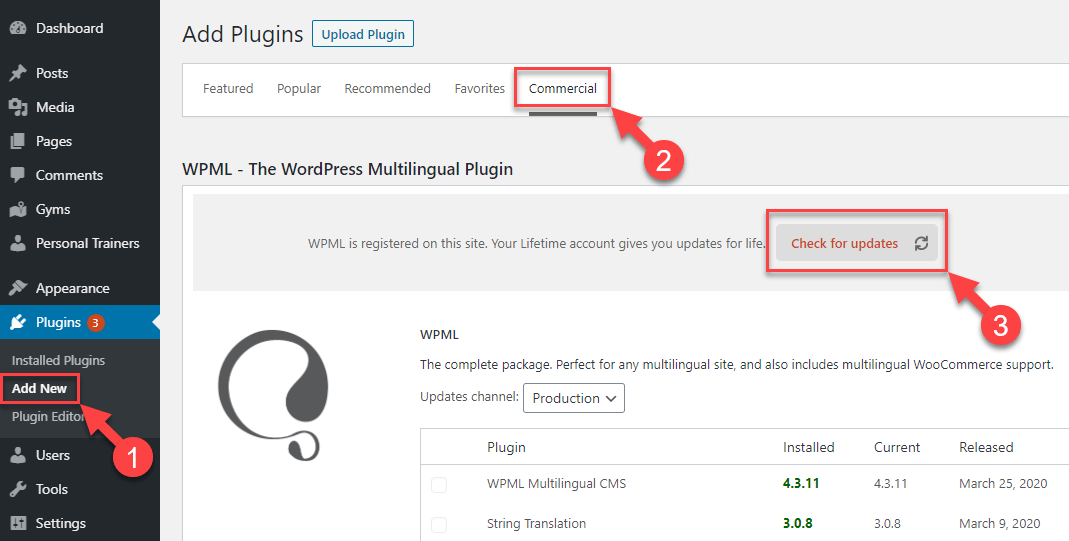
2. We have recently released WPML 4.8.5, please update it to the latest version. You can update it from Plugins >> Add New, click the Commercial tab, and then click the “Check for updates” button. Here is the screenshot for more details: https://wpml.org/wp-content/uploads/2020/04/wpml-force-plugin-update-1.png
3. Go to WPML >> Support > Troubleshooting page and press the below buttons:
- Clear the cache in WPML
- [Products] Synchronize posts taxonomies
- Remove ghost entries from the translation tables
- Synchronize local job ids with ATE jobs
- Synchronize translators and translation managers with ATE
- Assign translation status to duplicated content
- Fix post type assignment for translations
- Set language information
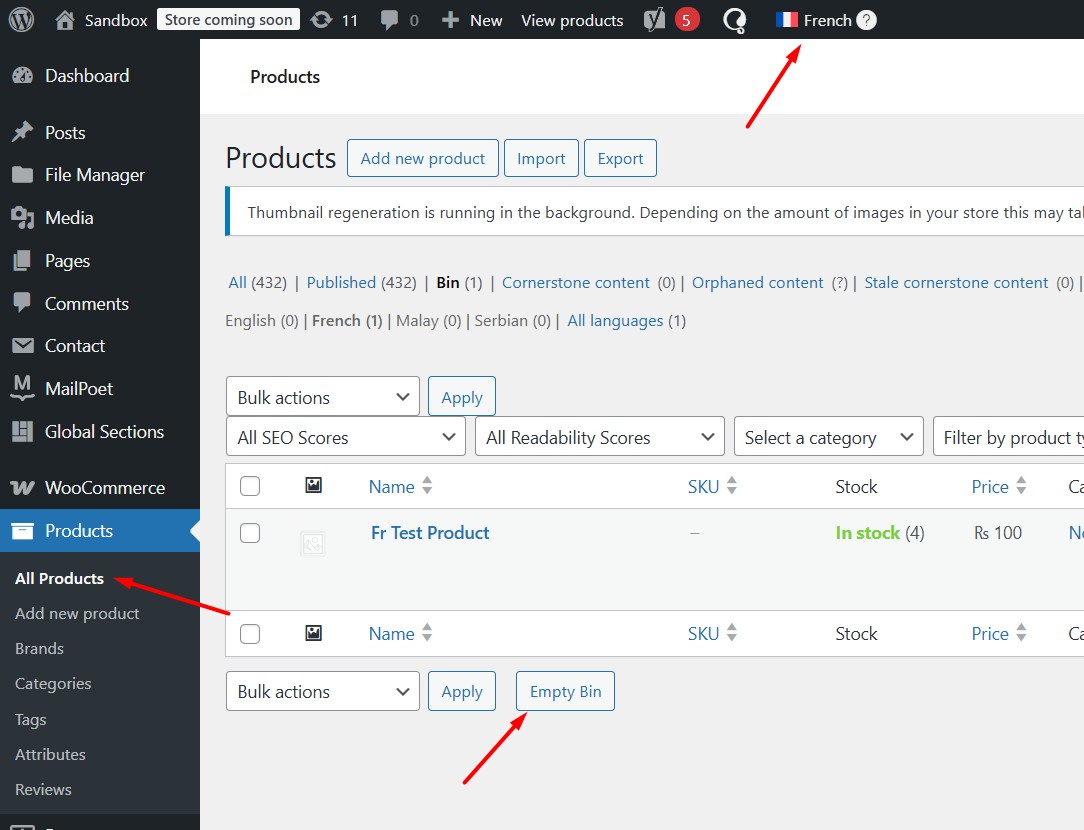
4. Empty the Product trash in each language.
5. Temporary deactivate the “WP Force Lowercase URLs” plugin.
6. Could you please try the below procedure:
6.1. Please open the default language product in Edit mode.
6.2. Make a small change, for example, add a space or + sign in your product title.
6.3. Update the product by pressing the “Update” button.
6.4. Now, please remove that small change that did in step #6.2.
6.5. Update the product again.
6.6. Now, please try to open the translated page in WPML Translation Editor and make sure the translation is 100% complete including product slug, and press the complete translation button.
7. Clear all sorts of site/server/CDN cache and see if this resolves the issue.
Thanks for trying the steps. It looks like the default-language product slug may be conflicting or the product itself might be corrupted, which is why the translated slug keeps disappearing.
Could you please try creating a new product, copy the same content into it, and then translate it to see if the slug stays intact?
If the issue continues, please try slightly changing the default-language slug and then retranslate the product. Let me know how it goes.
Thanks for the update. Please go to the Settings >> Permalinks page and press the Save Changes button and see if it helps.
If the issue persists, try the following steps to isolate the cause of the issue:
1. Take a backup of your site first for safety reasons.
2. Deactivate all plugins except WooCommerce, WPML and its add-ons.
3. Switch to the default WordPress theme Twenty Twenty-Five.
4. If the issue is gone, start reactivating the other plugins one by one to find which one might be causing a conflict.
Kindly let me know the results,
Thank you
The topic ‘[Closed] Translated product slug is removed automatically for one specific product’ is closed to new replies.