Skip to content Skip to sidebar

This thread is resolved. Here is a description of the problem and solution.

Problem:
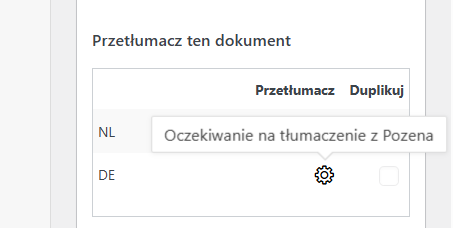
You are trying to translate a 404 template but encounter an issue where two languages are assigned to a non-existing translation service that was deactivated a year ago. This assignment prevents you from proceeding with the translation.
Solution:
If you're experiencing this issue, we recommend you follow these steps:
1. Navigate to the Translation Dashboard.
2. Select the templates you wish to translate.
3. Assign them to a local translator. This action will create new jobs for those templates, effectively overwriting the old jobs.
4. You can then proceed to translate or cancel these jobs as needed.

Please note that this solution might be outdated or not applicable to your specific case. We highly recommend checking related known issues at https://wpml.org/known-issues/, verifying the version of the permanent fix, and confirming that you have installed the latest versions of themes and plugins. If the issue persists, please open a new support ticket.

This is the technical support forum for WPML - the multilingual WordPress plugin.

Everyone can read, but only WPML clients can post here. WPML team is replying on the forum 6 days per week, 22 hours per day.

This topic contains 4 replies, has 0 voices.

Last updated by pccS 1 month, 4 weeks ago.

Assisted by: Itamar.

Author Posts
October 9, 2025 at 1:26 pm

pccS

Background of the issue:
I'm trying to translate, for example, a 404 template on my site hidden link, but two languages are assigned to a non-existing translation service that was turned off a year ago. I have tried troubleshooting, but nothing helped.

Symptoms:
Translations are assigned to a non-deactivated translation service, preventing translation.

Questions:
How can I reassign languages from a non-existing translation service and use "normal" translation by hand or automatic?
What steps should I take if troubleshooting tools do not resolve the issue?

October 9, 2025 at 2:04 pm #17471760

pccS

yest its about translations assigned to pozena, can't get rid of that.

October 9, 2025 at 2:04 pm #17471761

Itamar
WPML Supporter since 02/2016

Languages: English (English )

Timezone: Asia/Jerusalem (GMT+02:00)

Hi,

This ticket has been inactive for some time. I didn't get a reply from you. I've converted this chat into a support ticket because you may still require our assistance. If you do, please reply to this ticket, and one of our supporters will be happy to continue helping you.

I'm consulting our Translation Service experts about this issue. I'm asking them if they can cancel the In Progress jobs from the Pozena service.

As for the already completed translation jobs from the Poznan service, you can delete them directly on your site if needed. Go to the post type and switch to German or Dutch. Please select all the translations and move them to the trash section. Please see the attached screenshot. Then empty the trash section. I'm mentioning this in case you also need to delete the completed translations from the Poznan service.

**** Important! Please make a full site backup (files and DB) before you proceed with those steps****

Regards,
Itamar.

2025-10-09_16-53-38.jpg
October 10, 2025 at 8:49 am #17473798

pccS

Hi,
I don't want to delete the finished translations by Pozena.

The story is:
- we asked Pozena to translate the site to main languages
after we finished that project, the cooperation was finished and the rest languages we are translating automatically
but
strangely, even the pozena service is non active, while I wanted to add some transalations to the template they were asigned to that non-active service and now I can't do anything to translate it using translating editor..

October 10, 2025 at 9:50 am #17474030

Itamar
WPML Supporter since 02/2016

Languages: English (English )

Timezone: Asia/Jerusalem (GMT+02:00)

Hi,

There is a simple solution we can offer.

1. Go to -> Translation Dashboard.
2. Select those templates.
3. Assign them to a local translator.
Please see the attached screenshot.
4. This will create new jobs for those templates, and the new jobs will overwrite the old jobs.
5. Then you can either translate or cancel the jobs if needed.

Regards,
Itamar.

2025-10-10_12-46-32.jpg
October 10, 2025 at 12:36 pm #17474474

pccS

managed to do it that way.