Skip to content Skip to sidebar

This thread is resolved. Here is a description of the problem and solution.

Problem:
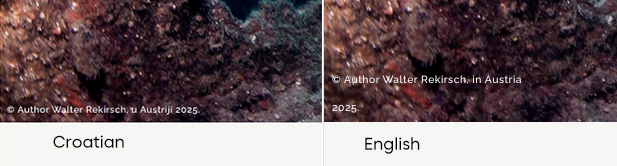
You are trying to translate dynamic content in Divi, specifically a sentence that includes a year as dynamic content. When translating, the year breaks into a second row in the other language.
Solution:
If you're experiencing this issue, we recommend you try the following steps:
1. Take a backup of your site first for safety reasons.
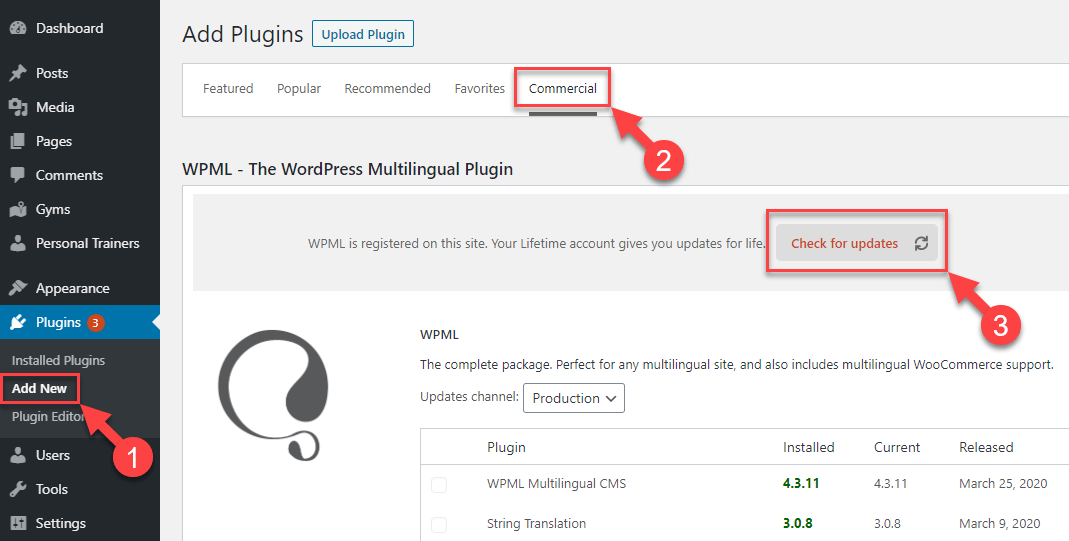
2. Update WPML plugins to the latest version. You can do this from the Plugins >> Add Plugin page, click the Commercial tab, and then click the “Check for updates” button.
3. Ensure you are using the latest version of the Divi theme.
4. If the issue persists, make a small change in the Divi footer template, translate it from WPML >> Translation Management/Dashboard, and see if this resolves the issue.

If this solution does not apply to your case, or if it seems outdated, we highly recommend checking related known issues at https://wpml.org/known-issues/, verifying the version of the permanent fix, and confirming that you have installed the latest versions of themes and plugins. If you still need assistance, please open a new support ticket at WPML support forum.

This is the technical support forum for WPML - the multilingual WordPress plugin.

Everyone can read, but only WPML clients can post here. WPML team is replying on the forum 6 days per week, 22 hours per day.

Tagged: 

This topic contains 1 replies, has 0 voices.

Last updated by damirK-4 6 months, 2 weeks ago.

Assisted by: Noman.

Author Posts
October 11, 2025 at 3:03 pm #17476353

damirK-4

Background of the issue:
I am trying to translate dynamic content in Divi on my site hidden link. The content includes a sentence with a year as dynamic content, and the rest of the sentence is regular text.

Symptoms:
When translating the sentence, the year breaks into a second row in the other language.

Questions:
how to make Year stay in the same sentence (row)?

October 12, 2025 at 4:07 pm #17477565

Noman

Hi,

Thank you for contacting WPML Support. Sorry for the delay due to high workload and the reply time will be shorter from now. I can see the issue in the footer copyright section, the p tags are added in secondary languages.

Could you please try to follow the below steps and see if this resolves the issue:

1. Take a backup of your site first for safety reasons.

2. Update WPML plugins to the latest version. You can update it from Plugins >> Add Plugin page, click the Commercial tab, and then click the “Check for updates” button and see if this resolves the issue.

Here is the screenshot for more details: https://wpml.org/wp-content/uploads/2020/04/wpml-force-plugin-update-1.png

3. Please make sure you are using the latest version of the Divi theme.

4. If the issue persists, make a small change in the Divi footer template, translate it from WPML >> Translation Management/Dashboard, and see if this resolves the issue.

Kindly let me know the results,
Thank you

October 14, 2025 at 12:41 pm #17483897

damirK-4

When I switched from Classic Editor to Advanced Editor everything is ok. It works.