Home›Support›English Support›[Resolved] Variation Swatches plugin are not showing colors on the translation pages
[Resolved] Variation Swatches plugin are not showing colors on the translation pages
This thread is resolved. Here is a description of the problem and solution.
Problem:
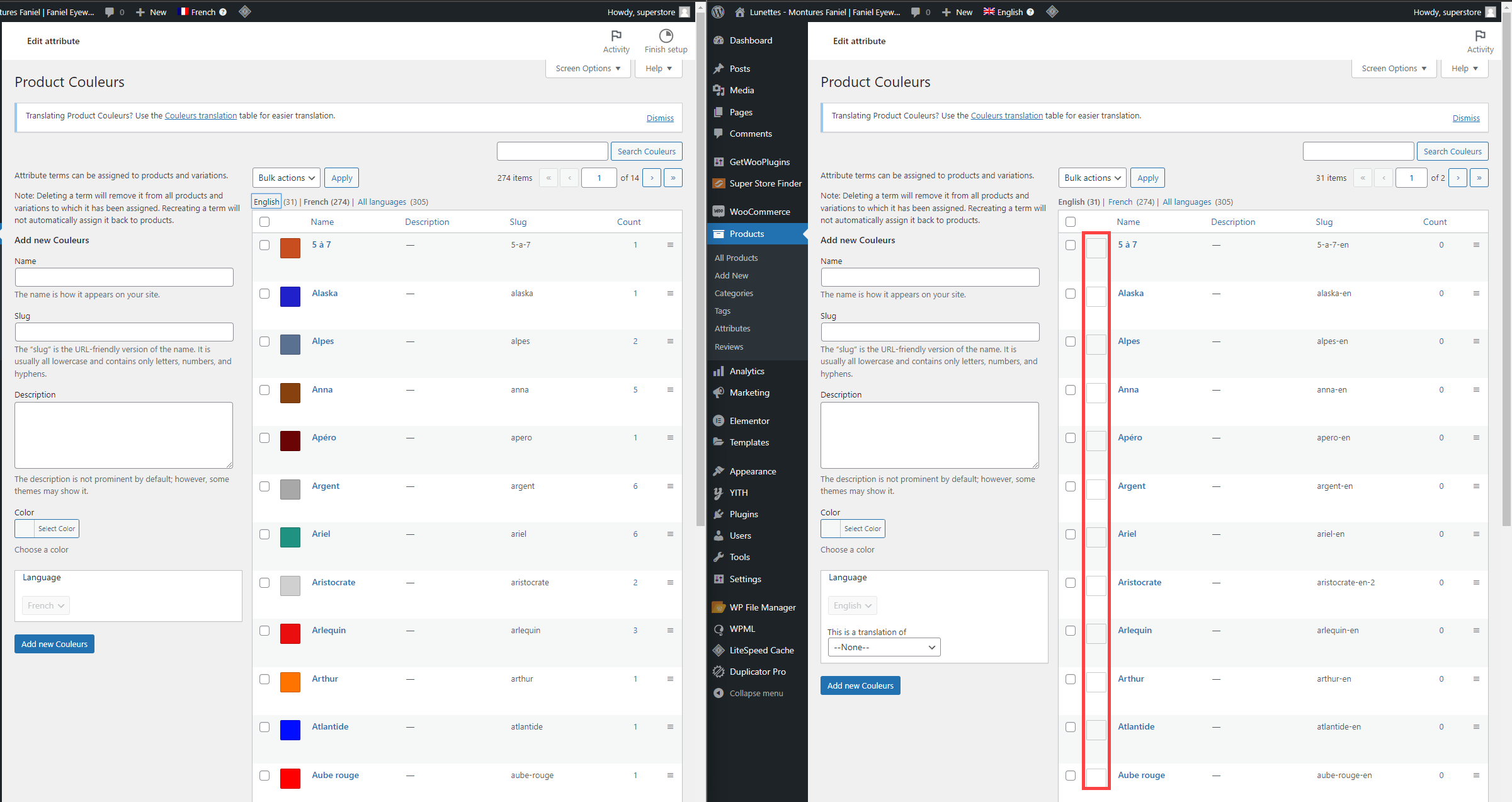
The variation Swatches plugin (Variation Swatches for WooCommerce) is not showing colors on the translated products.
Solution:
1- Go to WPML-> Settings-> Custom Term Meta Translation
2- Set the "product_attribute_color" to copy
3- Click on "Save"
4- Edit the default language color and re-save it
This is the technical support forum for WPML - the multilingual WordPress plugin.
Everyone can read, but only WPML clients can post here. WPML team is replying on the forum 6 days per week, 22 hours per day.
Thanks for contacting WPML forums support. I'll be glad to help you today.
I've checked your site and found that the colors are not copied to translated attributes. (Kindly check the attached screenshot)
The following steps fix the issue:
1- Go to WPML-> Settings-> Custom Term Meta Translation
2- Set the "product_attribute_color" to copy
3- Click on "Save"
4- Edit the default language color and re-save it
After that, the color will be copied to the English attribute. Kindly check this video to see the steps. (hidden link)
I hope this helps you. If you need further info, please let me know.
When you translate a product color using WPML-> Taxonomy Translation or WooCommerce Multilingual-> Attributes tab, the color will be copied to the translated attribute. Kindly check this video. (hidden link)
It would be best if you translated your attributes in order to copy the color. If you don't need the colors to be translated, you can set them to "Not Translatable" from WPML-> Settings-> Taxonomy Translation section.
1) I've checked the mentioned products, which are not connected. (Kindly check this hidden link)
Also, you have multiple products with the same name, and none is translated. (Kindly check this hidden link)
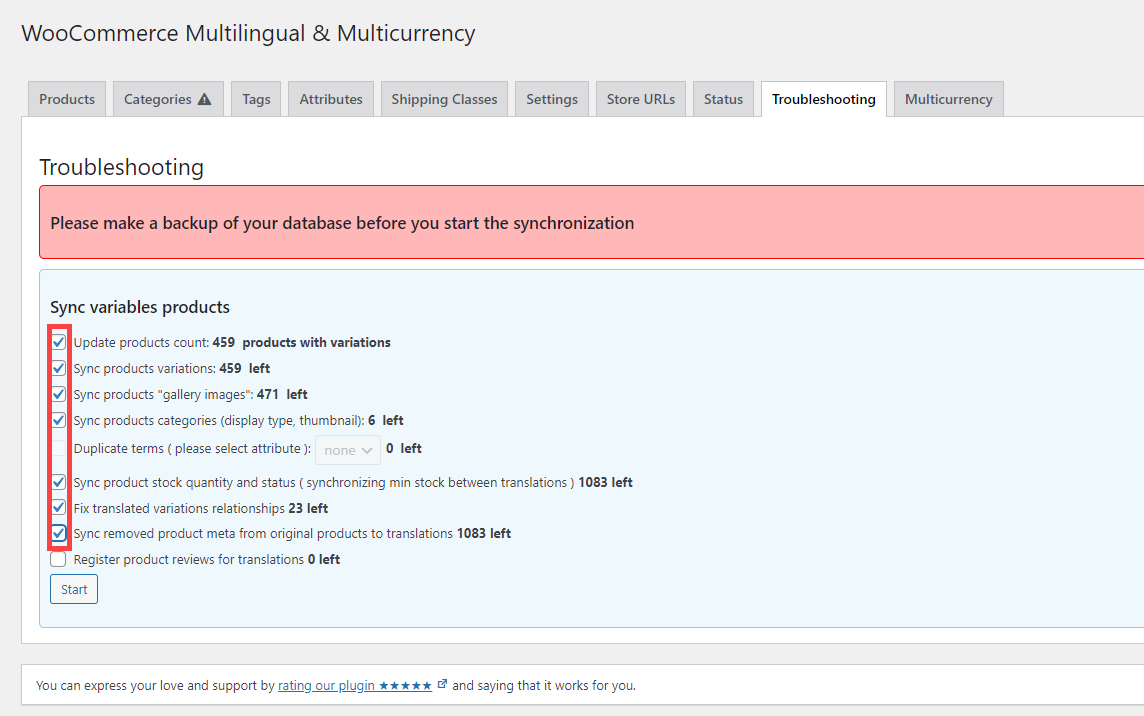
2) I noticed that you set the attributes to not translatable, so could you please go to WooCommerce Multilingual-> Status tab-> Troubleshooting. (hidden link)
Kindly select all except the last option and click on the "Start" button. (Kindly check the attached screenshot)
❌ Please backup your database before performing the above test ❌
1) Could you please let me know which products have duplicated attributes? I've checked some products and found that the attributes work correctly in French and don't work in English.
2) I've run some tests on my local installation and found that the best option in such cases is to set the "Product Couleurs" as translatable and translate the attribute because the products and variations post types are translatable.
Hi After translate all the attributes i still have some issues with the English translation, now the colors not appear on the English version and the products appear out of stock. Can i delete all translation products and copy it again? Another question on the description i have 3 words that need to be translate in all products can i do in bulk process ? regards
1) In order to bulk duplicate the products, kindly check the following steps:
1- Delete the English products, and empty the trash
2- Go to WPML-> Translation Management
3- Select products and duplicate them (Kindly check this hidden link)
Please note that you can bulk duplicate more than 20 products by increasing the number from the screen options. (Kindly check this hidden link)
2) If you mean the words in the product's short description, you might need to translate them using WPML Translation Editor or manually.
If you mean other words, please search for them in WPML-> String Translation.
I hope this helps you. If you need further info, please let me know.