This thread is resolved. Here is a description of the problem and solution.
Problem:
If you're experiencing issues where product categories are not bound together and no product categories appear in the category translation tab after importing with All Importer, follow these steps.
Solution:
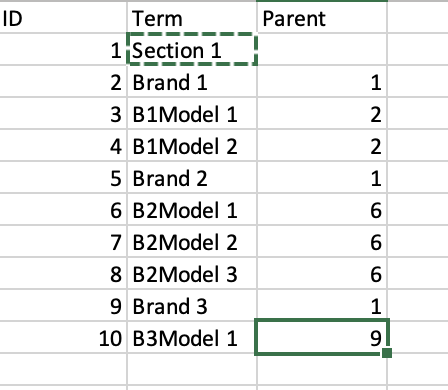
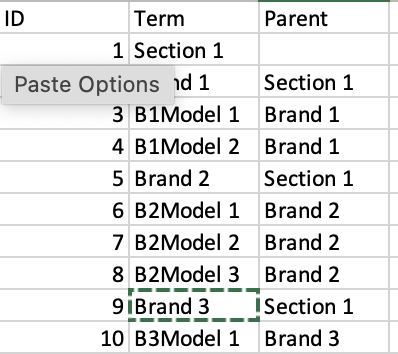
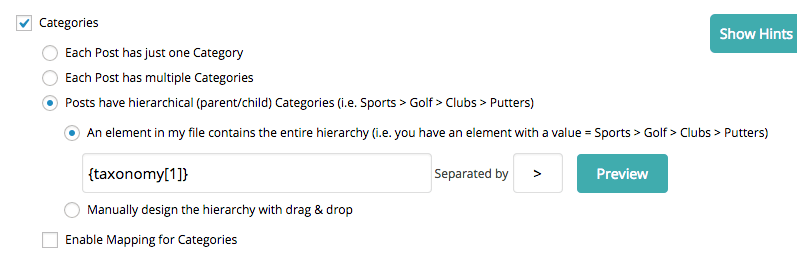
Ensure that your XLS file for import is formatted correctly. In the same cell, you should structure the categories as "Parent cat > Child cat". During the import, select the separator ">". Here's how your XLS should look:
Unique ID - Category<br />1 - Parent1 > Child1<br />2 - Parent1 > Child 2
Similarly, your translation file should be formatted as follows:
Unique ID - Translated Category<br />1 - Translated Parent1 > Translated Child1<br />2 - Translated Parent1 > Translated Child 2
If this solution does not resolve your issue or seems outdated, we recommend checking related known issues at https://wpml.org/known-issues/, verifying the version of the permanent fix, and confirming that you have installed the latest versions of themes and plugins. If the problem persists, please open a new support ticket at WPML support forum.
This is the technical support forum for WPML - the multilingual WordPress plugin.
Everyone can read, but only WPML clients can post here. WPML team is replying on the forum 6 days per week, 22 hours per day.
This topic contains 3 replies, has 2 voices.
Last updated by 2 years, 10 months ago.
Assisted by: Nicolas V..