Skip to content Skip to sidebar

This thread is resolved. Here is a description of the problem and solution.

Problem:
You are experiencing inconsistent translations across different languages on your website using WPML. While the Croatian language page appears fully translated, Macedonian and Serbian pages show incomplete translations. You have tried adding custom XML configuration, clearing cache, and rebuilding JS/CSS, but these steps did not resolve the issue.
Solution:
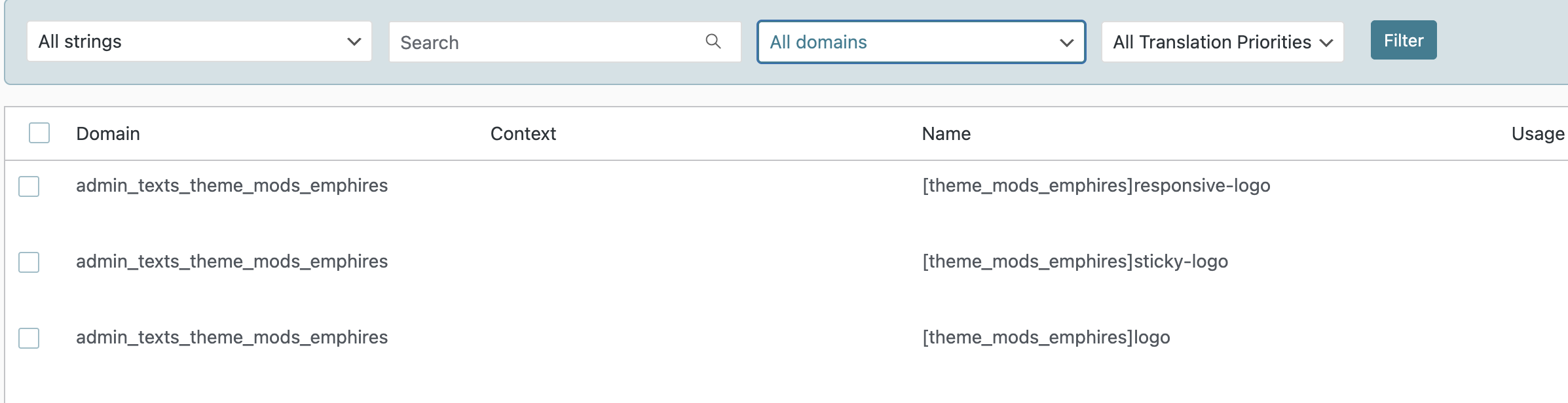
We recommend checking the admin texts for any untranslated URLs, particularly the logo URL. Once identified, add these URLs to the String Translation section of WPML. You should translate the URL using the URLs of the media files for the different languages. This step should help in resolving the inconsistency in translations across different languages.

If this solution does not apply to your case, or if it seems outdated, we highly recommend checking the related known issues, verifying the version of the permanent fix, and confirming that you have installed the latest versions of themes and plugins. If issues persist, please open a new support ticket.

This is the technical support forum for WPML - the multilingual WordPress plugin.

Everyone can read, but only WPML clients can post here. WPML team is replying on the forum 6 days per week, 22 hours per day.

Tagged: 

This topic contains 3 replies, has 0 voices.

Last updated by Lauren 5 months, 2 weeks ago.

Assisted by: Lauren.

Author Posts
November 6, 2025 at 8:24 pm

bostjanS-4

Background of the issue:
I am trying to translate my website from Slovene to five other languages each on it's own domain. I have used WPML automatic translations, which supposedly translated everything on my website but as you can see that's not the case. Some languages have translated some strings other languages show other strings translated. Main page for Croatian language is fully translated but Macedonian and Serbian is certainly not. In case you can't differentiate the languages I suggest you observe the issue when comparing Slovene original to Macedonian or Serbian websites because they use Cyrillic alphabet meanwhile other languages use Latin alphabet.

I have tried adding custom XML configuration, clearing cache, rebuilding JS/CSS but the issue still persists.

Symptoms:
WPML is not showing translated strings consistently across different languages. Some languages have certain strings translated, while others do not. Croatian appears fully translated, but Macedonian and Serbian are not. The inconsistency is noticeable when comparing the Slovene original to Macedonian or Serbian, as they use the Cyrillic alphabet. I have tried adding custom XML configuration, clearing cache, and rebuilding JS/CSS, but the issue persists.

Questions:
Why are some languages not showing translated strings consistently?
How can I ensure all languages are fully translated using WPML?

November 7, 2025 at 1:39 am #17555855

Lauren

Please tell me the name of the contact page in the original language so that I can see if updating it with Elementor resolves the issue.

November 7, 2025 at 2:24 pm #17557569

bostjanS-4

Hi Lauren, last night I got cut off and couldn't see the chat anymore.
I think that I figured out most of the problems, editing each elementor page in it's own translation seems to work. It's not the best solution but for now it's ok.
The only problem that still remains is that the media files links do not get translated therefore the elements that are displayed by the theme do not show up on translated pages. For example "SALAX" logo on .si has URL .si but when I open .hr page it still loads .si image and is therefore not displayed. I have tried duplicating files in library for every language but it didn't work. Can you help me with that? I would greatly appreciate it since this is the only problem parting me from finishing this project.

Thanks in advance!

November 7, 2025 at 5:10 pm #17558128

Lauren

I found the logo url in the admin texts and added them to String Translation. Please go there and translate the URL, using the URLs of the media files for the different languages, and let me know if this resolves the issue.

Screenshot 2025-11-07 at 12.04.47 PM.png