
This is the technical support forum for WPML - the multilingual WordPress plugin.
Everyone can read, but only WPML clients can post here. WPML team is replying on the forum 6 days per week, 22 hours per day.
| Sun | Mon | Tue | Wed | Thu | Fri | Sat |
|---|---|---|---|---|---|---|
| - | 10:00 – 17:00 | 10:00 – 17:00 | 10:00 – 17:00 | 10:00 – 17:00 | 10:00 – 17:00 | - |
| - | 18:00 – 19:00 | 18:00 – 19:00 | 18:00 – 19:00 | 18:00 – 19:00 | 18:00 – 19:00 | - |
Supporter timezone: Asia/Kathmandu (GMT+05:45)
This topic contains 16 replies, has 1 voice.
Last updated by Shekhar Bhandari 3 weeks, 6 days ago.
Assisted by: Shekhar Bhandari.
| Author | Posts |
|---|---|
| November 20, 2025 at 12:22 pm #17595465 | |
 nicolaiL-2 |
Background of the issue: Symptoms: Questions: |
| November 20, 2025 at 1:12 pm #17595845 | |
 Dražen Supporter Languages: English (English ) Timezone: Europe/Zagreb (GMT+02:00) |
Hello, To help us investigate this issue further , could you please try to reproduce it using a simple example on our test site? Test Site URL: $hidden link One of my colleagues will be taking over your case. They will review your findings once you have tested on the sandbox. Please let us know how it goes. Regards, |
| November 24, 2025 at 12:58 pm #17604933 | |
|
nicolaiL-2 |
Hello, I have added sample code to demo site. I added code in active theme functions.php file which adds the field in product variations. Image attached for sample. The Express production field getting copied for translation perfectly. But image selection field not getting copied. Please check and let me know how to make it copied over for translation. Originally this fields are getting added by my custom plugin. The code is same. Just added into theme for demo site. Already tried wpml.config in plugin as explained earlier. Regards, 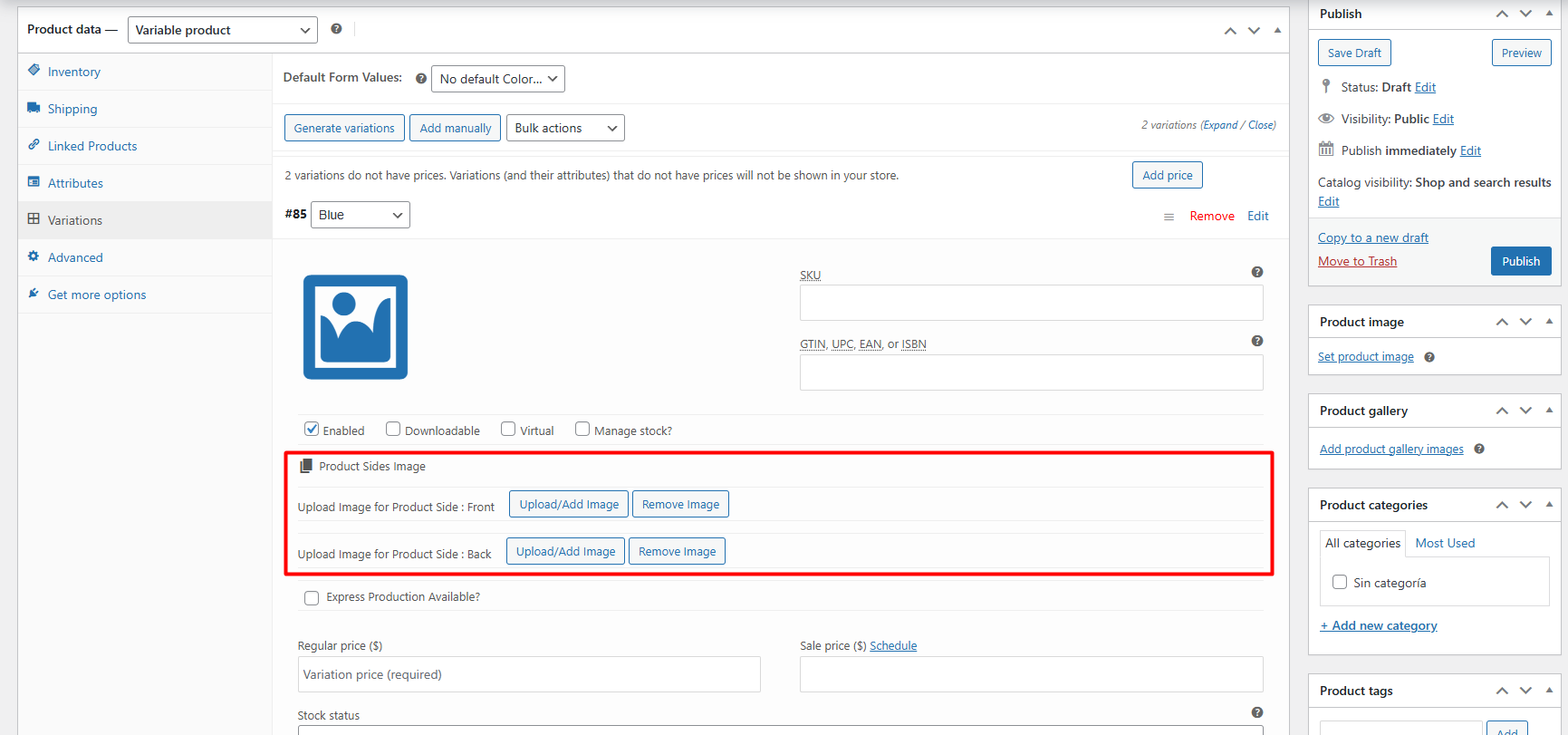 |
| November 25, 2025 at 9:16 am #17607143 | |
 Shekhar Bhandari WPML Supporter since 03/2015 Languages: English (English ) Timezone: Asia/Kathmandu (GMT+05:45) |
Hi there, I’m happy to help with this issue. I can confirm that wildcard support for custom field settings isn’t available at the moment. I reached out to our Tier 2 support team for more details, and they clarified that this currently falls under custom coding. They’ve shared a sample code snippet for you, but please note that we’re unable to provide support for or guarantee the functionality of custom code. I recommend backing up your site before making any changes and then adjusting the code as needed to achieve the desired results.
<?php
/**
 * One-off: mark all meta keys starting with "product_side_variation_image_"
 * as copy custom fields in WPML.
 *
 * Run via wp eval-file OR drop as temp MU plugin and call
 * gb_wpml_mark_test_fields_translate() once.
 */

function gb_wpml_mark_test_fields_translate() {
    if ( ! function_exists( 'get_option' ) ) {
        return;
    }

    if ( ! is_admin() || ! current_user_can( 'manage_options' ) ) {
        return;
    }

    global $wpdb;

    // 1) Collect all distinct meta_keys that match your prefix.
    $meta_keys = $wpdb->get_col(
        $wpdb->prepare(
            "SELECT DISTINCT meta_key
             FROM {$wpdb->postmeta}
             WHERE meta_key LIKE %s",
            'product_side_variation_image_%'
        )
    );

    if ( empty( $meta_keys ) ) {
        wp_die( 'No meta keys found for prefix product_side_variation_image_.' );
    }

    // 2) Read WPML settings via hooks (wpml_setting / wpml_sub_setting).
    // This is effectively a wrapper around icl_sitepress_settings.
    $tm_settings = apply_filters( 'wpml_setting', array(), 'translation-management' );
    $cf_translation = apply_filters(
        'wpml_sub_setting',
        array(),
        'translation-management',
        'custom_fields_translation'
    );

    if ( ! is_array( $tm_settings ) ) {
        $tm_settings = array();
    }
    if ( ! is_array( $cf_translation ) ) {
        $cf_translation = array();
    }

    // 3) Mark all matching keys as "Translate".
    // If constants are not loaded for some reason, fall back to 2.
    if ( defined( 'WPML_COPY_CUSTOM_FIELD' ) ) {
        $translate_value = WPML_COPY_CUSTOM_FIELD;
    } else {
        $translate_value = 2;
    }

    $changed = 0;

    foreach ( $meta_keys as $key ) {
        if ( ! isset( $cf_translation[ $key ] ) || (int) $cf_translation[ $key ] !== $translate_value ) {
            $cf_translation[ $key ] = $translate_value;
            $changed++;
        }
    }

    // 4) Write back into the full icl_sitepress_settings option.
    $all_settings = get_option( 'icl_sitepress_settings' );
    if ( ! is_array( $all_settings ) ) {
        $all_settings = array();
    }

    if ( ! isset( $all_settings['translation-management'] ) || ! is_array( $all_settings['translation-management'] ) ) {
        $all_settings['translation-management'] = array();
    }

    $all_settings['translation-management']['custom_fields_translation'] = $cf_translation;

    update_option( 'icl_sitepress_settings', $all_settings );

    wp_die(
        sprintf(
            'Done. Marked %d meta keys starting with "product_side_variation_image_" as copied (WPML_COPY_CUSTOM_FIELD).',
            $changed
        )
    );
}

// Example trigger: /wp-admin/?run_wpml_test_fields_translate=1
add_action( 'admin_init', function () {
    if ( isset( $_GET['run_wpml_test_fields_translate'] ) ) {
        gb_wpml_mark_test_fields_translate();
    }
} );
You have to use the parameter - e.g. /wp-admin/?run_wpml_test_fields_translate=1 to make the code work. Thanks |
| November 26, 2025 at 9:22 am #17610599 | |
|
nicolaiL-2 |
I have added this code into my plugin and it also ran successfully and showed message: "Done. Marked 412 meta keys starting with "product_side_variation_image_" as copied (WPML_COPY_CUSTOM_FIELD)." Still if i see in admin, its not copied for variations. Check attached image. Same as on frontend, its not able to get the image for translated product page. One more thing. It did show 412 first time. Later i created new product with variation and all. Added translation and ran the url again. It shows below message: "Done. Marked 0 meta keys starting with "product_side_variation_image_" as copied (WPML_COPY_CUSTOM_FIELD)." Please check and do needful. 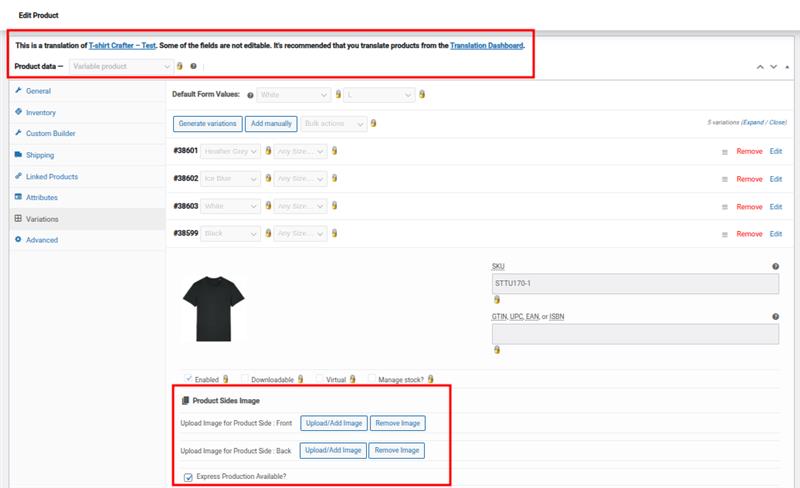 |
| November 26, 2025 at 11:21 am #17611270 | |
|
Shekhar Bhandari WPML Supporter since 03/2015 Languages: English (English ) Timezone: Asia/Kathmandu (GMT+05:45) |
Hello there, The code only saves the fields as copy preferences, can you check that. Once it's set as copy, you can update the product in default languages and the field should be synchronized. Thanks |
| November 26, 2025 at 1:07 pm #17612110 | |
|
nicolaiL-2 |
Nope. That didnt work either. I did below steps. - Go Edit main languange product -> press update without making any adjustment. - Still missing in translation - Go edit main language product -> went to edit variation, removed selected file, again selected file -> Save variation -> Update product - Still missing in translation |
| November 27, 2025 at 4:36 am #17613777 | |
|
Shekhar Bhandari WPML Supporter since 03/2015 Languages: English (English ) Timezone: Asia/Kathmandu (GMT+05:45) |
Hello, Could you please verify if the fields are set to “Copy” after running the operations? As this is a custom code, we can only provide general suggestions. You are welcome to modify the provided code and check if it resolves the issue. We eagerly await your response. Thank you, |
| November 27, 2025 at 8:45 am #17614042 | |
|
nicolaiL-2 |
Hello Shekhar, Where do i find that this fields are set to copy after running operations? Regards, |
| November 27, 2025 at 8:55 am #17614133 | |
|
Shekhar Bhandari WPML Supporter since 03/2015 Languages: English (English ) Timezone: Asia/Kathmandu (GMT+05:45) |
Hello there, You can go to WPML->Settings->Custom Fields Settings and check if the newly created field is set as copy. Thanks |
| November 27, 2025 at 9:16 am #17614201 | |
|
nicolaiL-2 |
Hello, There are all separate entries for all product variation meta and they are all set to copy. Still they are not copied over when creating translation. Regards, 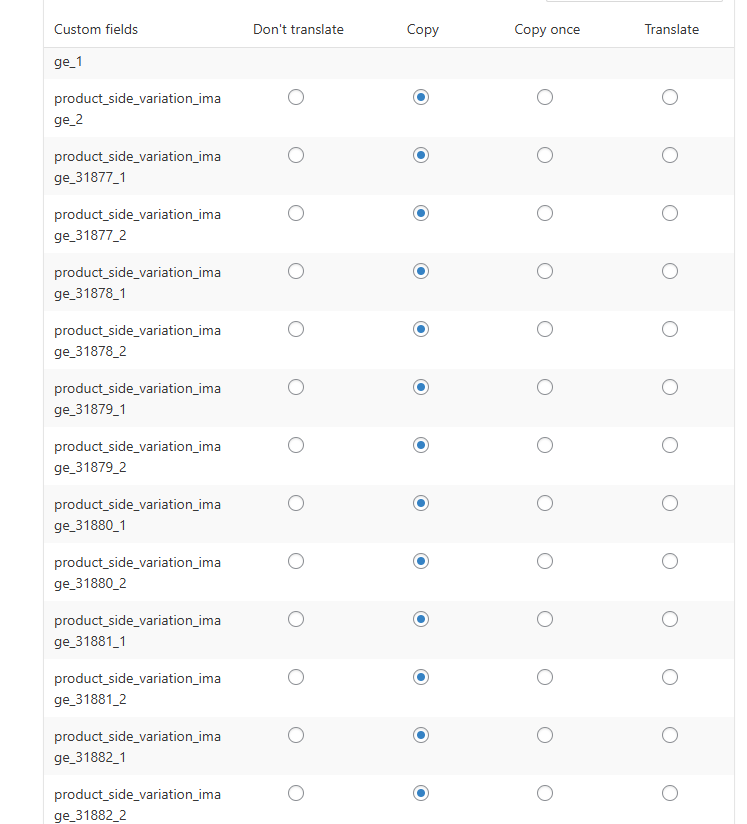 |
| November 27, 2025 at 9:18 am #17614217 | |
|
Shekhar Bhandari WPML Supporter since 03/2015 Languages: English (English ) Timezone: Asia/Kathmandu (GMT+05:45) |
Hello there, Can you provide me a product url where I can test this? Further, To debug this issue further, I would need to check your site settings once, for this I would need temporary access (wp-admin and ftp) to your site. So could you please provide me with those details, you will find the needed fields for this below the comment area when you log in to leave your next reply. This info is private and available to you and WPML supporters only. Note: Look forward to your reply. Thanks |
| December 10, 2025 at 11:54 am #17652041 | |
|
Shekhar Bhandari WPML Supporter since 03/2015 Languages: English (English ) Timezone: Asia/Kathmandu (GMT+05:45) |
Hello there, Can you also provide me product urls where I can see the issue? Look forward to your reply. Thanks |
| December 12, 2025 at 6:45 am #17657856 | |
|
nicolaiL-2 |
Hello, This is live site urls but products are there on staging as well. In swedish: Select color and click personalisation, t-shirt will open with image on canvas Change language to english: hidden link Because WPML configured to domain, on from staging it redirect to live site when language change. You can configure on staging to just add langauge suffix to urls and try it out. Regards, |
| December 12, 2025 at 8:25 am #17658194 | |
|
Shekhar Bhandari WPML Supporter since 03/2015 Languages: English (English ) Timezone: Asia/Kathmandu (GMT+05:45) |
Hello, Thank you for sharing the details. I’m sorry to inform you that making this work fully with WPML will require additional development. After reviewing how the plugin works, here’s what I found: 1. For each variation, the plugin allows adding several custom fields. These fields are named using the following format: 'product_side_variation_image_' . $variation->ID . '_' . ($key + 1); 2. When WPML is installed and a product is translated, it receives a new post ID. The same behavior applies to product variations. 3. If the custom fields are set to “Copy” in WPML, they will be copied to the translated product variations using the existing methods we discussed. 4. However, the copied custom field names remain unchanged, for example: product_side_variation_image_31912_1 5. Since your plugin expects the custom field name to include the **current variation ID**, it cannot find the fields in secondary languages because the ID in the field name belongs to the default language variation. Possible solutions: * Manually set these custom fields for each secondary language. Thank you. |








The topic ‘[Closed] I need help with proper code to make my custom fields copy when adding translation’ is closed to new replies.