[Resolved] Split: Missing gallery in product translation
This thread is resolved. Here is a description of the problem and solution.
Problem: If you're experiencing issues where featured images are set correctly in the backend but not displaying on the frontend in different language versions, this might be due to thumbnail issues. Solution: We recommend trying to regenerate your WordPress thumbnails. This can often resolve discrepancies between backend settings and frontend displays. You can follow the instructions on how to regenerate thumbnails here. If this does not solve the issue, consider replacing the image and relinking it in your content.
Please note that this solution might be outdated or not applicable to your specific case. We highly recommend checking related known issues at https://wpml.org/known-issues/, verifying the version of the permanent fix, and confirming that you have installed the latest versions of themes and plugins. If the problem persists, please open a new support ticket.
This is the technical support forum for WPML - the multilingual WordPress plugin.
Everyone can read, but only WPML clients can post here. WPML team is replying on the forum 6 days per week, 22 hours per day.
Ok - so it is working with updating the English product after having published the german one. But featured image are not set - is there a setting for that?
You can see the here: hidden link
hidden link
weird thing is, that it seems to be set in the backend where they both have the exact same. Any ideas?
I would like to request temporary access (wp-admin and FTP) to your site to take a better look at the issue. It would be better to a testing site where the issue is replicated.
You will find the needed fields for this below the comment area when you log in to leave your next reply. The information you will enter is private which means only you and I can see and have access to it.
Maybe I'll need to replicate your site locally. For this, I’ll need to temporarily install a plugin called “Duplicator” or "All in One WP Migration" on your site. This will allow me to create a copy of your site and your content. Once the problem is resolved I will delete the local site. Let me know if this is ok with you.
IMPORTANT
- Please make a backup of site files and database before providing us access.
- If you do not see the wp-admin/FTP fields this means your post & website login details will be made PUBLIC. DO NOT post your website details unless you see the required wp-admin/FTP fields. If you do not, please ask me to enable the private box. The private box looks like this:
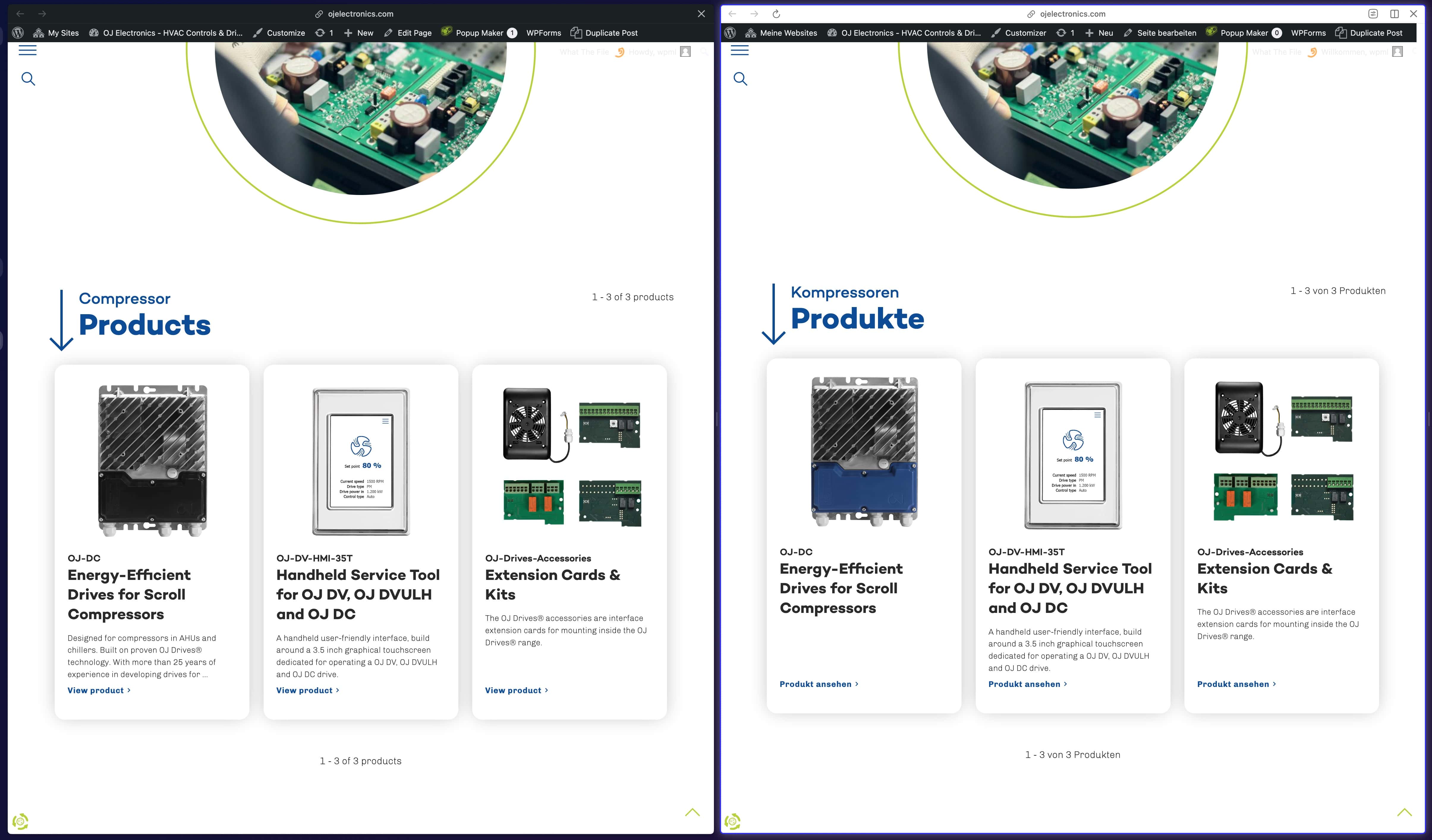
I just want to make sure I'm checking the correct issue. Please check the attached image. The issue is that the OJ-DC product shows different featured images in the page you sent, is that right?
Thank you for sharing. I wasn't able to see any issues directly on your website, so I want to test different solutions. To do that without harming your website, I'd like to get a copy of it. Can you please share one with me? Here are the instructions: https://wpml.org/pt-br/faq/provide-supporters-copy-site/
Thank you so much for sharing the staging version. What I really need is a copy of your website, to analyze it locally. Can you please do that for me? Please let me know if it's possible.
Unfortunately, the backup file you provided did not work. The website had errors and is not displaying properly. Can you please try again with the All In One WP Migration plugin? There are no settings required, you can simply install it, create the backup file and share it with me 🙂
Languages: English (English )Spanish (Español )German (Deutsch )
Timezone: America/Lima (GMT-05:00)
My apologies, but I can not longer access your site, as the last credentials were posted on a public comments and I am obligated to remove such information.
I suppose that hidden link is a page, correct?
This means you can go to Pages > All page, look out for the page in question and click "Edit".
Then make an edit to the original content and save the page again.
Now, inside the right sidebar of the WordPress Editor at "Language" click the translation status icon which will open the WPML Translation Editor.
Complete the translation to 100%.
Let me know if something is unclear about this workflow or in case this does not solve the issue.
Also, I have enabled the private reply form again, so that you can provide me access to your staging site.