Skip to content Skip to sidebar

This thread is resolved. Here is a description of the problem and solution.

Problem:
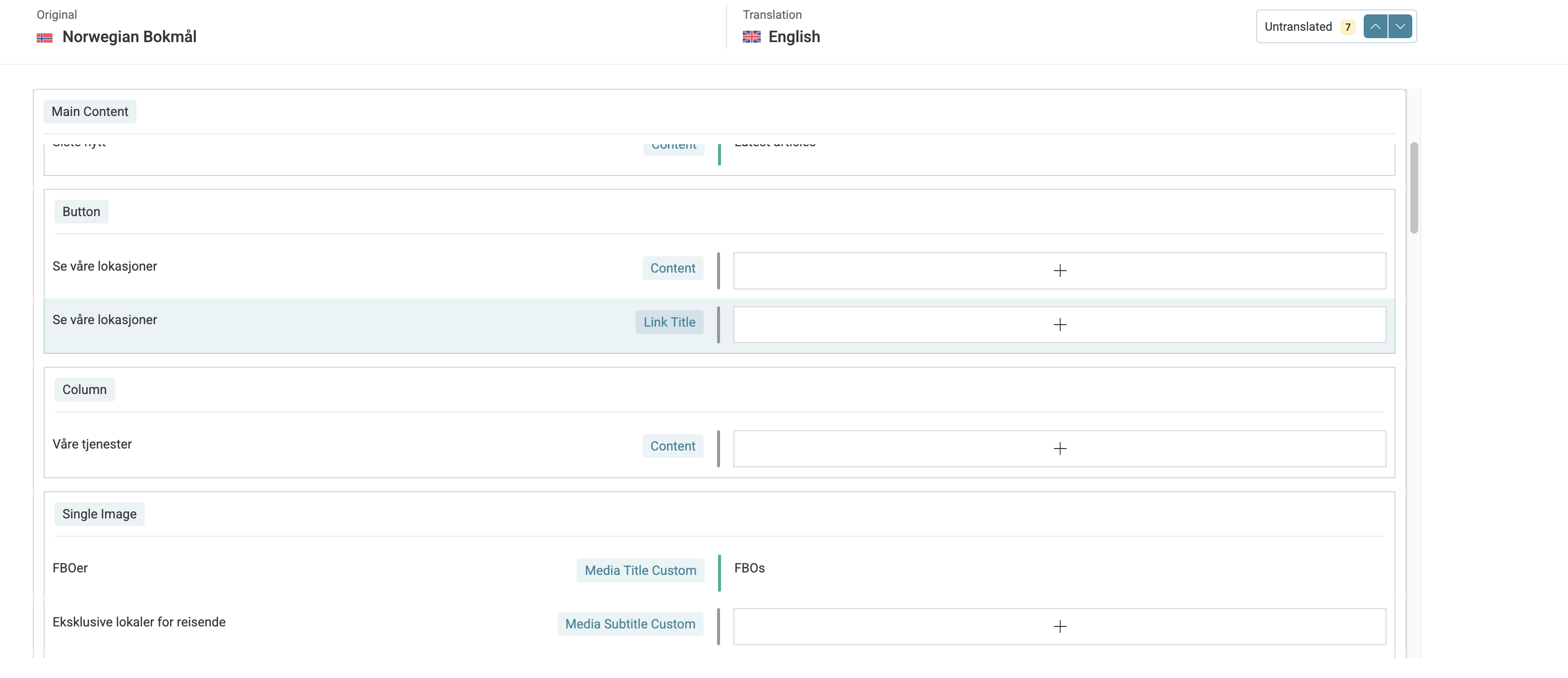
If you're unable to see where to translate custom title text and custom description text for images in the Uncode theme, particularly in the second section of the home page.
Solution:
We recommend following these steps to configure the translation settings for custom texts:
1. Navigate to WPML → Settings → Custom XML Configuration.
2. Add the following XML configuration:

<wpml-config>
  <shortcodes>
    <shortcode>
      <tag>vc_single_image</tag>
      <attributes>
        <attribute>media_title_custom</attribute>
        <attribute>media_subtitle_custom</attribute>
      </attributes>
    </shortcode>
  </shortcodes>
</wpml-config>

3. Save the configuration.
4. Make a slight change to the original page and update it (revert the change afterward).
5. The custom title text and custom description should now be available for translation.
For more detailed guidance, refer to the WPML documentation on language configuration files.

Please note that this solution might be outdated or not applicable to your specific case. We highly recommend checking related known issues at https://wpml.org/known-issues/, verifying the version of the permanent fix, and confirming that you have installed the latest versions of themes and plugins. If the issue persists, please open a new support ticket.

This is the technical support forum for WPML - the multilingual WordPress plugin.

Everyone can read, but only WPML clients can post here. WPML team is replying on the forum 6 days per week, 22 hours per day.

Tagged: 

This topic contains 4 replies, has 0 voices.

Last updated by Andrey 3 months, 3 weeks ago.

Assisted by: Andrey.

Author Posts
December 15, 2025 at 2:38 pm #17664690

guroT

Hi there!
I'm not seeing where I can translate custom title text and custom description text for images in the second section on the home page (four images on a row with icon, title and text). Can you help? I've added this text in the advanced section of images in Uncode theme. The screenshots I try to upload fail, but hope you can see what I mean on the site.

All the best,
Guro

December 15, 2025 at 7:55 pm #17665646

Andrey
WPML Supporter since 06/2013

Languages: English (English ) Russian (Русский )

Timezone: Europe/Kyiv (GMT+03:00)

Hello Guro,

The screenshots you tried to upload may be larger than what the support forum allows. Could you please try resizing the images, or alternatively, use a file-sharing service and share the link with me? I need to check how your images are being uploaded using your current theme.

Also, have you tried translating media directly from the Media Library by switching the language in the top admin bar, then editing the media item?

I’ve enabled debug information for this support ticket. Please follow the instructions in the link below to retrieve the debug information from your site and share it with us:
http://wpml.org/faq/provide-debug-information-faster

December 17, 2025 at 5:16 pm #17672167

guroT

Hello Andrey!

Thank you for coming back to me.

I've resized the screenshot of the section with images that I can't find how to translate.

I don't see where I can translate the media caption and description from the media library when switching the language. But I don't think it's the caption and description from the media file itself, it's text added to the overlay, I think.

While I'm here and I've pasted the debug info... and I understand if this has to go in another ticket. But the posts on the blog page in my translated version, does not load correctly. Can you see why? hidden link

All the best,
Guro

Skjermbilde 2025-12-17 kl. 17.56.33.png
December 18, 2025 at 9:42 pm #17676258

Andrey
WPML Supporter since 06/2013

Languages: English (English ) Russian (Русский )

Timezone: Europe/Kyiv (GMT+03:00)

Thank you for your feedback, Guro.

Please also show me in the screenshot exactly where in the theme you added the title text and custom description.

I need to request temporary access (wp-admin and FTP) to your site—preferably to a test site where the problem has been replicated, if possible—to be more helpful. When you log in to leave your next reply, you will find the needed fields below the comment area. The information you enter is private, meaning only you and I can see and access it.

December 23, 2025 at 1:18 pm #17684782

Andrey
WPML Supporter since 06/2013

Languages: English (English ) Russian (Русский )

Timezone: Europe/Kyiv (GMT+03:00)

Hello Guro,

Thank you for providing more details and the access credentials.

I have made the config for custom title text and custom description using the following article:
https://wpml.org/documentation/support/language-configuration-files/

1. Went to WPML → Settings → Custom XML Configuration

2. Added

<wpml-config>
  <shortcodes>
    <shortcode>
      <tag>vc_single_image</tag>
      <attributes>
        <attribute>media_title_custom</attribute>
        <attribute>media_subtitle_custom</attribute>
      </attributes>
    </shortcode>
  </shortcodes>
</wpml-config>

3. Saved the config.

4. Made a slight change to the original page, updated the page (reverted the change of course).

5. The custom title text and custom description have been added to the translation.

I hope this helps.

Screenshot 2025-12-23 at 15.12.54.png