Home›Support›English Support›[Resolved] From a user experience perspective, when a user enters the German homepage and then jumps to German,...
[Resolved] From a user experience perspective, when a user enters the German homepage and then jumps to German,...
This thread is resolved. Here is a description of the problem and solution.
Problem: You are working on a site and facing an issue where, after selecting the German language on the homepage, the site switches back to the English version instead of staying on the German pages. Solution: This problem is not related to redirects as the URL points correctly with HTTP Status 200. We recommend checking the translation of your menu to ensure that each button is properly translated and that the link targets are correctly set. This includes items like 'Elektronik', 'Mode', 'Geschenke', 'Musik', and 'Mein Konto' in both the main and footer menus. You can translate the menu by following the steps outlined in our documentation: Translating Menus.
If this solution does not resolve your issue, or if it seems outdated or irrelevant to your case, we highly recommend checking related known issues at https://wpml.org/known-issues/, verifying the version of the permanent fix, and confirming that you have installed the latest versions of themes and plugins. If further assistance is needed, please open a new support ticket at WPML support forum.
This is the technical support forum for WPML - the multilingual WordPress plugin.
Everyone can read, but only WPML clients can post here. WPML team is replying on the forum 6 days per week, 22 hours per day.
Background of the issue:
I am working on a site under development and trying to ensure that when users select the German language on the homepage, they remain on the German version of the site without it switching to English.
Symptoms:
When a user selects the German language on the homepage, the site switches to the English version, and users have to manually select German again.
Questions:
Why can't users stay on the German web pages after selecting the German language initially?
Can you provide a screenshot to show where the settings are to fix this issue?
Languages: English (English )Spanish (Español )German (Deutsch )
Timezone: Europe/Madrid (GMT+02:00)
So, if you deactivate Yoast Premium, does it work?
If yes, please check whether there’s a specific redirect set for German that might be causing the issue.
I close Yoast,but it still happen. I don’t want my German users to filter by language again when turning pages or opening other pages in the navigation bar, from English to German.
Languages: English (English )Spanish (Español )German (Deutsch )
Timezone: Europe/Madrid (GMT+02:00)
Could you let me know if there are any other server-side redirects (301 or 302) configured? If possible, please provide a publicly accessible URL endpoint I can use to verify the exact redirect path on your server. Otherwise, I don’t have anything I can test to confirm the issue and its origin.
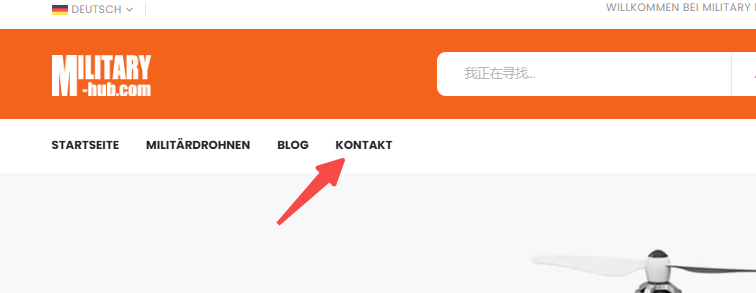
If you are a user, when you come to the German homepage, you want to open Kontakt, but after you open contact us, you jump to the English content(hidden link) instead of the German content. You can try this path.
Languages: English (English )Spanish (Español )German (Deutsch )
Timezone: Europe/Madrid (GMT+02:00)
Hi,
thanks! This isn’t a redirect issue, the URL correctly points to: hidden link (No redirect happens here, HTTP Status 200)
Please review the translated menu to ensure the button is translated properly there and that the link target is set correctly. The same is the case with "Blog" in the same menu. And same in footer:
- Elektronik
- Mode
- Geschenke
- Musik
- Mein Konto