
This thread is resolved. Here is a description of the problem and solution.
Problem:
The client is experiencing issues with hreflang and canonical tags across their multilingual sites. Specifically, hreflang tags are not appearing correctly, and the canonical tags are incorrect on certain sites. Additionally, the client is concerned about the absence of an x-default hreflang tag and the visibility of hreflang tags on a non-webshop site.
Solution:
We recommend enabling the option "Adjust IDs for multilingual functionality" in WPML > Languages to correct the hreflang and canonical tag issues. This setting helps ensure that each language version of the site uses the correct URLs in hreflang and canonical tags. Regarding the x-default hreflang tag, it's beneficial to include it as it serves as a fallback for users whose languages are not covered by your specified hreflang tags. If your default site language is Dutch, you can still use the Dutch domain as the x-default. For the non-webshop site, ensure that hreflang tags are not implemented if they do not share the same content as the other sites.
If these steps do not resolve your issues or if the information seems outdated, we highly recommend checking related known issues at https://wpml.org/known-issues/, verifying the version of the permanent fix, and confirming that you have installed the latest versions of themes and plugins. If problems persist, please open a new support ticket.
This is the technical support forum for WPML - the multilingual WordPress plugin.
Everyone can read, but only WPML clients can post here. WPML team is replying on the forum 6 days per week, 22 hours per day.
Tagged: Bug
This topic contains 14 replies, has 0 voices.
Last updated by Long Nguyen 2 months, 1 week ago.
Assisted by: Long Nguyen.
| Author | Posts |
|---|---|
| December 28, 2025 at 12:54 pm #17690467 | |
 lobkeB |
Hello WPML support, I have a question about the hreflang tag. I have 'a different domain per language' and I have disabled 'Display alternative languages in the HEAD section.' because the output was not correctly. ChatGPT made me a PHP code snippet, so now I have hreflang tags. Perhaps you can have a look at the source code of hidden link Is the hreflang tags correct? Is it ok that I don't have a x-default hreflang tag? Because I really don't have one. My default website is dutch, but it is weird to use that domain, right? Should I have an x-default or is it no problem for SEO? Also sometimes in the snippet made by ChatGPT heatperformance.com is not visible in the hreflang tags. Because this website is not a webshop, it is not a copy of all the other websites. However, for a couple of weeks heatperformance.com was shown in the hreflang tags. Is this a big SEO problem, or is it nothing to worry about? Is it a problem that on heatperformance.com the same hreflang tags appear as well? On this site no hreflang tags should appear, because this site is not a webshop as the others. Also the canonicals were not working correctly. On the .de and .ch website I saw .at canonicals. So ChatGPT made me a php code snippet for correct canonicals. Is my work around correct? Many, many thanks for your answers! |
| December 28, 2025 at 2:04 pm #17690486 | |
|
lobkeB |
Another question, now I see suddenly in the source code of heatperformance.ch that heatperformance.de appears: <link rel="alternate" type="application/rss+xml" title="HeatPerformance® » Feed" href="hidden link" /> |
| December 28, 2025 at 2:13 pm #17690489 | |
 Christopher Amirian WPML Supporter since 07/2020 Languages: English (English ) Timezone: Asia/Yerevan (GMT+04:00) |
Hi, I checked the .ch site and I could only see 2 .de instances: 1) The Hreflang one 2) data-rocket-prefetch The first one is for HREFANG and is how it is supposed to work. The second one I think, is related to WP Rocket plugin that refetches all the domains including the other separate domains. For the RSS feeds I see .ch domains. (please check the screenshot)  |
| December 28, 2025 at 2:13 pm #17690504 | |
|
lobkeB |
I see in the source code on the category pages of heatperformance.be this: : class="yoast-schema-graph">{"@context":"hidden link","@graph":[{"@type":"CollectionPage","@id":"hidden link","url":"hidden link" So instead of heatperformance.nl I see heatperformance.be. Same goes for .ch and .de. On these websites I see heatperformance.at. (same language cluster) |
| December 28, 2025 at 4:05 pm #17690651 | |
|
lobkeB |
The screenshot you send me from heatperformance.ch was a screenshot of the homepage. Only the category pages are showing the wrong rss feed. So: |
| December 29, 2025 at 1:03 pm #17694822 | |
|
Christopher Amirian WPML Supporter since 07/2020 Languages: English (English ) Timezone: Asia/Yerevan (GMT+04:00) |
Hello and thank you for the details. We will check that too about the RSS. I installed a clean installation and imported some products and added categories and installed Yoast + WPML SEO. I can not see the Canonical URLs there, it seems the category needs to be added a Canonical manually? May I ask you to check and see if I set it up correctly in Yoast? Here is the Dashboard access: hidden link I want to check and see if the sme thing can be seen on the clean installation. If you can replicate the issue there I will immediately report. If not, I will need you to test a thing: - IMPORTANT STEP! Create a backup of your website. Or better approach will be to test this on a copy/staging version of the website to avoid any disruption of a live website. See if the same problem for Canonical URLs happen when the directory mode is enabled? That will be a great help to identify if the issue is related to the separate domain mode or not. Most probably we will need you to provide a copy of the website and give us the login information for further investigation. You can set the next reply as private to give the login information for the copied website. Thanks. |
| January 2, 2026 at 7:38 am #17699778 | |
|
lobkeB |
Hello Christopher, Thanks for building this installation. There is no canonical - not only on the category page as well as on the product pages. On the category page "hidden link" I filled out the field Canonical URL manually. But still the canonical does not appear in the source code. There must be somewhere some setting I think. But I can't find it either. Best regards, 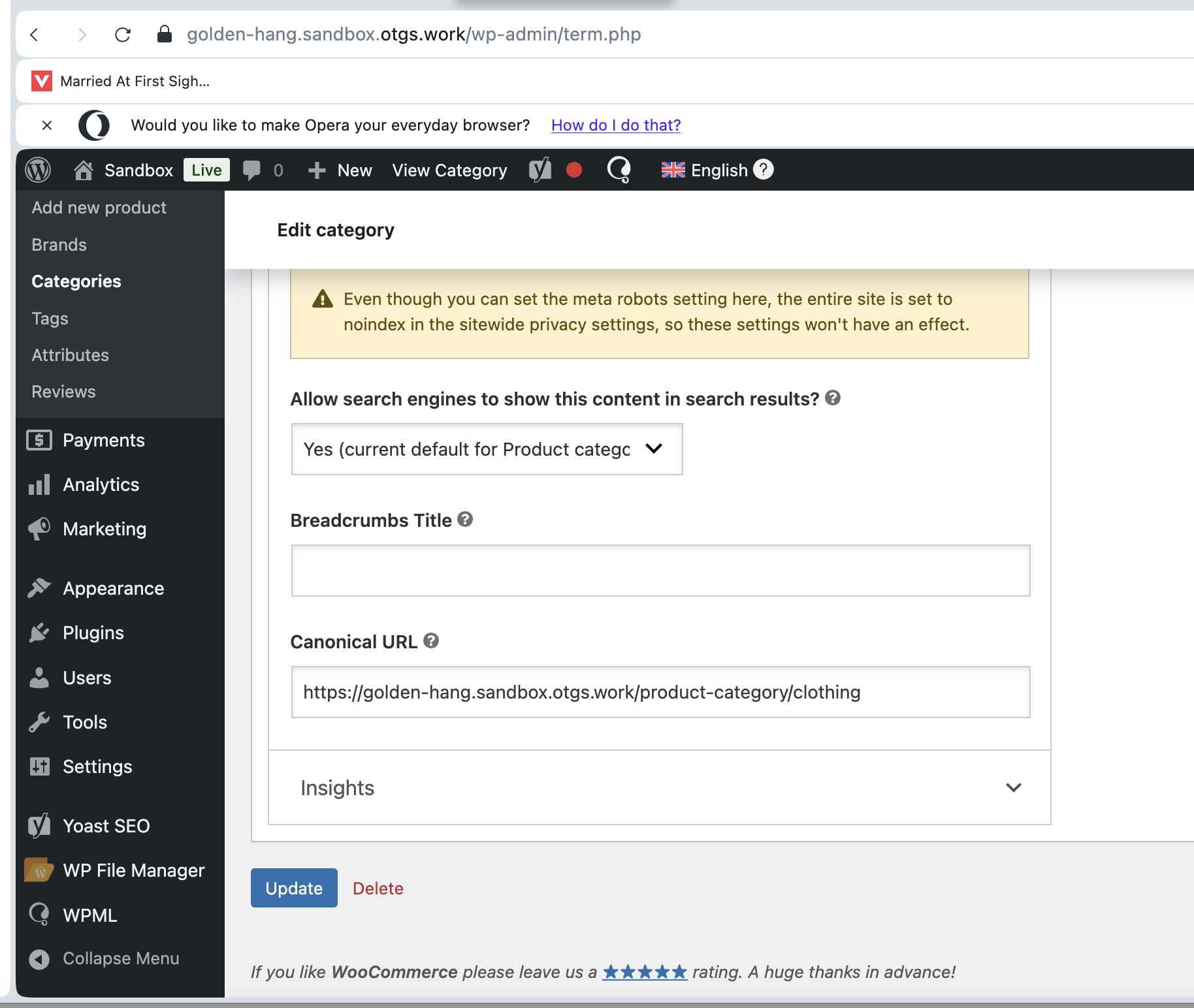 |
| January 2, 2026 at 8:53 am #17699840 | |
 Long Nguyen WPML Supporter since 02/2022 Languages: English (English ) Vietnamese (Vietnamese ) Timezone: Asia/Ho_Chi_Minh (GMT+07:00) |
Hi Lobke, I’m Long from the WPML Development team, I’m happy to help you with this issue. I'm sorry about the experience with canonical URLs on the sandbox site. The site is published and shared, we use some code to enable the option "Discourage search engines from indexing this site" on the Settings > Reading page by default to prevent indexing content, so the canonical won't be created by Yoast. To check the issue with the canonical of product category pages on your site further, please let me know your custom code snippet that you are using. And I would like to request temporary access (wp-admin and FTP) to your site so I can take a better look at the issue. It would be better to have a testing site where the issue is replicated. Your next reply is set to private to share the info. ❌ IMPORTANT: Please backup your database and website before proceeding ❌ Looking forward to your reply. |
| January 9, 2026 at 9:15 am #17715288 | |
|
lobkeB |
Hi Long, Thanks for your reply. I have actually 2 code snippets on my website. The first one: /** // Alleen voor WooCommerce productcategorie-archieven if ( $term && ! is_wp_error( $term ) ) { if ( ! is_wp_error( $url ) ) { return $canonical; And a second one, as on sites which share the same language, a wrong canonical was shown. For example on our .be website .nl canonicals were shown. This is the second code snippet: /** if ( is_admin() ) { $host = $_SERVER['HTTP_HOST'] ?? ''; $scheme = is_ssl() ? 'hidden link' : 'hidden link'; // Geen querystrings in canonical return esc_url( $current ); Unfortunately I don't have a test environment. I used to have it, but it was useless because a lot of plugins (WPML as well) did not function. Why don't we enable the this for a moment: "Discourage search engines from indexing this site" on the Settings > Reading page by default to prevent indexing content, so the canonical won't be created by Yoast. And then check of the canonicals are shown on the category pages of the sandbox environment. Best regards, |
| January 9, 2026 at 10:04 am #17715484 | |
|
Long Nguyen WPML Supporter since 02/2022 Languages: English (English ) Vietnamese (Vietnamese ) Timezone: Asia/Ho_Chi_Minh (GMT+07:00) |
Hi, If you want to test on a staging site with the canonical URL, please check the information in the private reply below. I setup another site on Cloudways with WPML installed so you can feel free to make the test. Besides that, I would like to request temporary access (wp-admin and FTP) to your site so I can take a better look at the issue. If you agree, your next reply is set to private to share the info. Thanks. |
| January 13, 2026 at 4:43 am #17723517 | |
|
Long Nguyen WPML Supporter since 02/2022 Languages: English (English ) Vietnamese (Vietnamese ) Timezone: Asia/Ho_Chi_Minh (GMT+07:00) |
Hi, I can understand the issue with the RSS URL. It happens when you have the same category slug across languages, for example: "verwarmde-handschoenen" "beheizbare-handschuhe" To fix the issue, please go to WPML > Languages > Enable option "Adjust IDs for multilingual functionality" so WPML can adjust the category ID correctly in the frontend. Looking forward to your reply. |
| January 15, 2026 at 12:26 pm #17733316 | |
|
lobkeB |
Hi Long, Many thanks! |
| January 16, 2026 at 3:16 am #17735614 | |
|
Long Nguyen WPML Supporter since 02/2022 Languages: English (English ) Vietnamese (Vietnamese ) Timezone: Asia/Ho_Chi_Minh (GMT+07:00) |
Hi, I think we can mark this ticket as Resolved. Feel free to open a new ticket if you have any questions. Thank you. |
| January 19, 2026 at 7:33 am #17741112 | |
|
lobkeB |
Dear Long, Many thanks for resolving the RSS issue. As for the canonicals on the category pages: It is normal that they don't appear? So I should continue using my PHP code snippets I send you earlier? Best regards, |
| January 19, 2026 at 9:03 am #17741437 | |
|
Long Nguyen WPML Supporter since 02/2022 Languages: English (English ) Vietnamese (Vietnamese ) Timezone: Asia/Ho_Chi_Minh (GMT+07:00) |
Hi, The canonical URL is displayed on your product category page properly. Just on our sandbox site, we disable it because the sandbox site shouldn't be available in the search result. Thanks.  |










