This thread is resolved. Here is a description of the problem and solution.
Problem: The client was trying to translate a link to the homepage using a static URL in a Dynamic Link Element within Elementor, which was not working as expected. Solution: We advised the client to avoid using '/' as the URL for the homepage and instead use the complete URL. This allows WPML to automatically find the homepage translation. If the client prefers to use '/', they need to manually translate it using the Advanced Translation Editor. For more details, visit how to translate URLs using the Advanced Translation Editor. Additionally, for Elementor, we recommended using the Text Editor widget to add a link, which can then be translated in WPML's Advanced Translation Editor. We implemented this solution for the client, and it resolved the issue.
If this solution does not apply to your case, or if it seems outdated, please check the related known issues, verify the version of the permanent fix, and confirm that you have installed the latest versions of themes and plugins. If the issue persists, we highly recommend opening a new support ticket at WPML support forum.
This is the technical support forum for WPML - the multilingual WordPress plugin.
Everyone can read, but only WPML clients can post here. WPML team is replying on the forum 6 days per week, 22 hours per day.
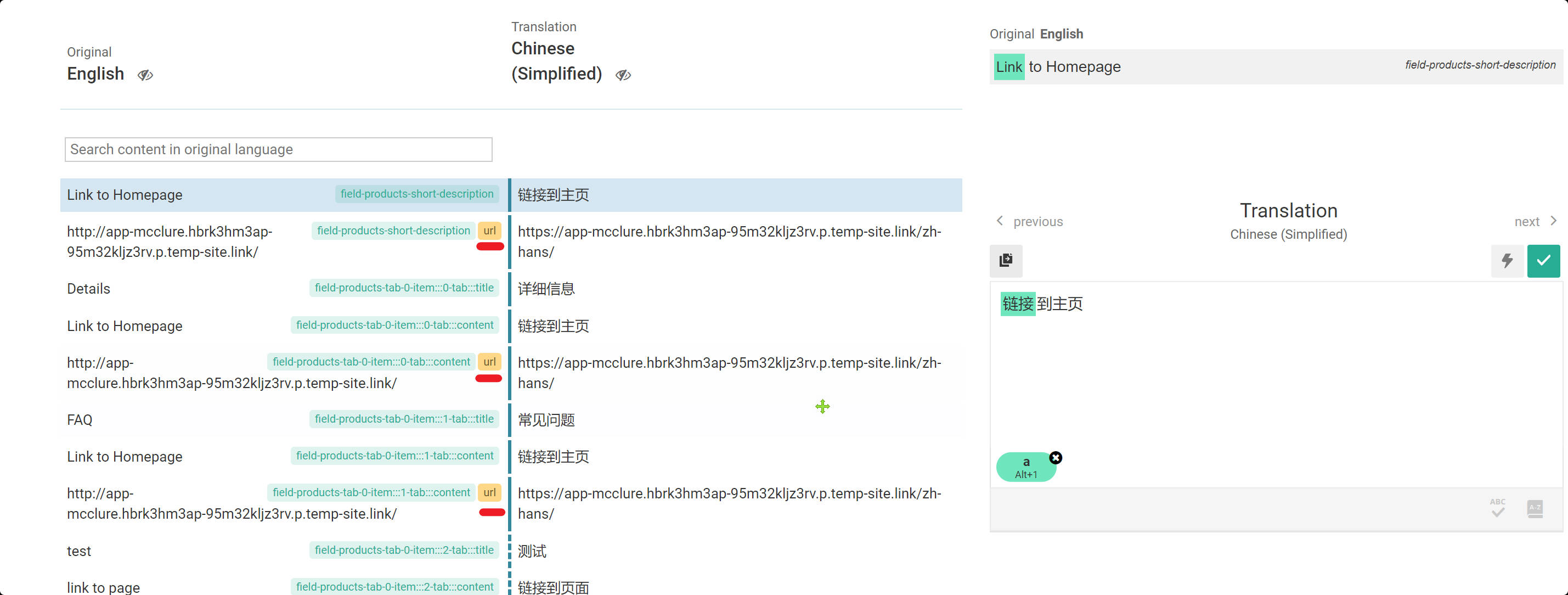
You used / as the URL for the homepage on the page which is not recommended.
You need to use the complete URL:
hidden link
Then WPML will find the homepage translation automatically.
If you want to keep / then you need to go to Advanced Translation Editor and search for / at the top left section of the screen and translate them manually:
Thank you, I'd appreciate it if you could give me the URL/User/Pass of your WordPress dashboard after you make sure that you have a backup of your website.
It is absolutely important that you give us a guarantee that you have a backup so if something happens you will have a point of restore.
Make sure you set the next reply as private.
I will try to check and see if there is something can be done on your installation. If the problem continues I will need to create a clean installation of WordPress WPML and Elementor and ask you to install JetEngine so you can replicate the issue on that installation top be able to report this to the compatibility team.
Thank you for the login info. I checked and the Dynamic Link Element is not meant for adding URLs with static content.
You will need to select something dynamic from the meta information available for you in the list in the options of that element.
If you want to have a link to the homepage of the website please use the Text Editor widget in Elementor and use the link icon to add a link for the text that you add in text editor.
That way you will be able to have the link available for you in ATE and translate the link.
I think you're mistaken.
You shouldn't go straight to editing the template I made with elementor.
Because this product page I gave you, is just an example of a product, I have very many products on my actual site and all use the same Elementor template.
If you add a link to the template, then all products will show that link.
Please visit the link I gave you to modify this product. hidden link
I created the custom post type “product” using jet engine. hidden link
I added custom fields to it using jet engine, such as products-short-description, and added the link to be translated in this field.
thank you for your video.
I tested it,it works.
one more question,Can I only modify them one by one? It would be inefficient if I had a lot of links to modify.