This thread is resolved. Here is a description of the problem and solution.
Problem: You are developing a site using Elementor and Ultimate Addons for Elementor (UAE), and you need WPML to translate the custom field 'UAE - Custom Link' for your media images. When you switch to your translated home page, the links in the images remain in their original English language. Solution: Here is what we recommend you try: 1. Take a backup of your site in case something goes wrong. 2. Open the file
5. Save the changes. Now, the external links on the UAE Image Gallery element will show the translations you inserted in the UAE—Custom Link field of the same image in the other language in the media library.
If this solution does not resolve your issue or seems irrelevant due to being outdated or not applicable to your case, we highly recommend checking related known issues at https://wpml.org/known-issues/, verifying the version of the permanent fix, and confirming that you have installed the latest versions of themes and plugins. If needed, please open a new support ticket at WPML support forum for further assistance.
This is the technical support forum for WPML - the multilingual WordPress plugin.
Everyone can read, but only WPML clients can post here. WPML team is replying on the forum 6 days per week, 22 hours per day.
Background of the issue:
I'm developing a site using Elementor and Ultimate Addons for Elementor (UAE). On my home page, I use the Image Gallery widget from UAE, which adds a custom meta field to all images in my media called 'UAE - Custom Link'. I attach specific images from my media and assign links through UAE Custom Link. I need WPML to translate the custom field 'UAE - Custom Link' for my media images.
Symptoms:
When I switch to my translated home page, the links in the images remain in their original English language.
Questions:
How can I make WPML translate the custom field 'UAE - Custom Link' for my media images?
I tried the Registering Custom Widgets for Elementor guide, but when I enter the page to check the WPML Elementor Widgets setting, it says, "All widgets on this page are already registered."
Please give me access to your site and explain where I can see the problem with the UAE Custom Link.
If you need further help with this, please share the access details to your site with me. I'm enabling a private message for the following reply.
Privacy and Security Policy
We have strict policies regarding privacy and access to your information. Please see: https://wpml.org/purchase/support-policy/privacy-and-security-when-providing-debug-information-for-support/ **IMPORTANT**
- - Please backup the site files and database before providing us access. --
-- If you have a staging site where the problem can be reproduced, it is better to share access to the staging site.--
I can see that the UAE - Custom Link field is not showing for translation in the Advanced Translation Editor.
I tried the following.
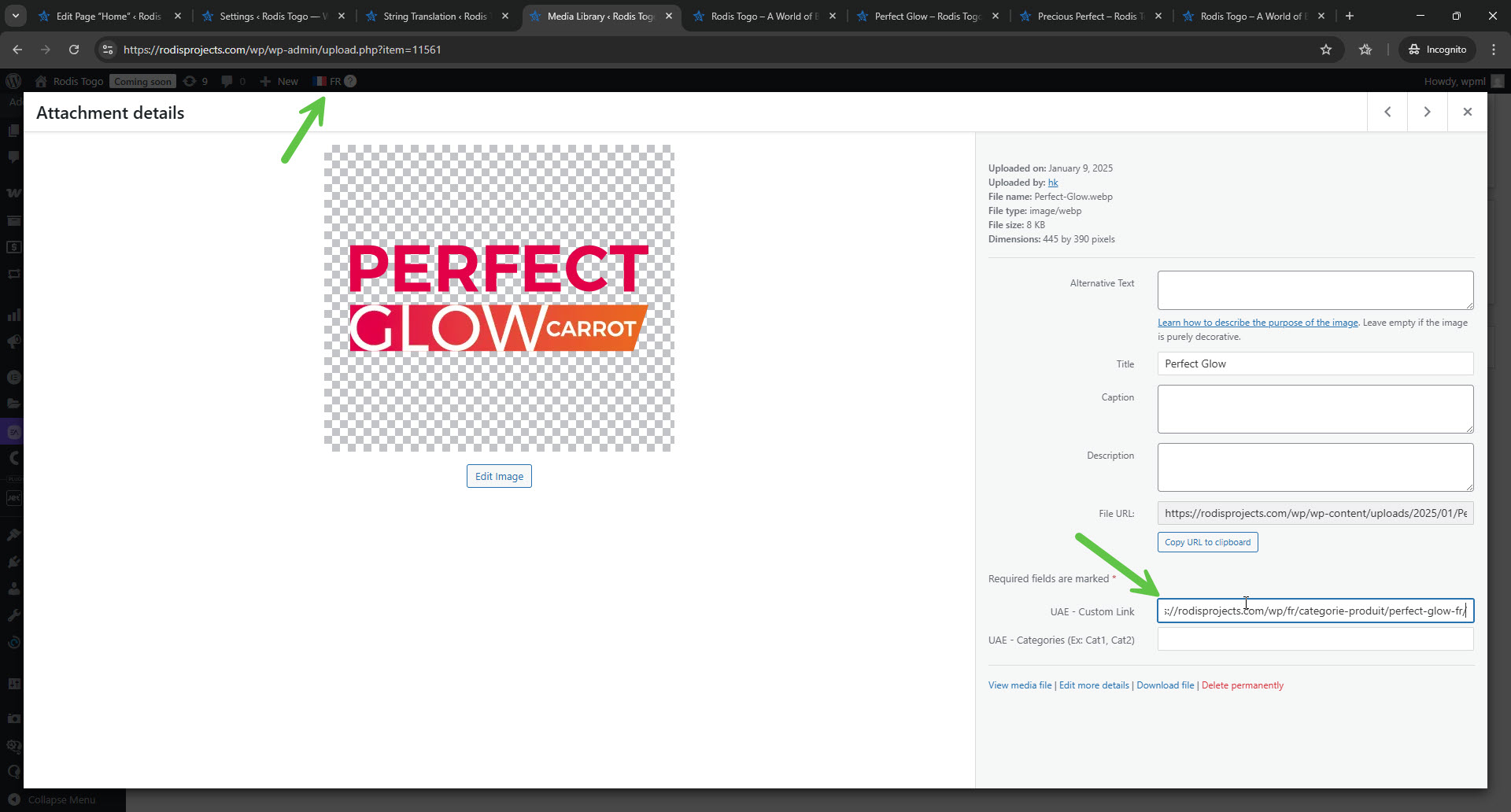
1. In Media -> Library, I switched to French.
2. I edited one of the images from the gallery (Perfect Glow).
3. I inserted the French link to this page. Please see the attached screenshot.
4. I updated the translation of the homepage.
Unfortunately, it didn't work.
The link still points to the Perfect Glow English page and not to the French page.
We need to replicate this issue on a fresh WordPress installation. Then I'll be able to escalate it to our compatibility team. For this, I created a test website with a clean WordPress install. You can access it through this link:
hidden link
With this link, you'll be directly logged in.
Could you please install the Elementor (UAE) plugin and see if the issue is replicable on a clean WordPress installation?
Please configure WPML as set on your site (just the basic configurations needed to replicate the issue are enough).
Please also ensure you install the latest version of the plugin.
Please let us know when everything is finished and you can replicate the problem.
Important! Do not import your site to the test site. We must replicate the problem on a fresh, clean WordPress installation.
I have done as you asked. I installed the latest version of UAE and did the basic configuration for WPML on your test site. I created a page called "Test Page" and added a Heading Widget and Image Gallery widget, then gave all the images links.
Afterwards, I went into the WPML Settings and set UAE Custom Link to "Translate" in the Custom Fields Translation section, and I ticked the "Translate media library texts with posts" in the Media Translation section to ensure that the media images show up in the ATE.
When I sent the page for translation in ATE, the issue unfortunately remained. Only the "Titles" for my Media images show up for translation in ATE. You can check it out for yourself.
To provide a workaround, I was trying to find a way to make it work on the sandbox site. Unfortunately, nothing worked. I'm consulting our second-tier supporters about it. They will tell me whether to esclate it to our compatibility team. I can't estimate when we will have a fix for this issue. You should know that the cooperation of the developers of the Ultimate Addons for Elementor Pro plugin may be required.
Please note that my weekend is Friday-Saturday, and I'll be able to continue to check this issue on Sunday.
Our second-tier supporter instructed me to esclate this issue to our compatibility team, so I did. Our second-tier supporter mentioned that it will not be a quick fix. But let's see what our ocmaptibility tema has to say about it.
5. Save the changes.
**** Important! Please make a full site backup (files and DB) before you proceed with those steps****
Now, the external links on the UAE Image Gallery element will show the translations you inserted in the UAE—Custom Link field of the same image in the other language in the media library. I'm talking about the steps I described in this reply.