
This is the technical support forum for WPML - the multilingual WordPress plugin.
Everyone can read, but only WPML clients can post here. WPML team is replying on the forum 6 days per week, 22 hours per day.
| Sun | Mon | Tue | Wed | Thu | Fri | Sat |
|---|---|---|---|---|---|---|
| - | 10:00 – 17:00 | 10:00 – 17:00 | 10:00 – 17:00 | 10:00 – 17:00 | 10:00 – 17:00 | - |
| - | 18:00 – 19:00 | 18:00 – 19:00 | 18:00 – 19:00 | 18:00 – 19:00 | 18:00 – 19:00 | - |
Supporter timezone: Asia/Kathmandu (GMT+05:45)
This topic contains 19 replies, has 1 voice.
Last updated by Shekhar Bhandari 2 months ago.
Assisted by: Shekhar Bhandari.
| Author | Posts |
|---|---|
| December 9, 2025 at 7:46 pm #17649310 | |
 irenek-4 |
Some acf fields are not sorted at all in greek, more specifically the Property type. You can check the problem here: hidden link |
| December 11, 2025 at 9:03 am #17654809 | |
|
irenek-4 |
Anyone? please? |
| December 12, 2025 at 12:52 pm #17659250 | |
 Shekhar Bhandari WPML Supporter since 03/2015 Languages: English (English ) Timezone: Asia/Kathmandu (GMT+05:45) |
Hello there, Thank you for contacting WPML support. I'd be happy to assist you on this issue. Since you already performed the basic troubleshooting steps, To debug this issue further, I would need to check your site settings once, for this I would need temporary access (wp-admin and ftp) to your site. So could you please provide me with those details, you will find the needed fields for this below the comment area when you log in to leave your next reply. This info is private and available to you and WPML supporters only. Note: Look forward to your reply. Thanks |
| December 15, 2025 at 3:25 am #17662592 | |
|
Shekhar Bhandari WPML Supporter since 03/2015 Languages: English (English ) Timezone: Asia/Kathmandu (GMT+05:45) |
Hello there, I have set the property_type to copy and updated one properties and it's working now, I suggest you to see if other works after updating. Also, for if the fields aren't different on translations, please set it to copy, this may help you further: https://wpml.org/documentation/related-projects/translate-sites-built-with-acf/recommended-custom-fields-translation-preferences-for-acf-and-wpml/ Let me know if this helps. Thanks |
| December 18, 2025 at 1:37 pm #17674877 | |
|
irenek-4 |
Let me check a little bit and I will reply soon afterwards |
| December 18, 2025 at 4:11 pm #17675591 | |
|
irenek-4 |
It creates a mess! The property type is copied but it shows mixed content in the archive page. Look at the image attached. The properties that I have resaved are showing the property type in english (not translated), the ones that aren't still saved are showing correctly in the grid (but not showing if i go to the english property sale page, select property type apartment and then click on the greek language) 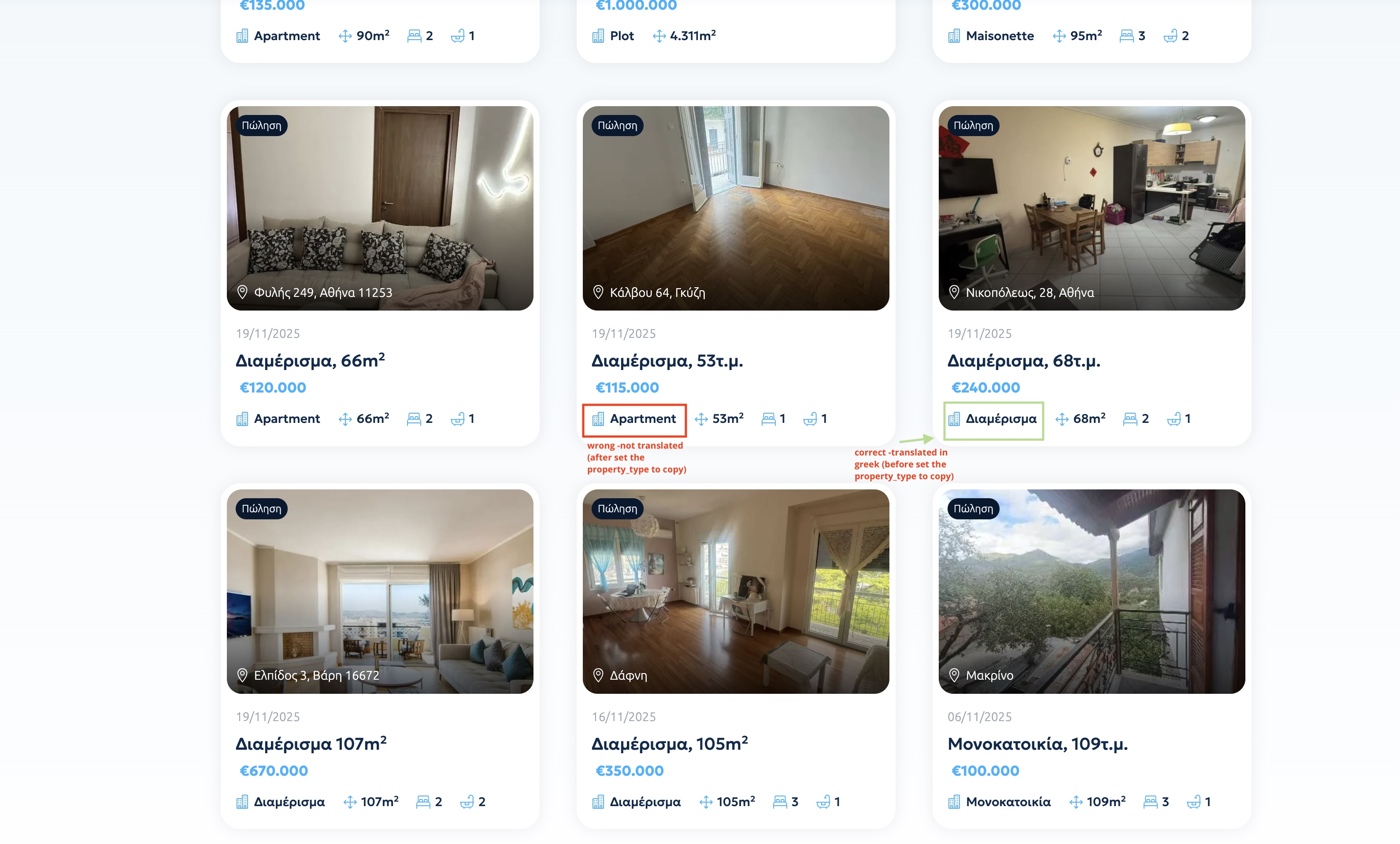  |
| December 18, 2025 at 4:20 pm #17675686 | |
|
Shekhar Bhandari WPML Supporter since 03/2015 Languages: English (English ) Timezone: Asia/Kathmandu (GMT+05:45) |
Hello there, The values are same so it's displaying it accordingly, I checked the acf fields and can see that you are using choices as follows Apartment Detached House Maisonette Office Plot It says For more control, you may specify both a value and label like this: red : Red Can you convert the choices as acf suggested and translate the labels from WPML->String Translation once, leave the value fields as it is and see if it works? hidden link Look forward to your reply. Thanks |
| December 19, 2025 at 9:57 am #17677053 | |
|
irenek-4 |
I think with property type to copy we are doing something not to work. The website was working correctly, because it was set to translate (please check the solution Bobby and Ilyes have given to me in this support: https://wpml.org/forums/topic/split-custom-post-not-showing-in-the-backend-in-the-language-for-translation/page/2/) |
| December 19, 2025 at 10:16 am #17677180 | |
|
Shekhar Bhandari WPML Supporter since 03/2015 Languages: English (English ) Timezone: Asia/Kathmandu (GMT+05:45) |
Hi there, If you’d like to continue using Translate, you’ll need to manually adjust each translation and set the correct property type. You can try that approach, but the recommended method is to use Copy Once and then translate the labels and values as described above. I agree that updating these fields will require some effort, but this approach is the recommended one and is less likely to cause issues than manually selecting the property type. Thanks! |
| December 19, 2025 at 1:42 pm #17678055 | |
|
irenek-4 |
Please help me a little more! I can't set up it. Can you show me a video of how to set it up? Or can you do it for me so I can have an example. I tried to use your advice and set it to copy once, translated the strings but it doesn't work. Please help. If you can use this one to show me how is done correctly: hidden link |
| December 22, 2025 at 4:52 am #17680996 | |
|
Shekhar Bhandari WPML Supporter since 03/2015 Languages: English (English ) Timezone: Asia/Kathmandu (GMT+05:45) |
Hello there, I am little confused here, I still see Acf radio choices as it was before Apartment Detached House Maisonette Office Plot It should be used as below appartment : Apartment detachedhouse : Detached House maisonette : Maisonette office : Office plot : Plot Once this saved on ACF field preferences, you have to update all the properties accordingly and it should work. Are you trying to use this method or want to use the translate method? Look forward to your reply. Thanks |
| December 24, 2025 at 11:22 am #17686533 | |
|
irenek-4 |
I used your method, but it doesn;t work. |
| December 24, 2025 at 12:28 pm #17686573 | |
|
Shekhar Bhandari WPML Supporter since 03/2015 Languages: English (English ) Timezone: Asia/Kathmandu (GMT+05:45) |
Hello there, I can see the issue. The Elementor widget provided by your theme does not offer an option to configure the property type as radio buttons; it is currently set up as a Text field (as shown in the attached screenshot). Because of this, the raw value is always displayed on the front end, regardless of any adjustments we make. You can observe the same behavior even in the default language, where the value appartment is shown instead of the intended label Appartment. I’m checking whether a workaround is possible from our side, but it would also be a good idea to contact the theme author and confirm whether this widget supports radio fields with labels. Look forward to your reply. Thanks  |
| December 29, 2025 at 11:03 am #17694583 | |
|
irenek-4 |
Hello, sorry for my delayed answer as it was holidays (Christmas). Have you found any workaround? I will contact today the developer of the theme to see if there is any solution. |
| December 29, 2025 at 11:23 am #17694615 | |
|
Shekhar Bhandari WPML Supporter since 03/2015 Languages: English (English ) Timezone: Asia/Kathmandu (GMT+05:45) |
Hello there, I am sorry but I was unable to find an easy workaround here so lets wait for the developer feedback before proceeding further. Thanks |






The topic ‘[Closed] Translation problem, sorting doesn’t work in translated language’ is closed to new replies.