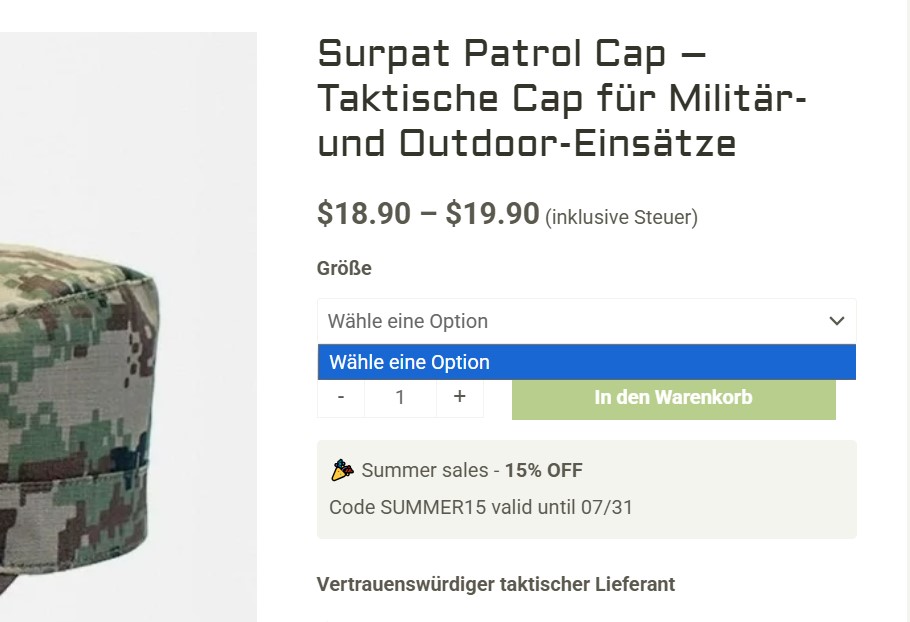
Background of the issue:
I am trying to synchronize attributes to translated product variations on my WordPress site. The issue can be seen on this page: hidden link.
Symptoms:
I expected to see some variations on the product, but instead, I got not a single variation.
Questions:
Why are the product variations not appearing on the translated product page?
How can I ensure that attributes are synchronized correctly to translated product variations?
I apologize for the delay in responding. I will take care of this ticket; the reply time will be shorter now.
I went through the conversation with Bruno, in order to fix the problem we need to understand how it's happening. Find out what triggers the missing attributes and from there we will be able to fix it.
You mentioned that you can provide us with a stagging environment, right? If that's the case, I'll enable a private form so you can share credentials safely.
Hi!
Please recap me how we will debug that. We can do it right away on the live website since it happens here all the time.
I will delete staging, it's useless at this point
1/ Install log plugin? Is this enough?
2/ Check once a week if the issue happened?
Yes, unfortunately it’s not happening on the staging site. 🙁
I understand how frustrating these kinds of issues can be — they frustrate me just as much. They can be tricky because there’s always something behind the “random” occurrence that we need to identify in order to solve it.
The fact that it’s not happening in staging tells us there must be something in the production environment triggering it — perhaps a cron job, an import, an update, a cache cleanup, or even a specific user interaction.
Our goal is to find out exactly what’s causing it. Hopefully, the WP Activity Log plugin will give us some clues.
Yes, please install it on your site, and the next time the issue occurs, we’ll check the logs together to see if there’s any useful information.
Done.
Now I have an idea. Here is the situation:
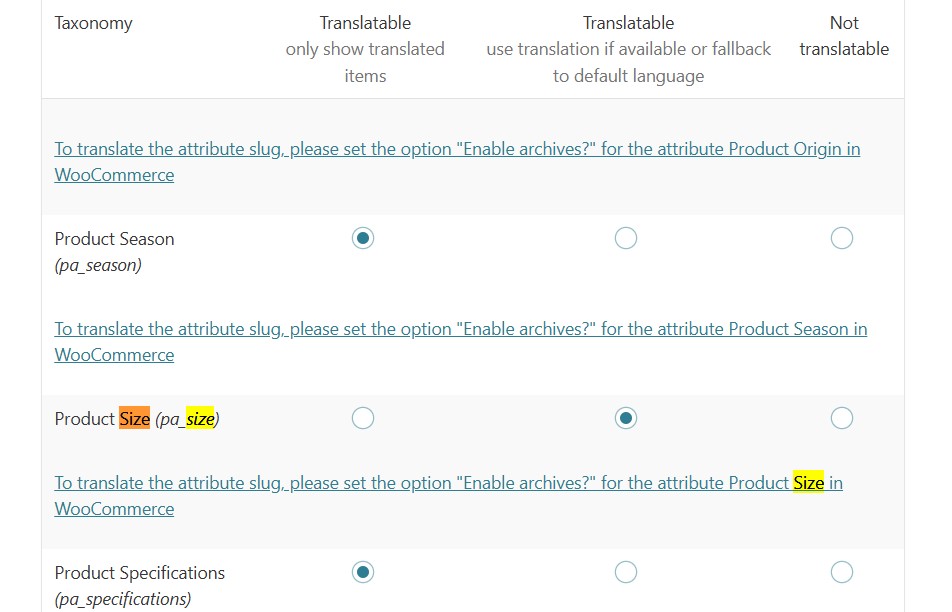
We don't translate product size, because size is "international". Numbers or letters that doesn't need to be translated like S, M, L...
It seems that this issue of missing attribute concerns only the product size.
Can you maybe check the settings of wpml? Maybe we use "non standard" way of doing things with those size attributes. And wpml have bad coded lines about it somewhere.
I couldn't check your settings because credentials to the staging environment no longer work. But here are my thoughts about the setup.
Having the attributes set as not translatable may be problematic. Even if you have it working somehow, as soon as you start updating products they may run out of sync with the translations, because WPML does not handle it.
We are not seeing the issue in the staging because there is no update. Maybe in production there is an autosave or some automatic process that triggers a product update that then generates the problem.
My suggestion here is to check and try the following:
❌ Please make a full website backup before proceeding ❌
Normalize “Size” as a global attribute and lock in WPML settings
• Go to Products → Attributes and ensure Size exists as a global attribute (not added ad‑hoc on each product). If you’ve been using per‑product “custom attributes”, migrate to a global pa_size with terms S, M, L, ….  
• In WPML → Settings → Taxonomy Translation, set the Size taxonomy to Translatable. 
• In WPML → Taxonomy Translation, open the Size taxonomy and "translate" them, copying from the original.
• Go to WooCommerce → WooCommerce Multilingual & Multicurrency → Attributes, select Size, and run Synchronize attributes and update product variations. Wait for completion. 
• To confirm it works: 1. Edit one representative product in the default language, 2. add or remove an attribute, re‑save (Update), 3. then open its translation in the WPML Translation Editor and complete to 100%. 4. Check that the variation attribute is correct in both languages.
As I mention, I couldn't check your setting, but I did test in a fresh site to set the attribute as not translatable and as soon as I start editing the product the field run out of sync. I don't think this is a bug, if the attribute is not translatable WPML does not handle it.
I suggest avoiding the fallback option and stick with Translatable - only show translated items.
**Why not the fallback option?**
- It mixes terms across languages, breaking variation matching and hiding variations.
- Updates/autosaves can re-sync and reintroduce mismatches.
**As I mentioned before, try this:**
❌ Please make a full website backup before proceeding ❌
- Make the attribute global (e.g., `pa_size`) and translate all its terms.
- Switch to “only show translated items”.
- Sync attributes and update product variations in WooCommerce > WooCommerce Multilingual & Multicurrency -> Settings (tab) -> Troubleshooting (bottom right of the page)
WooCommerce → WooCommerce Multilingual & Multicurrency → Attributes, select Size, and run Synchronize attributes and update product variations.
That function fixed the problem.
Big win here, because I lost multiple sales because of this issue.
I hope the issue will not appear anymore. But since situation of "size" attribute has been regulated, it should not.