This thread is resolved. Here is a description of the problem and solution.
Problem: If you're experiencing a fatal error stating 'Cannot use object of type stdClass as array' in sitepress-multilingual-cms/classes/localization/class-wpml-download-localization.php, it might be due to a conflict with Duplicator Pro plugin. This occurs because the translations_api filter should return an array, but Duplicator Pro sometimes returns an object, causing WPML to treat it incorrectly. Solution: We recommend deactivating Duplicator Pro to see if the issue resolves. If it does, you can apply a temporary fix by modifying the code in wp-content/plugins/duplicator-pro/src/Utils/Translations.php. Replace the problematic line with the following code:
$translations = $this->getTranslations($args['slug'], $this->apiUrl);<br />// Ensure we return an array, not an object (WordPress expects array)<br />if (is_object($translations) && isset($translations->{ $args['slug'] })) {<br /> return $translations->{ $args['slug'] };<br />}<br />return is_array($translations) ? $translations : [];
We also suggest reporting this issue to Duplicator Pro support for a permanent fix. If this solution does not resolve your issue or seems irrelevant due to being outdated or not applicable to your case, please check related known issues at https://wpml.org/known-issues/, verify the version of the permanent fix, and confirm that you have installed the latest versions of themes and plugins. If further assistance is needed, we highly recommend opening a new support ticket at WPML support forum.
This is the technical support forum for WPML - the multilingual WordPress plugin.
Everyone can read, but only WPML clients can post here. WPML team is replying on the forum 6 days per week, 22 hours per day.
Environment: PHP 8.3, WPML Multilingual CMS (latest), WordPress X.X
Error:
Fatal error: Cannot use object of type stdClass as array
in
sitepress-multilingual-cms/classes/localization/class-wpml-download-localization.php:136
Cause:
translations_api() may return an object (stdClass), but WPML treats it as an array:
if ( empty( $api['translations'] ) ) {
Temporary fix:
Casting $api to array after is_wp_error() check:
To isolate the cause of this issue, I have set up a fresh WP site on a test server(cloudways). Please migrate your site there using the details I shared in my earlier private reply, and let me know once the migration is complete.
Please provide temporary access (WP-Admin Login info) to the migrated site, so that I can look into your setup and debug the issue.
Your next answer will be private, meaning only you and I can access it.
Thanks for installing the Duplicator package on a fresh WordPress site.
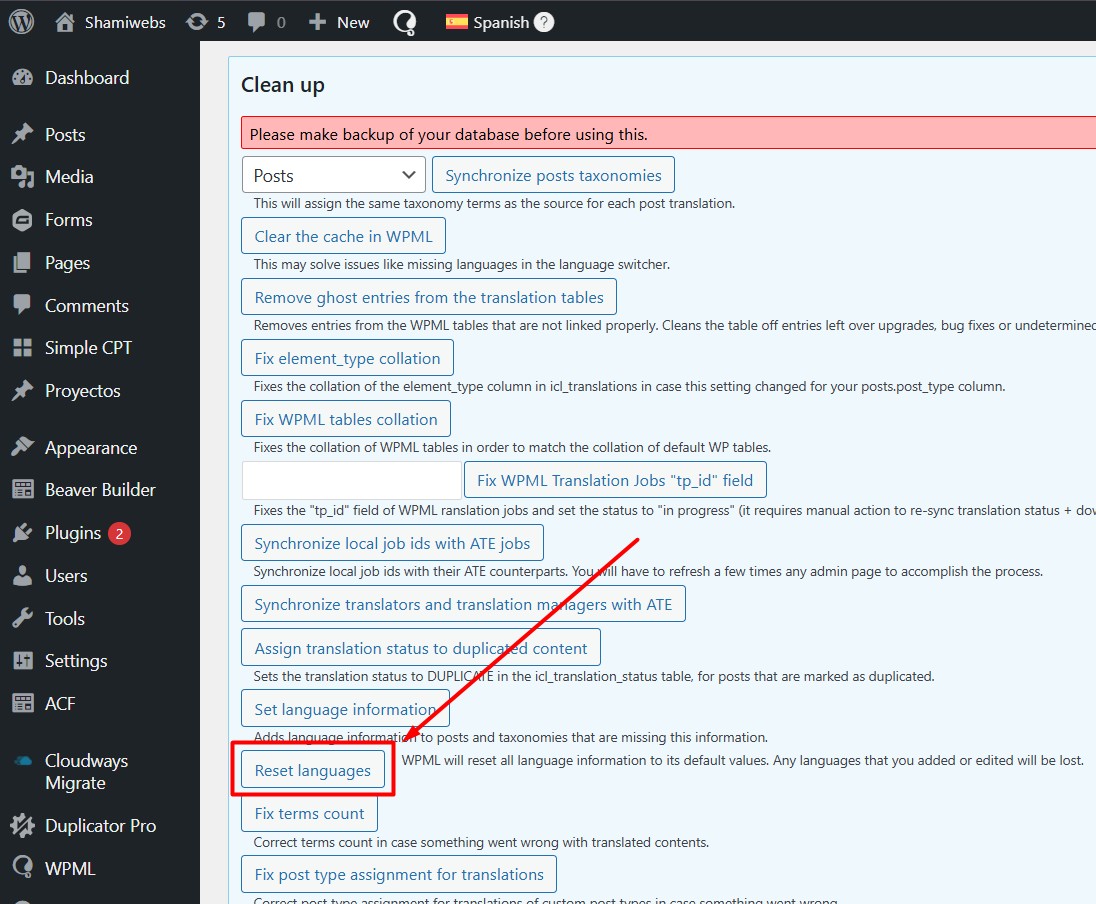
I can see a critical error when trying to save the languages. I followed these steps:
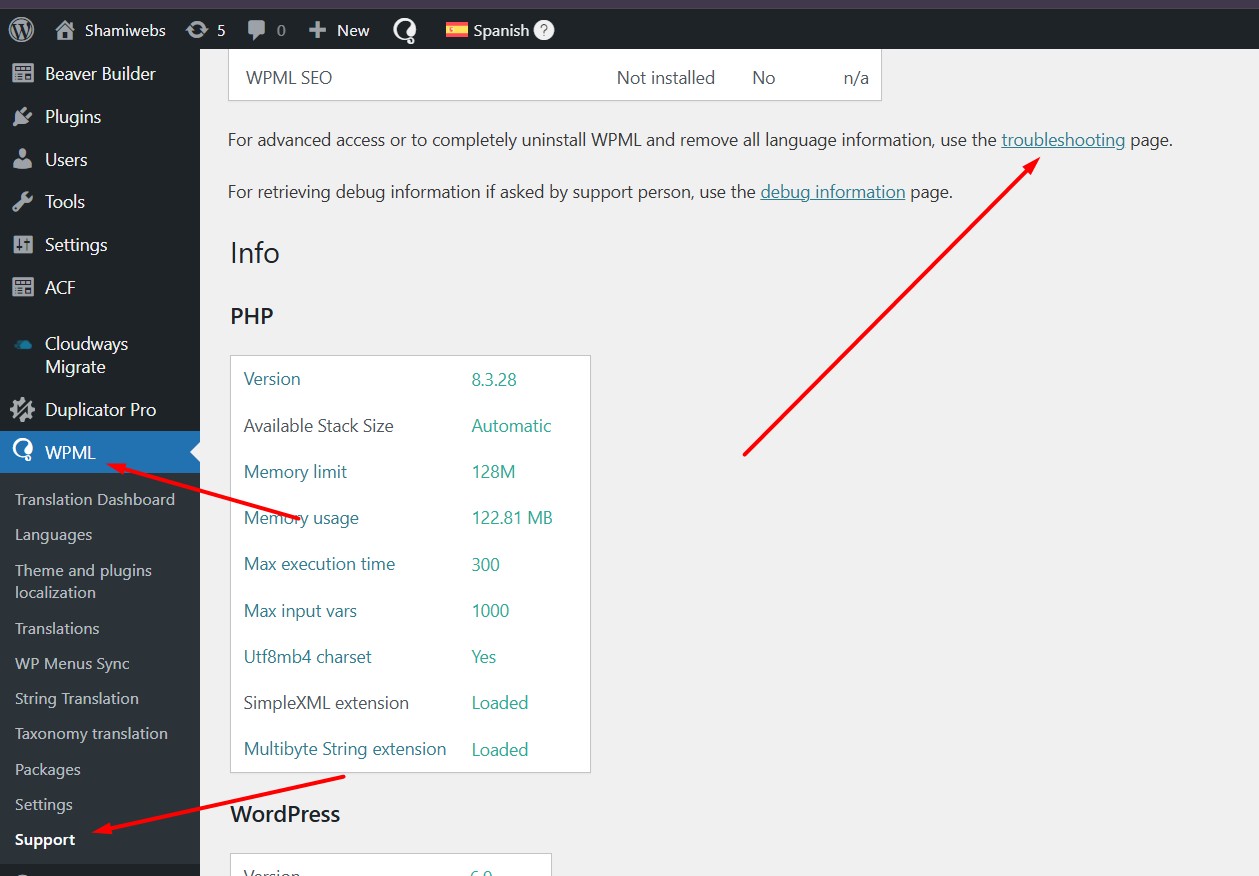
1. Went to WPML >> Support.
2. Click on the Troubleshooting link.
3. Click on the “Reset languages” button.
After that, I was able to update the languages without any errors.
Please note that this action will remove any customizations made under WPML → Languages → Edit Languages. You may need to add those labels again using the translation text boxes.
Could you please take a full backup of your site and try the same steps on your side to see if this resolves the issue?
I have already followed exactly the same procedure on my side:
– Full site backup taken
– WPML → Support → Troubleshooting
– Clicked Reset languages
Unfortunately, the fatal error still occurs when saving the languages after the reset.
So in my case, resetting the languages does not resolve the issue.
Important notes:
– The error is reproducible on this site consistently
– It does not happen on a fresh WP install
– The temporary fix you mentioned (casting $api to array) confirms this is a WPML-side handling issue when translations_api() returns an object instead of an array
At this point, I believe this is either:
– a data-related edge case triggered by a real-world site, or
– a regression affecting certain environments / plugin combinations
Could you please escalate this to the WPML developers for deeper analysis using the provided Duplicator package?
I’m happy to provide any additional logs or testing if needed, but I’d prefer not to dismantle a production-like setup plugin by plugin.
Thanks for the detailed explanation, that’s very helpful.
I’ll install the provided Duplicator package on my local environment to reproduce the issue and rule out any local factors. If the error persists there as well, I’ll escalate this to the 2nd tier support with full context and the package for deeper analysis.
I’ll keep you posted on the progress. Thank you for your patience.
I tested the site in a minimal setup (default WordPress 2025 theme and only WPML active), and the issue no longer occurs. I then reactivated plugins one by one and identified Duplicator Pro as the cause. When Duplicator Pro is deactivated, everything works correctly.
This is a known issue. According to WordPress documentation, the translations_api filter must return an array, but Duplicator Pro sometimes returns an object, which triggers the fatal error.
You can correct it as follows:
In the file wp-content/plugins/duplicator-pro/src/Utils/Translations.php