Background of the issue:
I am trying to use WPML auto-translate to offer our full site in non-English languages. We have been testing it and encountered some problems. When we auto-translate a page or news post, WPML only publishes the translated h1 into the new language page, even after updating in the WordPress page editor. In the Advanced Translation Editor in WPML, every text object is translated and marked as complete. Please see this walk-through: hidden link. I’ve tested with the following: News post test: hidden link and Page test: hidden link – translated to French.
Symptoms:
WPML only publishes the translated h1 into the new language page, even after updating in the WordPress page editor. In the Advanced Translation Editor, every text object is translated and marked as complete.
Questions:
Why does WPML only publish the translated h1 and not the entire page?
Why is the Advanced Translation Editor showing all text objects as complete but not reflecting on the site?
Thanks for contacting us. I can see the issue based on the screen recording that you shared.
Before I investigate this further, could you please update the WPML plugins to the latest version? You can do this in WP > Plugins > Add new > Commercial Tab > Click "Check for updates". Scroll down and check the WPML plugins that you'd like to update.
While checking the debug info, I see that the WordPress Memory Limit is below the requirements. The minimum requirements are 128M, but we do recommend 256M and the debug information of your site shows it set to 40M. Please check this link for more details https://wpml.org/home/minimum-requirements/.
You can increase it by adding the following code in your wp-config.php file, right before the /* That’s all, stop editing! Happy publishing. */ line:
Hi Kor, thanks very much for this. We took the measures above and I think they've helped to some degree, but I've done some further testing and we have some outstanding issues. These are displayed in this test walkthrough that I've just recorded: hidden link
ISSUE 1
Even after publishing a translation in WPML, reviewing it in ATE, saving it in ATE and then marking as approved, the body content still isn't coming through to the translated page. The page is created and the H1 and hero image are there, but the rest of the page content isn't – despite being in the APML ATE. To make it appear, we need to open the translated page in the WordPress editor and hit 'Update'.
This is not ideal as it's creating more steps in the process which will add up, especially at the start when we have lots of pages to publish, and also it's confusing for translators who don't otherwise use WordPress.
ISSUE 2
As you'll see in the video above, we are translating to four languages and having varied results:
German and Italian: Auto-translate is NOT pulling text/image/video WYSIWYG blocks through to the published page – although the full translated text blocks are in the WPML translation editor, so the translations are in the system. German is pulling through full-width image blocks AND multi-image blocks. Italian is pulling through only full-width image blocks – not multi-image blocks.
French and Vietnamese: Auto-translate IS pulling through text/image/video WYSIWYG blocks along with both types of image blocks.
Could you please point us in the right direction for both of these issues?
Thanks for your reply. I will require temporary access (WP-Admin and FTP) to a test site where the problem has been replicated, if possible. This will enable me to provide better assistance and determine if any configurations need to be modified.
Please note that it is important to have a backup for security purposes and to prevent any potential data loss. You can use the UpdraftPlus plugin (https://wordpress.org/plugins/updraftplus/) to fulfill your backup requirements.
Your upcoming reply will be treated with confidentiality and will only be visible to you and me.
✙ To resolve the issue, I may need your consent to deactivate and reactivate plugins and the theme, as well as make configuration changes on the site if necessary. This emphasizes the significance of having a backup.
Hi Kor, confirming I've installed the new dev site (hidden link) in WPML's 'registered sites' and tested.
The test has replicated the issue I've reported above. I've translated a news article – hidden link – to all 4 languages and have:
- French and Vietnamese: Fully translating
- German pulling through full-width image blocks AND multi-image blocks – nothing else
- Italian is pulling through only full-width image blocks – nothing else.
Please let me know if you need anything else to investigate.
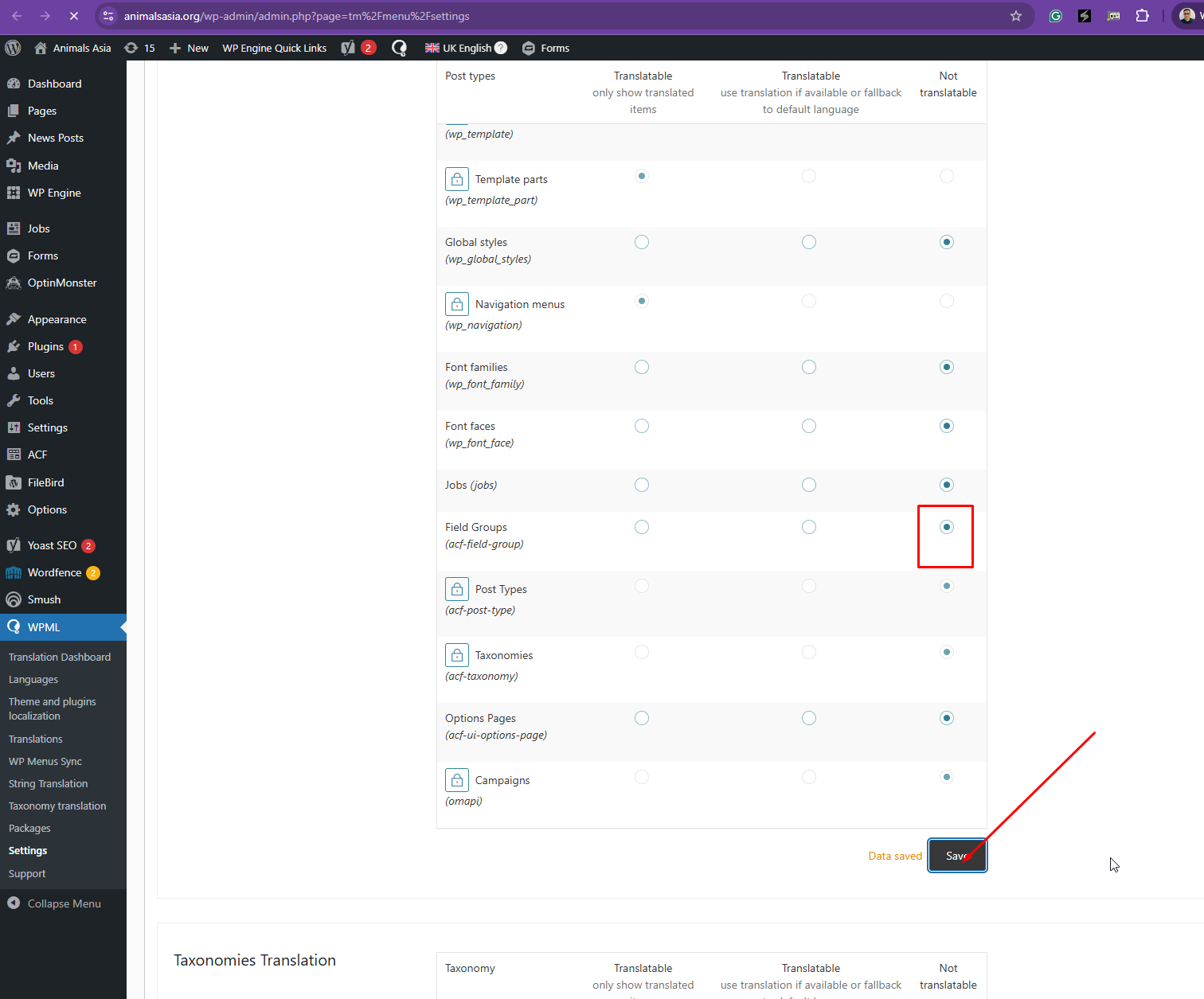
Thanks for your reply. ACF field Groups must not be configured as "Translated", so I've turned it off for you in WPML > Settings > Post Types Translation.
Anyway, where can I see the ACF fields? It's not here hidden link when I checked, and are you using custom PHP codes?
Re the first part of your response: On the production site, I am able to switch ACF Field Groups from "Translatable" to "Not translatable", but I'm not able to save it. There's no save button there like there is on the dev site.
Please see this video: hidden link
The video also shows how I appear to have lost the translations list and queue on the production site since yesterday. Could you please help with that?
Re your question about ACF fields and custom PHP, I'm going back to our dev team on that, will come back to you.
Thanks for your reply. Strange, it's working fine here when I checked. Could you try logging in using my account that you prepared for me? Also, try using another browser.
Please note: In my previous video, I'm switching between two sites – the production site (which you don't have access to) and the dev site (which you do have access to).
On the dev site, I see the same as you – 'ACF Field Groups' is set to 'Not translatable' and the Save button in the 'Post Types Translation' section is visible. This is good and as it should be.
It's on the production site – which you don't have access to – where there's no Save button in the 'Post Types Translation' section and I can't save it when I change 'ACF Field Groups' to 'Not translatable'. Could you please help us solve what's happening here?
The Translation Dashboard and Translations queue have re-appeared on the production site, so that's no longer a problem.
Thanks for your reply. The save works fine as shown in the attached screenshot in WPML > Settings > Post Types Translation as shown in the attached screenshot and the field group option looks correct when I checked.