
This is the technical support forum for WPML - the multilingual WordPress plugin.
Everyone can read, but only WPML clients can post here. WPML team is replying on the forum 6 days per week, 22 hours per day.
This topic contains 10 replies, has 0 voices.
Last updated by Ashraf Hesham 1 month ago.
Assisted by: Ashraf Hesham.
| Author | Posts |
|---|---|
| February 25, 2026 at 10:01 am #17850574 | |
 alexandreP-37 |
Since updating to the latest versions of WPML plugins, we are unable to complete translation jobs. When starting a job in the WPML dashboard, the status spinner spins indefinitely. 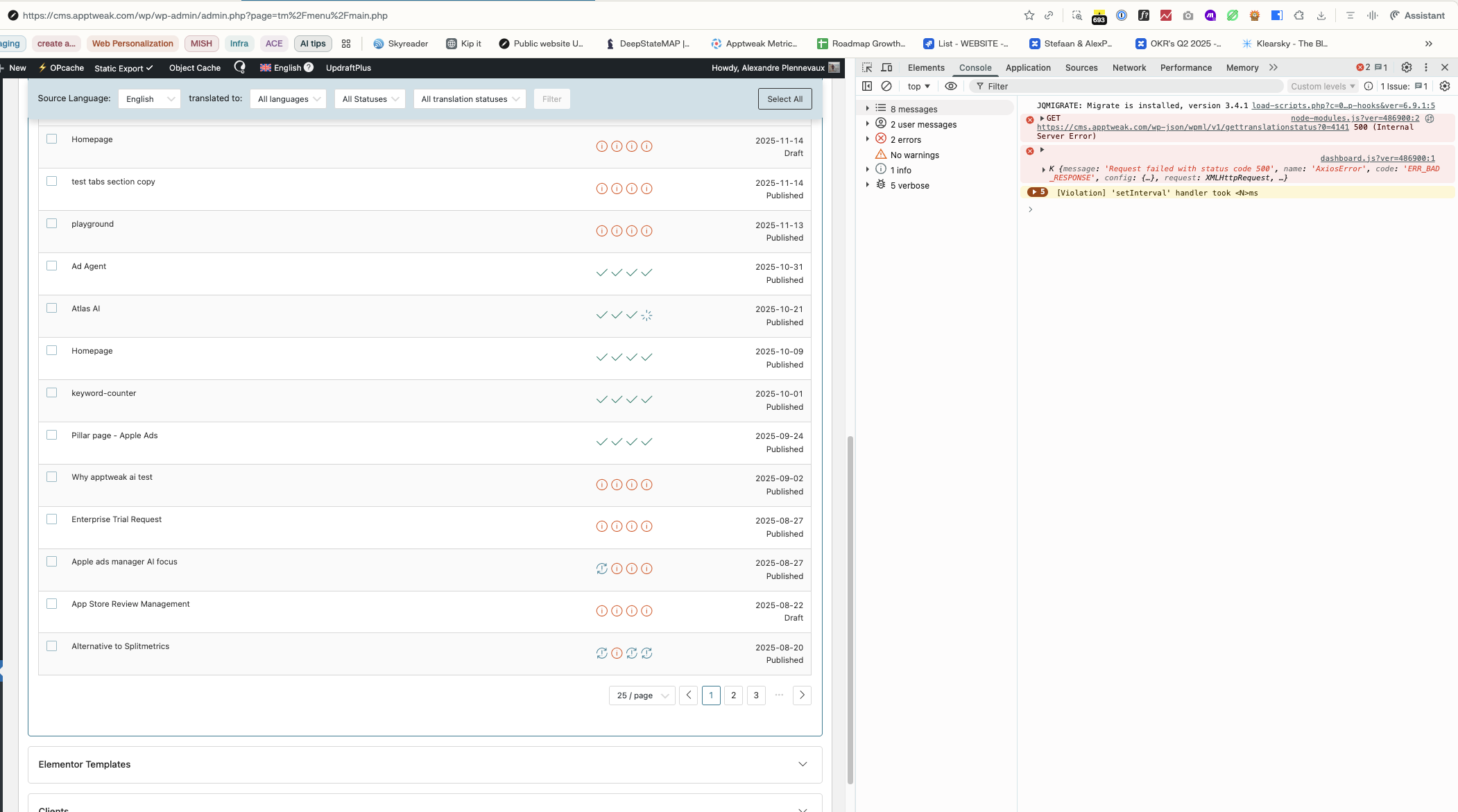 |
| February 25, 2026 at 10:48 am #17850732 | |
|
alexandreP-37 |
Status update: I upgraded to wpml 4.9.1 Unfortunately, the issue remains. 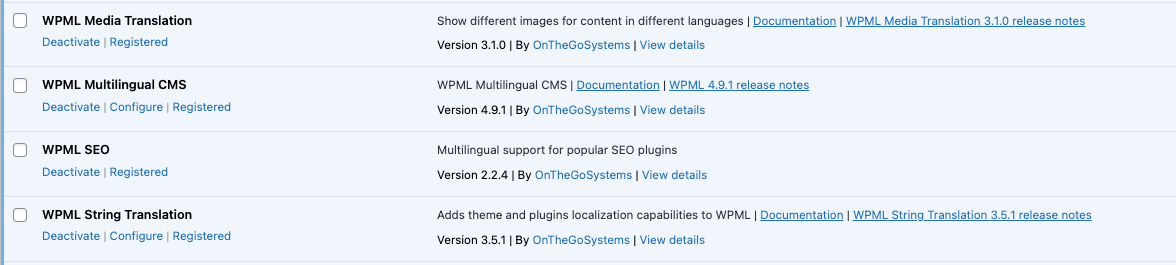 |
| February 25, 2026 at 1:19 pm #17851645 | |
|
alexandreP-37 |
Hi WPML team, After updating to the latest WPML plugins, we reproduced two REST API regressions on the Translation Dashboard. Environment Issue A (critical): Translation flow breaks with 500 Runtime diagnosis (confirmed) Likely upstream fix Issue B: wpml-content-stats returns 403 What we need from WPML Thank you in advance for providing a fix ASAP |
| February 26, 2026 at 7:36 am #17854543 | |
 Ashraf Hesham WPML Supporter since 12/2025 |
Hi! I'm Ashraf from the WPML Dev team and I'm here to try to help you resolve your issues. Thank you for providing all these details, from my end I will try to reproduce the issues and get back to you with feedback ASAP. Thanks and best regards! |
| February 27, 2026 at 11:12 am #17859501 | |
|
Ashraf Hesham WPML Supporter since 12/2025 |
Hi Alexandre! I started to look into this issue and as I said I'm trying to reproduce it on my local site, I started with the issue with "gettranslationstatus" endppint, so far I didn't manage to reproduce it but I think I'm missing something, for that I think I need to ask for 2 things: 1- I need access to the wp-admin of the site so that I can see the error details in browser console. For that I've set your next reply as private to secure the login details you're going to share. 2- I need you please to provide me with detailed error messages you can see in the "debug.log" file of your site. Most probably you know how to do it but just for the sake assuring I'm going to share some steps: define( 'WP_DEBUG', true ); define( 'WP_DEBUG_LOG', true ); define( 'WP_DEBUG_DISPLAY', true ); - Then repeat the steps to reproduce the issue Thanks in advance and Looking forward to your reply. |
| March 3, 2026 at 11:45 am #17868075 | |
|
Ashraf Hesham WPML Supporter since 12/2025 |
Hi Alexandre, I would like to give an update about the investigatoin results for the issues mentioned in this thread. 1. The first two issues for the following REST endpoints: I would like to inform you that the "rest_route" parameter that you see in the request body isn't part of WPML implementatoin, it's rather a result of the Nginx server configuration., Some Nginx configurations (common in containerized/Kubernetes environments) explicitly rewrite REST API URLs: location ~ ^/wp-json/(.*)$ {
rewrite ^/wp-json/(.*)$ /index.php?rest_route=/$1&$args last;
}
This results in a request like /wp-json/wpml/v1/gettranslationstatus?0=123&1=456 becomes: /index.php?rest_route=/wpml/v1/gettranslationstatus&0=123&1=456 Which results in PHP's request array as follows: ['rest_route' => '/wpml/v1/gettranslationstatus', 0 => '123', 1 => '456'] // ↑ string key ↑ integer keys In the end this is passed internally to further functions which either tries to unpack the array or validate its values and then causes the "500" erros you encountered. How to fix it? From our side we will apply the following fixs in our plugin to avoid such edge cases in the spotted places where we can avoid it, I already created 2 development tickets to handle fixing them so that the fixes can be provided in a next WPML release ASAP. To unblock your site, you can also apply the following 2 fixes manually until we plan the fix in a proper WPML release. 1. for the "gettranslationstatus" : the following modification needs to be done in the "/plugins/sitepress-multilingual-cms/vendor/wpml/wpml/src/UserInterface/Web/Core/Component/Dashboard/Application/Endpoint/GetTranslationStatus/GetTranslationStatusController.php" - Inside function named "handle" change $jobIds = array_map( 'intval', $requestData ?: [] ); to be :
$jobIds = array_values(
      array_filter( $requestData ?: [], 'is_numeric' )
    );
    $jobIds = array_map( 'intval', $jobIds );
- This would removes non-numeric values and re-indexes the array to sequential integer keys 2. for the "get-words-to-translate-for-items" : the following modification needs to be done in "/plugins/sitepress-multilingual-cms/vendor/wpml/wpml/src/UserInterface/Web/Core/Component/Dashboard/Application/Endpoint/GetWordsToTranslate/GetWordsToTranslateForItemsController.php" - Inside function named "handle" add the following: $requestData = array_filter( $requestData, 'is_array' ); - This removes any non-array values (like the 'rest_route' string) before processing so only valid item data (which must be arrays) is processed in the following loop in the function. 3. Restart the Nginx and clear chaches if needed then re-test again. ---- Now about the third issue related to "wpml-content-stats returns 403" This one is also not related to WPML, and I don't think it can be fixed from WPML side, here's an explanation of how I think it happened: WordPress REST API uses two things to verify that a request is legitimate: 1. A login cookie — proves who the user is ** The Problem seems to be in Your Environment Based on our investigation, the most likely cause is: The proxy/ingress layer in your Kubernetes setup is not forwarding the WordPress login cookies to the application when requests go through "/wp-json/". Potential valid fix for this case could be: ---- In the end I hope the information and fixes provided here will unblock your site and you continue sending content to translation again, and I will be waiting for your confirmation. Thanks and best regards! |
| March 6, 2026 at 11:16 am #17877628 | |
|
alexandreP-37 |
Hello, Your point about Basic Auth potentially interfering with cookie forwarding is valid and We will check it in our Kubernetes ingress config. 1. In our local Docker setup (no Kubernetes, no Basic Auth), we still reproduced the 403. This means it's not exclusively a production/ingress issue. I'll check with our devops and get back to you about the cookie forwarding. in case it helps, I created a temporary mu-plugin that solves the problem for now, until you release a patch. Here is its code, in case it helps others or your team to better illustrate the issue:
/**
 * Plugin Name: WPML REST API Fixes (Temporary)
 * Description: Temporary compatibility fixes for WPML REST endpoints.
 * Version: 0.1.0
 */

if ( ! defined( 'ABSPATH' ) ) {
	exit;
}

/**
 * Proven fix: remove rest_route from WPML request params before handlers run.
 */
add_filter(
	'rest_request_before_callbacks',
	function ( $response, $handler, WP_REST_Request $request ) {
		$route = $request->get_route();
		if ( strpos( $route, '/wpml/v1/' ) !== 0 ) {
			return $response;
		}

		$query_params = $request->get_query_params();
		if ( isset( $query_params['rest_route'] ) ) {
			unset( $query_params['rest_route'] );
			$request->set_query_params( $query_params );
		}

		return $response;
	},
	10,
	3
);

/**
 * Log auth layer failures for wpml-content-stats route.
 */
add_filter(
	'rest_authentication_errors',
	function ( $result ) {
		$request_uri = isset( $_SERVER['REQUEST_URI'] ) ? (string) $_SERVER['REQUEST_URI'] : '';
		$is_content_stats = strpos( $request_uri, '/wp-json/wpml/v1/wpml-content-stats' ) !== false
			|| strpos( $request_uri, 'rest_route=%2Fwpml%2Fv1%2Fwpml-content-stats' ) !== false
			|| strpos( $request_uri, 'rest_route=/wpml/v1/wpml-content-stats' ) !== false;

		if ( ! $is_content_stats ) {
			return $result;
		}

		$has_invalid_nonce_error = false;
		if ( is_wp_error( $result ) ) {
			$has_invalid_nonce_error = in_array( 'rest_cookie_invalid_nonce', $result->get_error_codes(), true );
		}

		// Temporary workaround: WPML content stats sends an invalid REST nonce in some environments.
		// We only bypass this specific nonce error for authenticated users with WPML admin capabilities.
		if (
			$has_invalid_nonce_error &&
			is_user_logged_in() &&
			current_user_can( 'manage_translations' )
		) {
			return null;
		}

		return $result;
	},
	999
);

/**
 * Admin notice to remind to remove this plugin after the next WPML update.
 */
add_action(
	'admin_notices',
	function () {
		if ( ! current_user_can( 'activate_plugins' ) ) {
			return;
		}
		?>
		<div class="notice notice-warning is-dismissible">
			<p>
				<strong>WPML REST API Fixes:</strong> This temporary "glue" plugin is active to fix regressions in the latest WPML update (PHP 8 compatibility and 403 errors).
				Please <strong>remove</strong> <pre>src/web/app/mu-plugins/wpml-rest-api-fixes.php</pre> once WPML releases an official patch.
			</p>
		</div>
		<?php
	}
);
|
| March 9, 2026 at 10:52 am #17881528 | |
|
Ashraf Hesham WPML Supporter since 12/2025 |
Hi, I tried to re-investigate the problem with "content-stats" request again, specifically looking at whether window.wpmlContentStats.nonce and window.wpmlEndpoints.nonce could get "out of sync" and cause the 403. What I found: wp_create_nonce('wp_rest')
during the same PHP request. They always produce the same value on a single page load. On WPML pages (like the TM Dashboard), wpmlEndpoints.nonce is available, so content-stats uses the same nonce as the dashboard. If these were "out of sync," the dashboard would also fail — not just content-stats. 3. No script load-order race condition — the inline nonce data (var wpmlContentStats = {...})
is injected before the script file in the HTML. The nonce is always available when the script evaluates. So, I think that the "403" could be enviromental, maybe a just a caching problem or another plugin causing mismatch, because as far as I investigated I can't still spot the root cause of it in the WPML code. I'll be waiting your feedback, thank you! |
| March 12, 2026 at 12:28 pm #17892309 | |
|
Ashraf Hesham WPML Supporter since 12/2025 |
Hi! I would like to give an update about the 403 reported for the "content-stats" request. I think we have spotted a case that can be causing this issue and it's going to be fixed in the version 4.9.3. To briefly explain it: Regards. |
| March 12, 2026 at 12:55 pm #17892362 | |
|
alexandreP-37 |
good to read. looking forward to 4.9.3 |
| March 16, 2026 at 8:41 am #17899007 | |
|
Ashraf Hesham WPML Supporter since 12/2025 |
Thanks! Best regards, |