
This is the technical support forum for WPML - the multilingual WordPress plugin.
Everyone can read, but only WPML clients can post here. WPML team is replying on the forum 6 days per week, 22 hours per day.
| Sun | Mon | Tue | Wed | Thu | Fri | Sat |
|---|---|---|---|---|---|---|
| - | 9:00 – 14:00 | 9:00 – 14:00 | 9:00 – 14:00 | 9:00 – 14:00 | 9:00 – 14:00 | - |
| - | 15:00 – 18:00 | 15:00 – 18:00 | 15:00 – 18:00 | 15:00 – 18:00 | 15:00 – 18:00 | - |
Supporter timezone: Asia/Dhaka (GMT+06:00)
This topic contains 8 replies, has 0 voices.
Last updated by Prosenjit Barman 8 hours, 59 minutes ago.
Assisted by: Prosenjit Barman.
| Author | Posts |
|---|---|
| March 16, 2026 at 9:13 am #17899117 | |
 emmanuelF-11 |
hello, i'm following our lastest discussions about our new website's blog and support content. We have lost a month on these issues. And I start to think the wpml plugin won't solve those problems. Can you pls tell me when you start doing the actions - so that we do not do any actions on our side ? Alexandre ------ Hi Alexandre, Hope you're doing well! Sorry for the delayed response due to the Weekend! Good news, though: I checked, and the images are now showing up correctly on the Blog page. You can take a look here: hidden link As I thought, the issue was happening during the import. It looks like the "Import Attachments" option was turned off at the time, so the images didn't come through properly. I ran the import again with that option enabled, then ran the WPML importer as well — and everything is now showing up just fine on the target site. One thing worth mentioning: a few blog posts don't have a featured image set in the default language either (for example, "UX chatbot design : les règles d'or pour une expérience client réussie"). For those, it's totally normal not to see a featured image in the English version. Once you add the featured image to the original post and save, just update the translation and it should appear correctly on both sides. Take a look when you get a chance and let me know how it looks! Happy to help if anything else comes up. Best,  |
| March 17, 2026 at 5:28 am #17902156 | |
 Prosenjit Barman WPML Supporter since 03/2023 Languages: English (English ) Timezone: Asia/Dhaka (GMT+06:00) |
Hi Alexandre, Hope you’re doing well. I completely understand the other issues, and I’m sorry for the inconvenience this has caused. As far as I remember, in the previous ticket, the last issue you reported was related to the media items, which I was able to fix, and I also shared how it was displaying afterward. However, the duplicate posts issue appears to be a new one, and I’ll definitely check it and do my best to help you resolve it. Before I start the investigation, may I ask a few quick questions? Have you run the Export/Import process again on your site after the last fix? If yes, on the destination site, did you delete the posts that were already imported previously before running the import again? Do the duplicate posts appear randomly, or do they appear immediately after the import? I also noticed that the blog posts are appearing duplicated in both the default language and the translation, and they seem to be rendered using an Elementor widget. Could you please check what happens if you do not use the Elementor widget and instead use the default WordPress post rendering? For example, please set and open the default WordPress blog posts page and check whether the posts are still duplicated there as well. You can check this guide to see how to set a default posts page: hidden link The purpose of these checks is to help us understand whether the issue is related to the import process, the rendering method, or something else entirely. Once we confirm that, we’ll be in a much better position to identify the root cause and help you fix it properly. Looking forward to your response. I’m here and happy to help. Best regards, |
| March 19, 2026 at 3:40 pm #17911710 | |
|
emmanuelF-11 |
Hello, We migrated the account key from staging to prod website Now we are facing a new issue. With a newly created page on prod we are getting this message - shot attached. Can you pls help ? 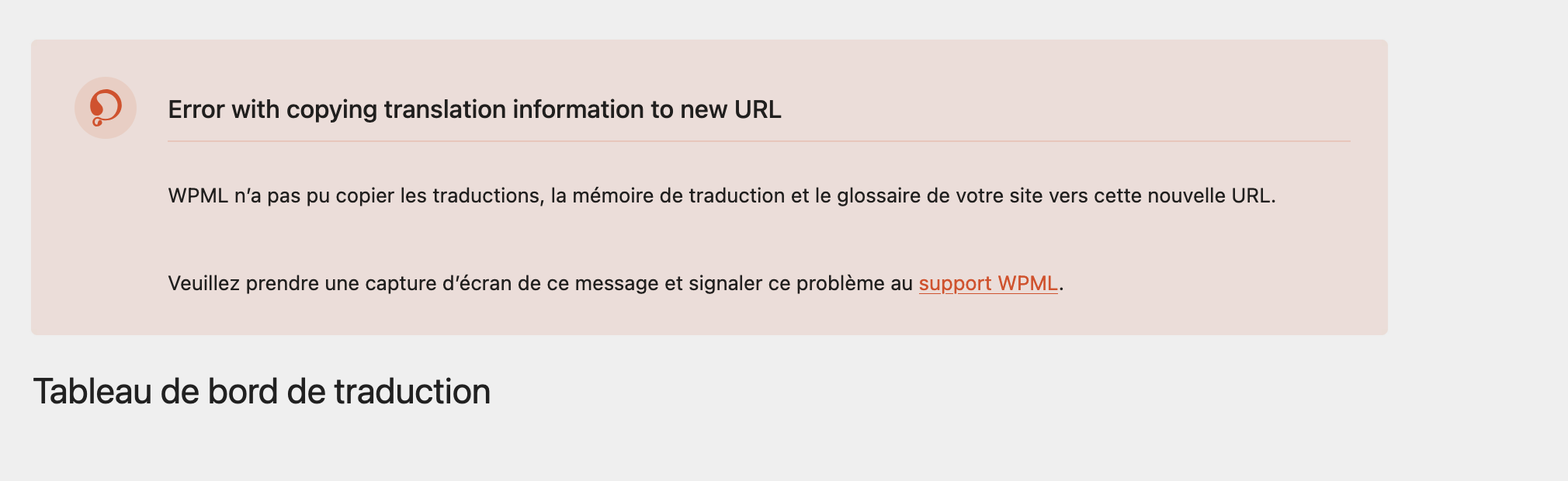 |
| March 23, 2026 at 11:09 am #17918264 | |
|
emmanuelF-11 |
Hello, hope you are well. Can you pls help? Alexandre |
| March 24, 2026 at 5:04 am #17920088 | |
|
Prosenjit Barman WPML Supporter since 03/2023 Languages: English (English ) Timezone: Asia/Dhaka (GMT+06:00) |
Hi Alexandre, I hope you’re doing well, and sorry for the delayed reply — the weekend and my day off happened back-to-back. Thank you for the update. I’m glad to hear that the blog posts are working correctly now, even though you ran into a few hurdles along the way. Regarding the other issue you mentioned, it looks like something may not have completed correctly during the migration process or while registering the site again, which is likely why the warning is still appearing in the dashboard. If you have already updated the site key in your WPML.org account to point to the production site, could you please try re-registering the site key on the website and check whether that clears the warning? Please try the following: After that, please check whether the warning banner is still showing in the dashboard. In most cases, re-registering the site key should refresh the connection and clear this kind of warning. However, if the issue still remains after that, please let me know and I’ll be happy to continue helping until it’s fully resolved. Best regards, |
| March 25, 2026 at 9:49 am #17925508 | |
|
emmanuelF-11 |
hello, thank you for your message. We run a video, you can find it there hidden link How can we make the WPML plugin work again on our website, can you pls help find the issue ? Alexandre |
| March 27, 2026 at 5:02 am #17930815 | |
|
Prosenjit Barman WPML Supporter since 03/2023 Languages: English (English ) Timezone: Asia/Dhaka (GMT+06:00) |
Hi Alexandre, Thank you for the video! After checking in our system, we noticed some inconsistencies with both the Site URL and the site key. For example, the site key you are trying to use on botnation.ai actually belongs to: hidden link Normally, WPML should be activated using the site key generated specifically for the current domain, so the production site should use the site key assigned to botnation.ai, not the staging domain. What is unusual here is that, even though the site key belongs to a different domain, the registration still went through and then showed the migration banner. That is not expected behavior. Could you please check the following on your site? - Go to Settings → General Please confirm that both URLs are correctly set to the production domain and do not still point to: hidden link If the issue still persists even after confirming the URLs are correct, then this will require a closer inspection to identify the root cause. For that, I’d like to request temporary access to the site for further investigation. I’ve enabled the private box for your next reply, so you can safely share the access details there. Once I have access, I’ll investigate further and do my best to help you resolve this as quickly as possible. Looking forward to your reply, and I’m always here to help. Best regards, |
| March 31, 2026 at 10:39 am #17939468 | |
|
Prosenjit Barman WPML Supporter since 03/2023 Languages: English (English ) Timezone: Asia/Dhaka (GMT+06:00) |
Hi Alexandre, Thank you for sharing the access details. I tried logging in with the credentials you provided, but it seems the access information is not correct. It looks like the password for the user is incorrect. Could you please double-check and share the correct login details? Kindly make sure the credentials are working before sending them. I have also enabled the private box for you again, so you can securely share the access details there if needed. Thank you for your patience and kind cooperation. I’m looking forward to your response. Best regards, |
| April 7, 2026 at 5:45 am #17952578 | |
|
Prosenjit Barman WPML Supporter since 03/2023 Languages: English (English ) Timezone: Asia/Dhaka (GMT+06:00) |
Hi there, Thank you for sharing the updated access details. It worked this time! I checked the issue and I’m happy to let you know that it is now fixed. Please have a look at the attached screenshot. The issue was related to a timeout. It looks like one of the plugins on the site may be changing the timeout value, which interferes with the default HTTP timeout. Because of that, the copy process was timing out, and the error was showing in the banner. Please note that we have already fixed this issue in our plugin, and the fix is expected to be included in the next official update. For now, I have applied the same fix directly in the current plugin version installed on your site, so everything should work fine until the update is released. I hope that helps! Please feel free to let me know if there’s anything else you need help with — I’ll be happy to assist. Best regards,   |



