Skip to content Skip to sidebar

This is the technical support forum for WPML - the multilingual WordPress plugin.

Everyone can read, but only WPML clients can post here. WPML team is replying on the forum 6 days per week, 22 hours per day.

Sun Mon Tue Wed Thu Fri Sat
- 8:00 – 12:00 8:00 – 12:00 8:00 – 12:00 8:00 – 12:00 8:00 – 12:00 -
- 12:00 – 16:00 12:00 – 16:00 12:00 – 16:00 12:00 – 16:00 12:00 – 16:00 -

Supporter timezone: Europe/Zagreb (GMT+01:00)

This topic contains 4 replies, has 0 voices.

Last updated by Dražen 1 year, 1 month ago.

Assisted by: Dražen.

Author Posts
January 27, 2025 at 4:59 pm #16638741

rafaelF-23

Background of the issue:
Estou tentando vincular uma página existente como tradução, mas elas não são postagens, são modelos padrão do Elementor. Segui estas instruções https://wpml.org/pt-br/faq/how-to-link-already-translated-pages/.

Symptoms:
A opção para vincular páginas já traduzidas não aparece, pois não se trata de uma postagem, mas de um modelo.

Questions:
Como posso vincular modelos do Elementor como traduções?
Por que a opção para vincular páginas já traduzidas não aparece para modelos?

January 28, 2025 at 7:51 am #16640184

Dražen
Supporter

Languages: English (English )

Timezone: Europe/Zagreb (GMT+01:00)

Hello,

thanks for contacting us.

It does not matter that it is a template, it is still post-type in WordPress.

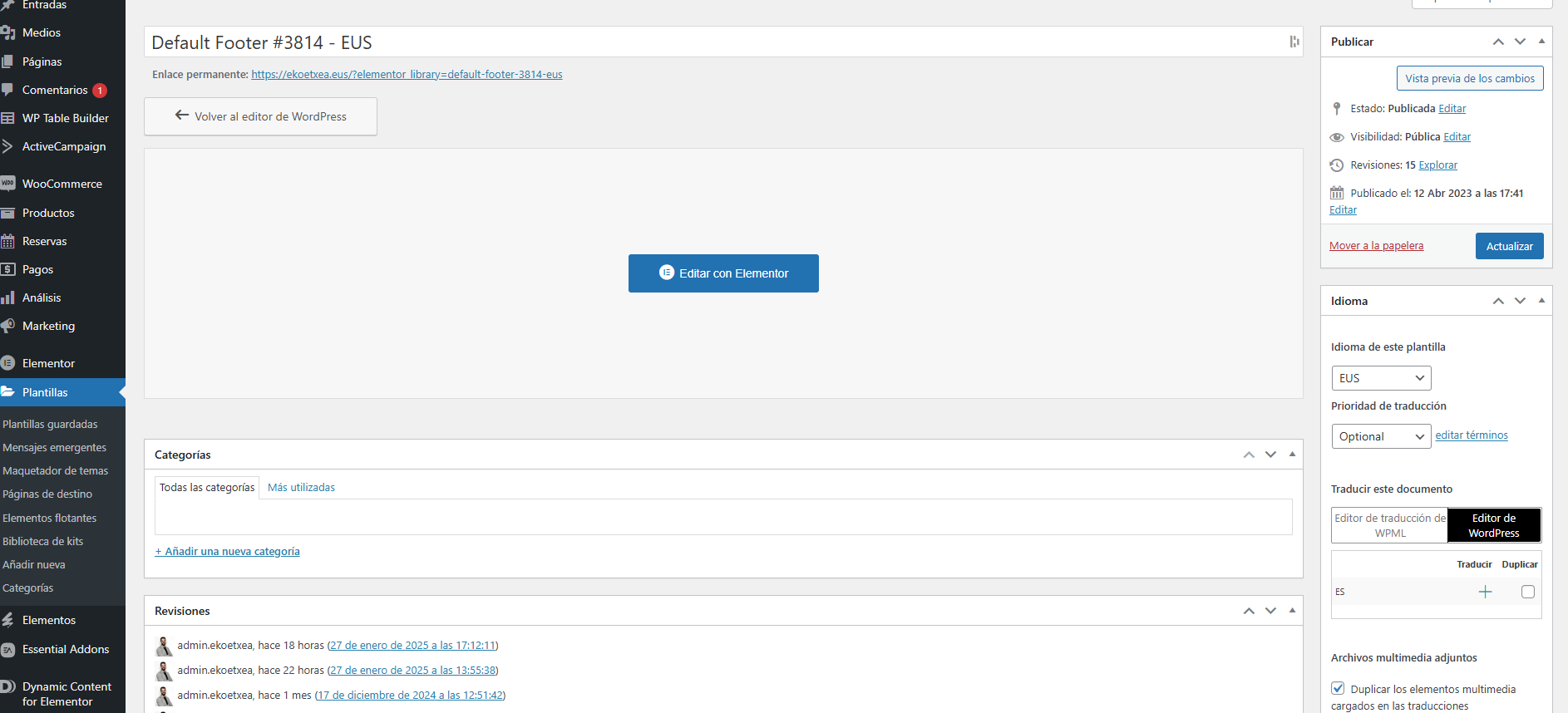
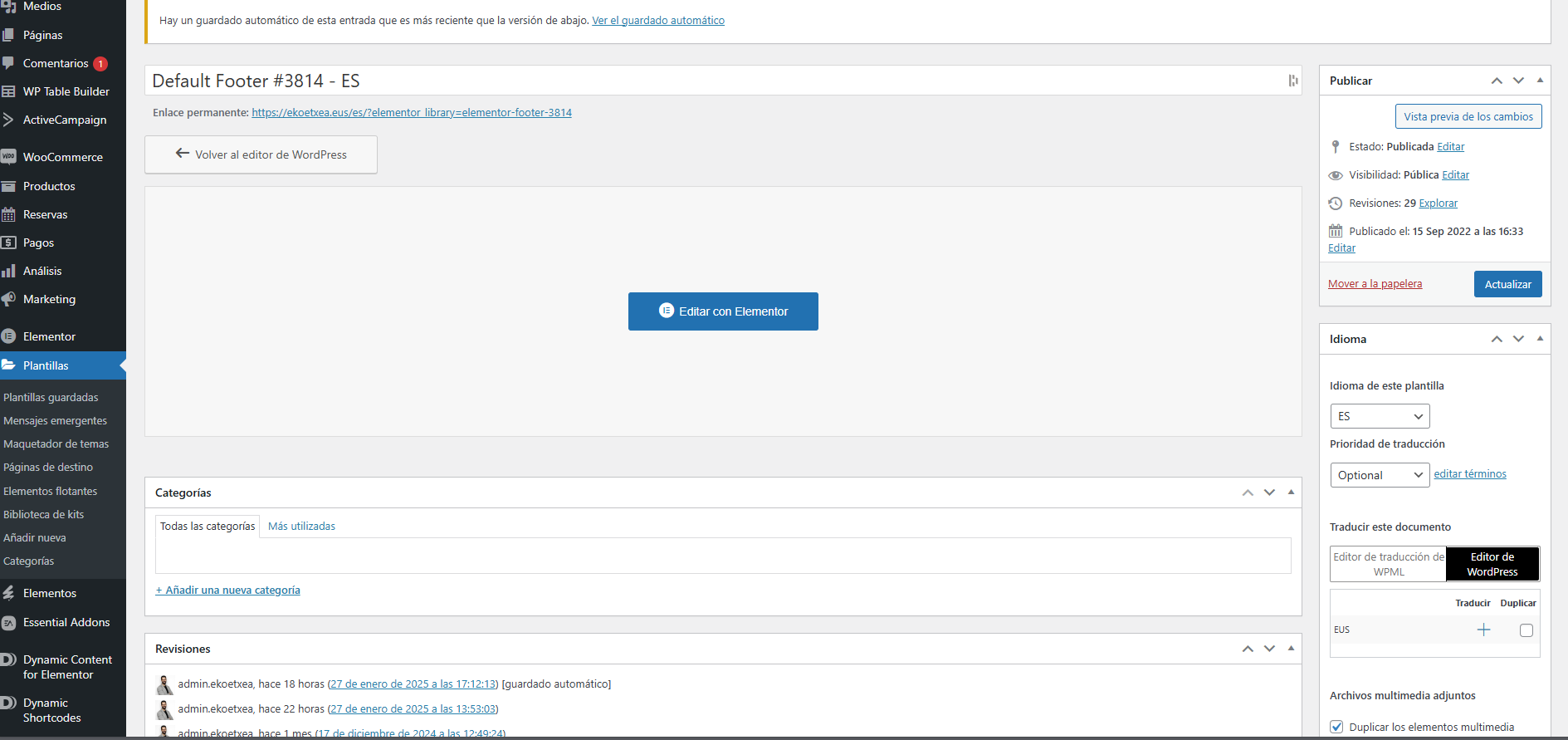
When you edit the Elementor template in the backend editor, check for the same option on the right side. Note template should not be translated, there should be a plus icon for another language. You can try check-ing for this option in the default language or 2nd language.

If it is not there, please share an image or video of what you see.

Thanks,
Drazen

January 28, 2025 at 10:32 am #16640958

rafaelF-23

Hi,

i do not want to create a new translation, i want to connect a existing one. But I don't have that option in the template

22.png
11.png
January 28, 2025 at 10:44 am #16641045

Dražen
Supporter

Languages: English (English )

Timezone: Europe/Zagreb (GMT+01:00)

Hello,

thanks for getting back, I understadm you request.

It should be there, please follow next:

1)  In order to expedite handling your support requests, can you please share WPML support debug information from your site.

- To give debug information, login to your site and go to WPML → Support. From there click on the “debug information” link at the bottom of the page.
- Once on the “debug information” page, select the entire content of the text box and copy it.
- Now go back to our support forum, find debug information box and paste it.

More information on the link: https://wpml.org/faq/provide-debug-information-faster-support/

2) Are you maybe on WPEngine hosting? If yes, can you please check the next solution:

https://wpml.org/forums/topic/connect-with-translation-option-is-missing-in-some-languages/#post-13878883

Regards,
Drazen

January 28, 2025 at 12:15 pm #16641573

rafaelF-23

I'm not sure if i'm wp engine user, i do have de ACF plug in from them

January 28, 2025 at 12:21 pm #16641595

Dražen
Supporter

Languages: English (English )

Timezone: Europe/Zagreb (GMT+01:00)

Hello,

I meant the hosting you use since it can have some additional configuration.

Anyway, let me have a look:

Please share the access details of your website, so I can log in and take a look. If you have a staging site where the problem can be reproduced, it is better to share access to the staging site.


I’m enabling a private message for the following reply.

We have strict policies regarding privacy and access to your information.

Please see:
https://wpml.org/purchase/support-policy/privacy-and-security-when-providing-debug-information-for-support/

Please backup the site files and database before providing us access. 


Thanks,
Drazen

January 29, 2025 at 8:01 am #16644708

Dražen
Supporter

Languages: English (English )

Timezone: Europe/Zagreb (GMT+01:00)

Hello,

thanks, but the role you provided me doesn't have full access to WPML plugin.

Please make sure to provide a full admin access account and it would be better to provide the staging site with FTP access, as I would need to disable some plugins and switch themes, to confirm plugins/custom code in the child theme is not causing issues.

Thanks,
Drazen

The topic ‘[Closed] Link existing pages (templates) as translation’ is closed to new replies.