Background of the issue:
I am trying to update 'WPML Multilingual CMS' from version 4.7.6 to version 4.8.4. The issue can be seen at the following URL: hidden link (but only after updating. right now, the version is being kept at 4.7.6). Here are some more details on our setup: $ wp plugin list --format=csv --fields=name,status,version name,status,version acf-better-search,active,4.3.1 acf-content-analysis-for-yoast-seo,active,3.2 aunds-wp-aria-label-plugin-master,active,1.3.8 acfsync,inactive,0.0.1 acf-to-rest-api,active,3.3.4 acf-extended-pro,active,0.9.1.1 acf-image-aspect-ratio-crop,active,6.0.5 acfml,active,2.1.5 advanced-custom-fields-pro,active,6.6.1 all-in-one-wp-security-and-firewall,active,5.0.6 aunds-consent-management-backend,active,4.1.1 encyclopedia-pro,active,1.6.51 filebird,inactive,6.5.1 filebird-pro,active,6.4.3 login-with-google,active,1.4.1 post-duplicator,active,2.48 simple-history,active,5.17.0 svg-support,active,2.5.14 view-admin-as,active,1.8.10 wordpress-importer,active,0.9.4 wp-rest-api-v2-menus,active,0.12.1 wp-extended-search,inactive,2.2.1 fulltext-search,inactive,1.79.274 wpml-media-translation,active,2.7.7 sitepress-multilingual-cms,active,4.7.6 wpml-rest-api,active,1.1.1 wp-seo-multilingual,active,2.2.3 wpml-string-translation,active,3.3.3 wp-rest-cache,active,2025.1.8 wordpress-seo,active,26.2 wordpress-seo-premium,active,26.2 aundscorporatelogin,must-use,1.0.0 noautoupdates,must-use,1.0.0 wp-rest-cache,must-use,2021.3.0 $ wp core version 6.8.3 $ php -v php -v PHP 8.2.14 (cli) (built: Jan 5 2024 17:07:19) (NTS) Copyright (c) The PHP Group Zend Engine v4.2.14, Copyright (c) Zend Technologies with Zend OPcache v8.2.14, Copyright (c), by Zend Technologies.
Symptoms:
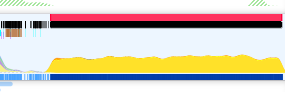
The admin interface freezes after updating to WPML 4.8.4. Firefox profiling shows a sudden increase in CPU use and constant janking. The WPML JS is the bulk of the flame chart and occupies most of the total CPU time. This issue is isolated to this particular update and blocks updates to other WPML plugins.
Questions:
Why does the admin interface freeze after updating to WPML 4.8.4?
How can I resolve the high CPU usage and janking caused by the WPML JS?
Additional info: We could stop the freezing by filtering out the admin interface navbar. That is, of course, not an actual solution and is only intended to help you narrow down the issue.
Thanks for your reply. This isn't a known issue and I will need to investigate this further on your Website.
I will require temporary access (WP-Admin and FTP) to a test site where the problem has been replicated, if possible. This will enable me to provide better assistance and determine if any configurations need to be modified.
Please note that it is important to have a backup for security purposes and to prevent any potential data loss. You can use the UpdraftPlus plugin (https://wordpress.org/plugins/updraftplus/) to fulfill your backup requirements.
Your upcoming reply will be treated with confidentiality and will only be visible to you and me.
✙ To resolve the issue, I may need your consent to deactivate and reactivate plugins and the theme, as well as make configuration changes on the site if necessary. This emphasizes the significance of having a backup.
Hi Kor, at the moment it's impossible for us to set up a temporary instance to give you access.
Some feedback after further debugging:
We ran almost every action in the plugin troubleshoot page. None made a difference. Optimising the database didn't help either. We also deactivated all plugins except for WPML (the main one) and removed almost all logic from our theme. Again, to no avail.
We use the classic editor, not ATE. Should the ATE status icon be shown at all in this case? In the plugin code I see you check only if the current user is a translator manager, not if ATE is enabled.
The ATE status element contains 3600+ items, which are not being processed (the progress remains at 0 completed). Could the JS lock be originating there? The code is minified (dist/js/vendor/app.js) so properly debugging it is beyond what we have time to do now.
Thanks for your reply. Could you share a screen recording from your end? I'd like to see how bad it is.
Then, please try the basic troubleshooting steps below and see if it helps:
1. Disable all the plugins except the WPML related ones from your WordPress Dashboard > Plugins and see if the issue is gone, if so, activate one plugin at a time until the culprit one is found.
2. Temporary change to a default WordPress theme such as the ‘TwentySeventeen’ theme from your WordPress Dashboard > Appearance > Themes menu.
Hi Kor,
I don't really think a screen recording is going to help much. The site literally freezes. Constant high CPU usage and a blocked main thread right after updating. There is nothing to be seen other than a frozen site.
We already tried these basic troubleshooting steps and more like we said in our previous message. It doesn't help. The site even freezes when we use the [twentytwentyfive theme](https://wordpress.org/documentation/article/twenty-twenty-five/), only have WPML activated and then update it.
I have attached a screenshot from the Firefox profiler that shows the constant janking right after updating. In case you're unaware, the red bar means that the main thread is being blocked (site freezes), the black bar means that there are ongoing JavaScript microtasks and the yellow graph is CPU usage (circling around 50%, all attributed to WPML JavaScript).
Thanks for the additional details and the profiler screenshot, that’s very helpful.
Since the issue persists even with a default theme and only WPML active, the next step is for us to inspect the environment directly. To proceed, we will need access to a site where the problem can be reproduced.
We understand if you prefer not to share access to your production environment. In that case, could you please clone the site to a staging environment and remove any sensitive information (users, personal data, etc.)? Once done, kindly share temporary credentials so we can investigate this further.
Let us know once it is ready and we will take it from there. Thank you!
The topic ‘[Closed] WPML 4.8.4 freezes admin interface’ is closed to new replies.