This thread is resolved. Here is a description of the problem and solution.
Problem: After updating WPML Multilingual CMS to version 4.7.3, the client experienced issues with text colors and fonts changing in the backend. More critically, payments made using the EveryPay payment gateway for WooCommerce were not visible in the order list when WPML was active. Deactivating WPML resolved the issue, indicating a compatibility problem between WPML and the payment gateway. Solution: We recommended the client to first create a full backup of their site. Then, to address the issue with the EveryPay payment gateway not displaying payments correctly, we provided a custom code snippet to be added to the theme's functions.php file. This code ensures that the correct payment method title is displayed by fetching the sub-method name directly from the order meta, instead of using the main gateway title. Here is the code to be added:
// WPML Workaround for compsupp-7975
add_filter( 'woocommerce_order_get_payment_method_title', 'custom_everypay_submethod_title', 15, 2 );

function custom_everypay_submethod_title( $title, $order ) {
    if ( ! is_a( $order, 'WC_Order' ) ) {
        return $title;
    }

    if ( $order->get_payment_method() !== 'everypay' ) {
        return $title;
    }

    // get sub method stored in the order meta
    $sub_method_key = $order->get_meta( '_wc_everypay_payment_method', true );
    if ( ! $sub_method_key ) {
        return $title;
    }

    // get everyPay settings
    $settings = get_option( 'woocommerce_everypay_settings' );
    if ( ! is_array( $settings ) ) {
        $settings = maybe_unserialize( $settings );
    }

    if ( empty( $settings['payment_methods'] ) ) {
        return $title;
    }

    // get sub methods from settings
    $methods = json_decode( $settings['payment_methods'], true );
    if ( ! is_array( $methods ) ) {
        return $title;
    }

    // loop and match
    foreach ( $methods as $method ) {
        if ( isset( $method['source'], $method['name'] ) && $method['source'] === $sub_method_key ) {
            return $method['name'];
        }
    }

    return $title;
}
If this solution does not resolve your issue or seems outdated, please check the related known issues and confirm that you have installed the latest versions of themes and plugins. If the problem persists, we highly recommend opening a new support ticket for further assistance.
This is the technical support forum for WPML - the multilingual WordPress plugin.
Everyone can read, but only WPML clients can post here. WPML team is replying on the forum 6 days per week, 22 hours per day.
Background of the issue:
I just updated WPML Multilingual CMS to the new version 4.7.3 on my site hidden link. I am trying to maintain the site's appearance and functionality after the update.
Symptoms:
The update changed all text colors and fonts in the backend. Additionally, when WPML is active, I can't see payments made with the EveryPay payment gateway for WooCommerce in the order list. When I deactivate WPML, everything works fine.
Questions:
How to resolve this problem with WPML Multilingual CMS?
This isn't a known issue and I will need to closely examine your website. Therefore, I will require temporary access (WP-Admin and FTP) to a test site where the problem has been replicated, if possible. This will enable me to provide better assistance and determine if any configurations need to be modified.
Please note that it is important to have a backup for security purposes and to prevent any potential data loss. You can use the UpdraftPlus plugin (https://wordpress.org/plugins/updraftplus/) to fulfill your backup requirements.
Your upcoming reply will be treated with confidentiality and will only be visible to you and me.
✙ To resolve the issue, I may need your consent to deactivate and reactivate plugins and the theme, as well as make configuration changes on the site if necessary. This emphasizes the significance of having a backup.
Thanks for your response. I was able to replicate the issue when the WPML plugin is activated—it seems the strings in the backend are being translated.
Just to confirm, are you referring to the backend text being translated, and you're looking to stop that from happening?
Hello!
No, backend texts translations not a problem at all. But text colors change when WPML Multilingual CMS in active and that's strange. Any other plugin does not cause this. And CMS cause problem which is described in my first message. And I think it can cause some problems more what I haven't discovered yet.
Thanks for your response. Just to clarify, are you only referring to the text color issue in the backend when the WPML plugin is activated, or are there other issues that occur with the plugin enabled?
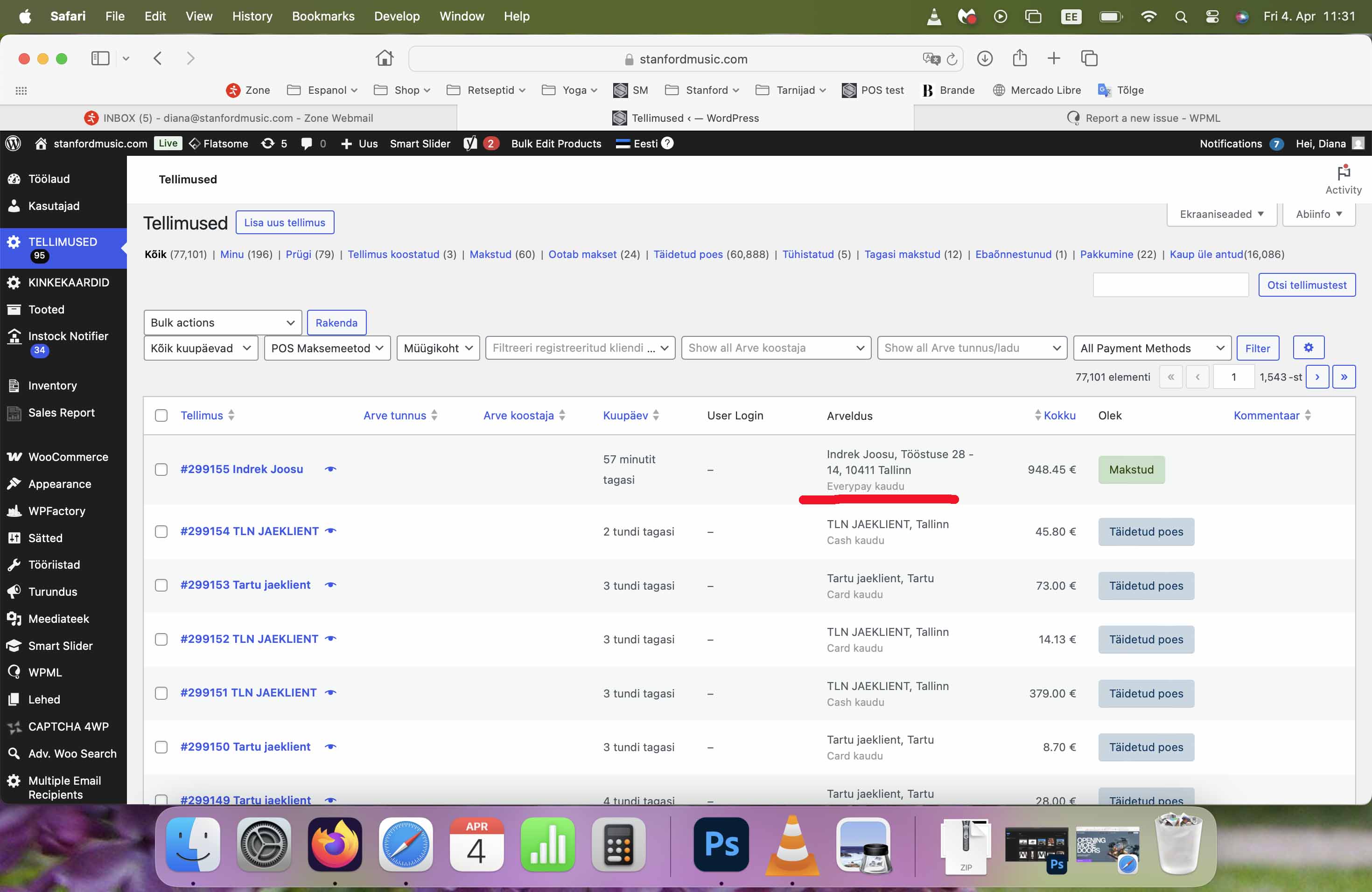
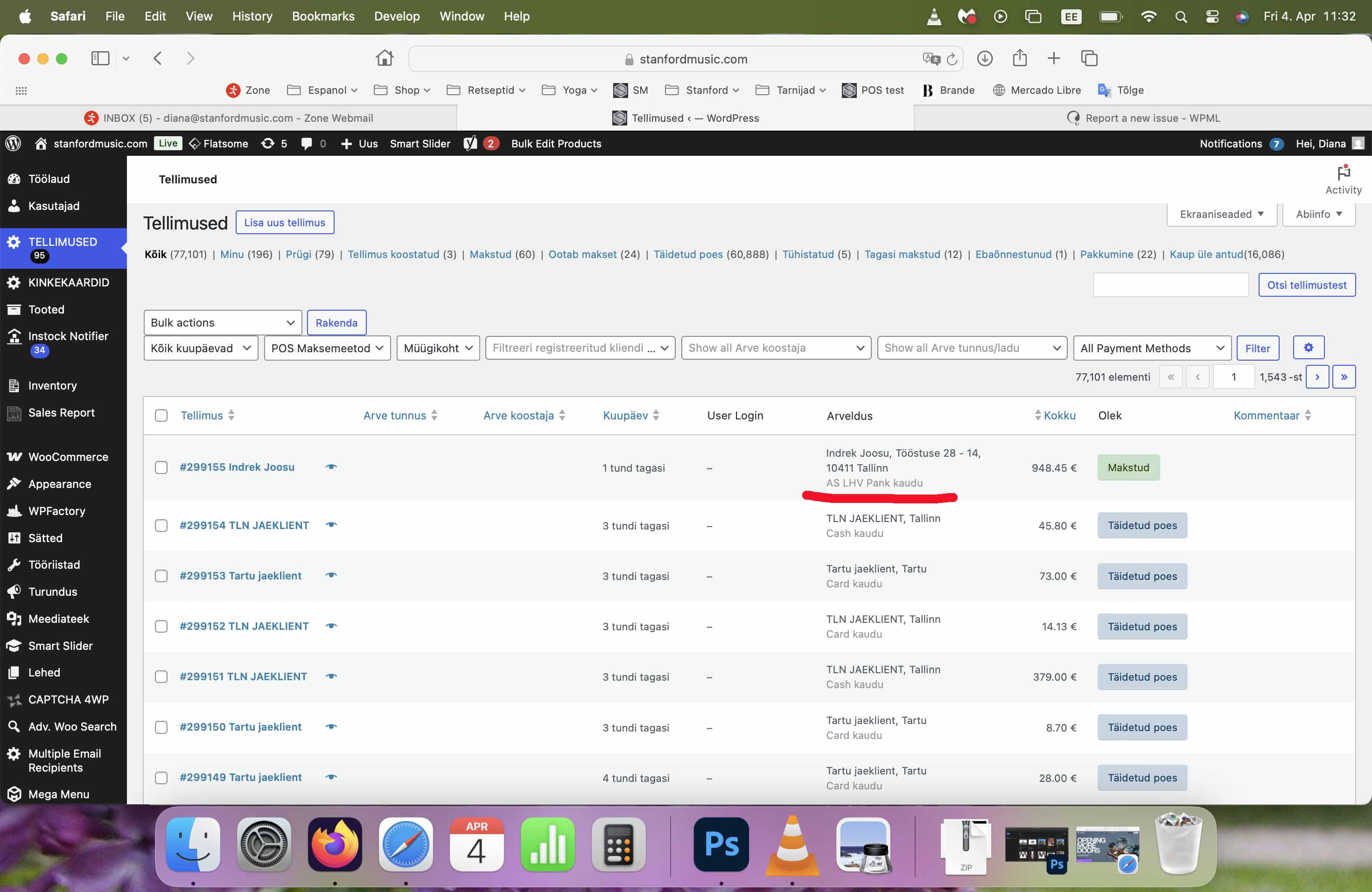
No, also when WPML Multilingual CMS is active, we can't see payments made with the EveryPay in the order list. Please look the screenshots added to the first message. This is really big problem.
The color is not so importat, but also very strage, this shouldn't happen. This means that WPML Multilingual CMS is making radical changes in backend.
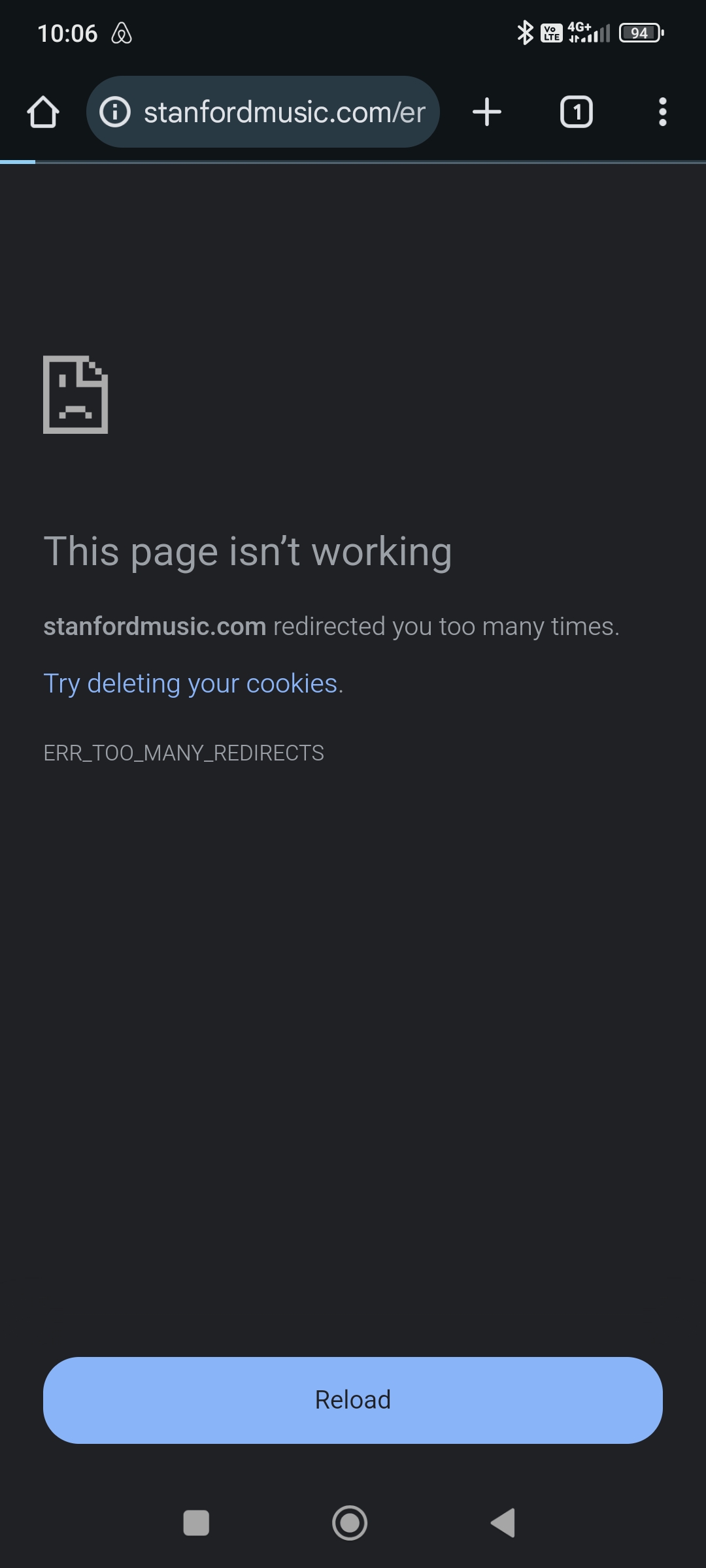
And also some clients can't open products in some android phones. I'm very shure that this problem also caused by WPML Multilingual CMS. I can't test it, because I don't have androd phone.
Thanks for your reply. Based on your initial screenshot, you've highlighted the text "Everypay kaudu" and "AS LHV Pank Kaudu". I'm not sure what it is about, and could you elaborate?
As for "some clients can't open products in some Android phones.", could you tell me which product you are referring to? Maybe you can share some screenshots or a screen recording from your mobile phone?
When WPML Multilingual CMS is active, all payments are listed as "via Everypay" in the order list, but this is a very vague explanation. Everypay is one of the plugins used for payments. We need to see which banks the customers paid through. Just like "via AS LHV Pank" (that's the bank). If we deactivate WPML Multilingual CMS, we can see the bank and everything is correct. But when we activate WPML Multilingual CMS, we only see "via Everypay".
In some Android phones we can't open any products. Only menu and other pages. But not any product. Screenshot is attached.
Thanks for your reply. I can see the issue even after deactivating most of the plugins hidden link .
I kindly ask for a snapshot of the site. Alternatively, with your permission, I can create one myself. For this purpose, I typically recommend using the free plugin "Duplicator." If you're already familiar with Duplicator (https://wordpress.org/plugins/duplicator/), please skip the following steps and simply send me the archive file you downloaded.
To guide you further, please adhere to these instructions:
1. View the Duplicator instructions video: hidden link
3. If the archive file exceeds 400MB, please use Duplicator's file filters to exclude cache, wp-uploads directory, media, and archive files.
Once you have the archive file ready, kindly share the link with us. You can utilize platforms like Google Drive, Dropbox, or similar for file sharing, as the snapshot file might be large.
Please note that your next reply will be private, visible only to you and me. You can paste the file link there. Rest assured that once the issue is resolved, I will delete the local site.
Hi!
I give you permission to create the snapshot yourself. It's a lot of work for me and a lot to learn and it takes a lot of time. I have other work to do.
With best
Diana
Thanks for your patience. I cannot find a solution for this and I will escalate this to our 2nd Tier Support for further assistance. I will come back to you once I've feedback.
Thanks for your patience. Our 2nd Tier Support shared a workaround, and this is what they mentioned. Please try this on your staging site and let me know how it goes.
The issue is that we (WCML) filter the gateway title from the gateway settings stored in the wp_options_table
But here, the gateway offers several "sub methods" and displays the sub method name instead of the gateway title.
Workaround
-Make a full back-up of your site
-Add the following to your theme's functions.php file:
// WPML Workaround for compsupp-7975
add_filter( 'woocommerce_order_get_payment_method_title', 'custom_everypay_submethod_title', 15, 2 );

function custom_everypay_submethod_title( $title, $order ) {
	if ( ! is_a( $order, 'WC_Order' ) ) {
		return $title;
	}

	if ( $order->get_payment_method() !== 'everypay' ) {
		return $title;
	}

	// get sub method stored in the order meta
	$sub_method_key = $order->get_meta( '_wc_everypay_payment_method', true );
	if ( ! $sub_method_key ) {
		return $title;
	}

	// get everyPay settings
	$settings = get_option( 'woocommerce_everypay_settings' );
	if ( ! is_array( $settings ) ) {
		$settings = maybe_unserialize( $settings );
	}

	if ( empty( $settings['payment_methods'] ) ) {
		return $title;
	}

	// get sub methods from settings
	$methods = json_decode( $settings['payment_methods'], true );
	if ( ! is_array( $methods ) ) {
		return $title;
	}

	// loop and match
	foreach ( $methods as $method ) {
		if ( isset( $method['source'], $method['name'] ) && $method['source'] === $sub_method_key ) {
			return $method['name'];
		}
	}

	return $title;
}