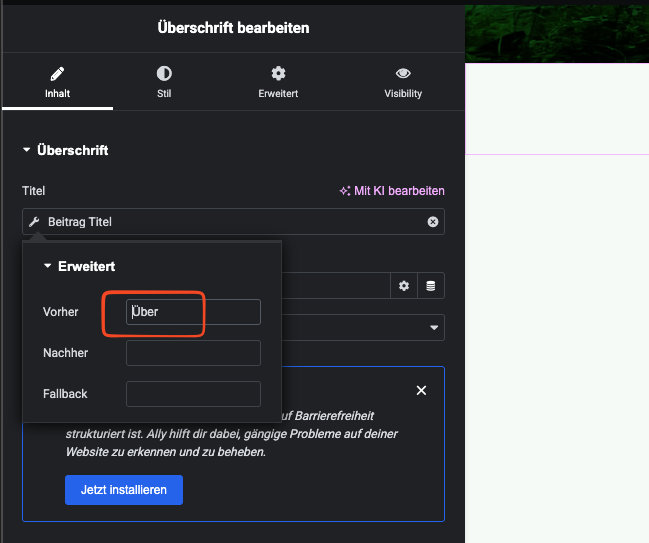
In Elementor im using dynamic "Post Title" field for displaying my post title in my templates. In the dynamic post title field i set an prefix "Über " - this prefix is not shown in ATE or in string translations, so currently i have no change to translate it in english which should be "About ". How to translate that? Check the screenshot vor better understanding what exactly i mean.
I already tried to search for the exact string in ATE and also in string translations but it does not appear
First, I double-checked on a local test site that this is working normally, that the prefix text is available for translation, and I can confirm that it is.
From the screenshots you can see I added a prefix "Aardvark" (I chose such an unusual word that it would be easy to locate if I had to search for it).
I then used the Translation Dashboard to send the Elementor template for translation (by me, manually).
When I opened the translation job in ATE, the prefix text was offered for translation.
So my first question would be about how you translated the template. Did you send it for translation via the Translation Dashboard? That is the recommended workflow for translating templates, and if followed it should work.
If it is not working, do you have a staging site available for some simple testing.
I'd like to know what happens if you try the same workflow after deactivating the few plugins you have which are Elementor add-ons (e.g. the dynamic content for Elementor plugins) and switch from your child theme to the parent Hello theme. That would help identify if there is a possible conflict from one of these which is affecting the availability of the text for translation.
If the problem persists in that minimal environment then I think we would need a copy of your site to be able to investigate more closely. Would you grant permission for me to install the Duplicator plugin and take a copy of the site to install locally?
I will set your next reply as private in case the next step does involve taking a site copy, for which I will need the login credentials from you.
Hi Nigel, i also tried this and also tried to completely start the translation new but its still not showing in my ATE. Could it be that its the case that im using an "Elementor Single Page Template" for a custom post type? So its type "Elementor Template"
Every variant of template I create in Elementor to display posts (whether standard posts, pages, custom posts etc.), or even just a section template, it always seems to create a template whose post type is elementor_library.
I don't seem to be able to create anything with post type Elementor Template.
All of the templates I have made, where I have used a prefix for the dynamic post title, in each case the prefix text has been available for translation in ATE.
So, perhaps you could
1. confirm that your workflow is to send the templates for translation from the WPML Translation Dashboard, and
2. give me some specific steps showing how you create a template of the type "Elementor Template".
If we can rule out that the different template types is significant then we can move on to trying to locate the problem on your site.